How to Run a Successful Virtual Event: 2026 Best Practices

Tom Kotze
Content Contributor, HeySummit
To run a successful virtual event, start with one measurable outcome, choose the event format that matches your audience, and build the registration, video, speaker, engagement, follow-up, and reporting workflow around that outcome. The event should be easy to understand before people register, smooth to join live, useful even if someone watches later, and measurable after the last session ends.
This guide turns the old "10 tips" list into a practical 2026 workflow for planning, hosting, and improving a virtual event. Use it whether you are running a creator-led workshop, an educator summit, a community event, a paid training day, or a multi-speaker online conference.
What counts as a virtual event?
A virtual event is any planned gathering where people attend online rather than meeting only in a physical venue. It can be live, pre-recorded, on-demand, or a mix of those formats. A small paid workshop, a webinar, a multi-session summit, an online conference, a product demo, a community meetup, and a replay-based training series can all be virtual events.
The best virtual events are not just livestreams with a registration form attached. They connect several moving parts: a clear promise, an audience-specific format, an online event platform, a video or webinar provider, a registration page, speaker preparation, reminders, live engagement, replay access, and post-event reporting.
The virtual event workflow that matters most
If you only remember one thing, make it this: a successful virtual event is designed backward from the outcome you want attendees to reach.
For example, a creator selling a paid workshop needs a clear paid-registration path, strong reminders, a smooth live room, and a useful replay. A nonprofit running a free awareness event needs simple registration, accessible attendance, shareable follow-up resources, and donation or volunteer next steps. A B2B team running a product education event needs qualification, attendance data, useful questions, and a follow-up sequence that matches attendee intent.
Work through the plan in this order:
- Define the goal and success metric.
- Choose the audience, promise, and event format.
- Select the platform and video stack.
- Build the registration and landing page.
- Prepare speakers, sessions, and run-of-show notes.
- Promote the event with enough time to learn what works.
- Rehearse the technical flow and contingency plan.
- Design live engagement before the event starts.
- Plan accessibility, time zones, and replay access.
- Follow up and report on what happened.
1. Set one goal and one success metric
Start by deciding what the event is meant to do. "Get people together" is a mood, not a goal. A useful goal tells you what to optimize before, during, and after the event.
Good virtual event goals include:
- Teach a specific skill to a defined audience.
- Sell paid access to a workshop, training, or summit.
- Generate qualified demo requests or sales conversations.
- Grow an email list or community around a topic.
- Launch a course, membership, book, product, or offer.
- Help existing customers adopt a product or workflow.
- Build authority with a speaker-led or expert-led event.
Then choose one primary metric. That might be registrations, paid ticket revenue, attendance rate, replay views, qualified questions, booked calls, sponsor leads, community signups, or post-event sales. You can track secondary metrics too, but one primary metric keeps the event from becoming fuzzy.
2. Choose the audience, promise, and format
Your event format should follow the audience and promise, not the other way around.
A beginner audience may need a short workshop with examples and a generous Q&A. A professional audience may prefer a tightly moderated expert panel. A creator community may respond to a paid cohort-style session, office hours, or a multi-speaker summit. A global audience may need two live sessions, regional networking, or replay-first access.
Before you choose the tools, write down:
- Who the event is for.
- What attendees should be able to do, decide, or understand by the end.
- Whether the event is free, paid, sponsor-supported, or part of a bigger funnel.
- Whether people need to attend live, watch on demand, or both.
- Whether speakers, sponsors, affiliates, or partners are part of the plan.
For paid events, make the value concrete before you open registration. For free events, make the next step clear so attendance does not disappear into a polite "thanks for joining" email.
3. Pick the platform and video stack
Many virtual events need two layers: an event platform for registration, pages, access, emails, speaker workflows, replays, and reporting; and a video or webinar provider for the live session itself. A simple webinar may only need a registration page plus Zoom. A larger summit may need multi-session scheduling, speaker management, ticket tiers, sponsor visibility, replay access, and reporting across the whole event.
Zoom's virtual event planning guide is useful for thinking through live delivery, production, and session setup. For the broader event workflow, choose tools based on what happens before and after the livestream too.
| Decision | What to check | Why it matters |
|---|---|---|
| Registration | Can you create a clear page, collect the right fields, and segment attendees? | Registration quality affects reminders, attendance, follow-up, and reporting. |
| Video delivery | Does the platform connect to your webinar, livestream, or pre-recorded provider? | The attendee experience depends on smooth access and reliable live delivery. |
| Speaker workflow | Can speakers manage bios, sessions, materials, deadlines, and promotion tasks? | Multi-speaker events fail quickly when prep lives in scattered emails. |
| Paid access | Can you sell tickets, create access tiers, add offers, and handle checkout cleanly? | Paid events need a different flow from simple free lead-generation webinars. |
| Engagement | Do you have Q&A, chat, polls, worksheets, networking, or community prompts? | Engagement needs to be designed; it rarely appears by accident. |
| Replay and follow-up | Can attendees access recordings, resources, and next steps after the live event? | Many attendees register because replay access makes the event safer to commit to. |
| Reporting | Can you see registrations, attendance, revenue, content performance, and source data? | Without reporting, the next event starts from guesses. |
HeySummit is useful when you want the registration page, session pages, attendee access, speakers, emails, tickets, replays, integrations, and reporting in one workflow. You can still connect the video provider you prefer through video and streaming integrations.
4. Build a registration page that answers the real questions
Your event page should help someone decide quickly whether the event is worth their time. That means it needs more than a title, date, and registration button.
Include:
- The specific promise of the event.
- Who should attend and who should skip it.
- The format, length, date, time zone, and replay policy.
- Speaker names, session topics, or the agenda when available.
- What is included with free or paid registration.
- Accessibility notes, captions, or accommodation contact details when relevant.
- A clear next step after registration.
A strong event landing page builder helps you test the event promise, organize the agenda, and reduce avoidable questions before people register.
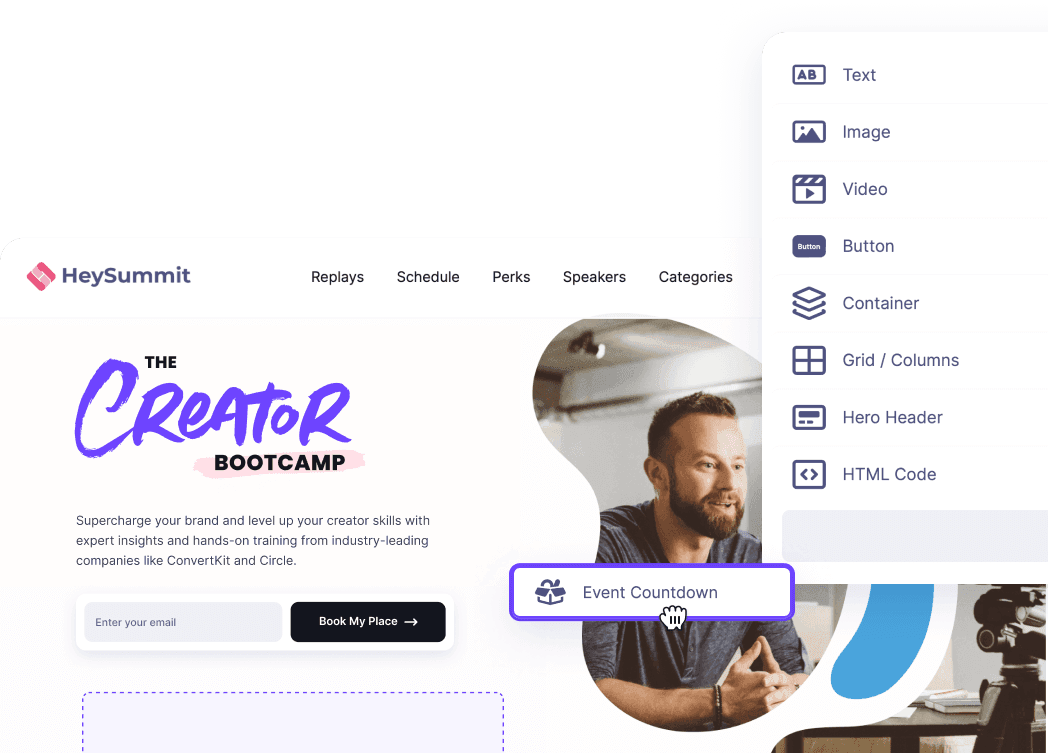
If the event is paid, be explicit about what the ticket includes. If the event is free, be explicit about why someone should show up live rather than vaguely promising a recording later. When paid access matters, use virtual event ticketing that can handle the access rules and checkout experience cleanly.
5. Prepare speakers and sessions before promotion peaks
Speaker preparation is not just a calendar invite. Give every speaker the same basic operating kit:
- The audience and promise of the event.
- The exact session goal and time limit.
- Slides, demo, lighting, audio, and camera expectations.
- Login links, rehearsal times, and backup contact details.
- Promotion copy and deadlines if speakers are helping promote.
- A simple plan for Q&A, chat, handoffs, and overruns.
For multi-speaker events, create a run of show that includes the host intro, session order, speaker joins, transitions, engagement prompts, sponsor mentions, offers, breaks, replay instructions, and contingency steps. The more people involved, the less you should rely on memory.
6. Promote with enough lead time to learn
Promotion should start early enough that you can see what is working before registration closes. For small events, that might mean two weeks. For a summit or paid training series, you may need a longer window and several waves of messaging.
Useful promotion channels include:
- Email announcements to your audience.
- Speaker, sponsor, affiliate, or partner promotion.
- Organic social posts with a clear audience promise.
- Paid campaigns only when the offer and conversion path are already clear.
- Blog, newsletter, podcast, or community mentions tied to the event topic.
- Retargeting or reminder campaigns for people who visited but did not register.
Segment your reminders where possible. Registrants need different messages from non-registrants. Paid-ticket buyers need practical attendance details. Speakers need deadlines and assets. No-shows need a useful replay or next step, not the same generic thank-you email as live attendees.
Use event reminder emails to confirm registration, reduce no-shows, prepare attendees, share resources, and keep the post-event follow-up from becoming an afterthought.
7. Rehearse the technical flow and backup plan
Technical issues are not always avoidable, but surprise is. Run a rehearsal that mirrors the real event as closely as possible. Do not only check whether the host can log in; check what happens when the speaker joins, screen share starts, captions are enabled, chat opens, polls run, recordings begin, and the event moves from one segment to the next.
Before going live, confirm:
- Host, moderator, speaker, and support roles.
- Internet, microphone, camera, screen-share, and recording settings.
- Backup host or co-host access.
- Emergency speaker contact details.
- Where attendees should go if the live link fails.
- How you will communicate delays or access problems.
- Where recordings and replay files will be stored afterward.
Pre-recorded sessions can reduce live risk, but they still need a host plan, chat or Q&A support, and clear attendee instructions. A recording dropped into a live event slot without context usually feels flat.
8. Design engagement before the event starts
Engagement is easier when you plan it into the format instead of asking people to "drop questions in the chat" after forty minutes of one-way presentation.
Match the engagement mechanic to the event type:
- Workshops: worksheets, pauses, examples, implementation time, and live review.
- Panels: moderated questions, audience voting, and clear speaker handoffs.
- Summits: session tracks, chat prompts, speaker Q&A, sponsor activities, and replay paths.
- Community events: introductions, breakout rooms, shared boards, or structured discussion prompts.
- Product education: demos, scenario questions, feature checklists, and follow-up resources.
Keep the interaction easy. A simple poll at the right time is better than a complex engagement tool nobody understands. Assign someone to watch chat, surface questions, and help attendees who get stuck.
9. Plan accessibility, time zones, and replay access
Virtual does not automatically mean accessible. Build inclusion into the plan before the event page goes live.
W3C's event accessibility guidance recommends planning for organizers, presenters, participants, and accessible materials before and during the event. The Government of Canada's accessible virtual events guidance also emphasizes planning, common barriers, and timelines rather than treating accessibility as a last-minute setting.
At minimum, consider:
- Captioning for live and recorded video.
- Transcript or resource access for replay viewers.
- Readable slides and described visuals.
- Accessible registration forms and event pages.
- A contact route for accommodation requests.
- Time-zone clarity on the landing page and reminders.
- Replay access for people who cannot attend live.
If your audience is spread across regions, do not hide the time-zone problem. Offer a replay, add the time-zone conversion clearly, or run multiple sessions when the live experience is central.
10. Turn follow-up and replay into part of the event
The event is not over when the livestream ends. For many organizers, the follow-up is where the business value appears: replay views, resource downloads, sales conversations, course enrollments, community joins, sponsor reporting, or feedback that improves the next event.
Prepare the follow-up before the event goes live:
- Send live attendees a thank-you email with resources and the next action.
- Send no-shows a replay-focused message with the most useful session or timestamp.
- Send paid attendees their replay, bonuses, slides, or certificates when promised.
- Give speakers and partners a shareable replay or recap link.
- Package high-value sessions into on-demand events or evergreen resources when the topic has a longer shelf life.
Do not make every follow-up email a hard sell. Match the next step to the attendee's behavior. Someone who watched the whole training may be ready for an offer. Someone who registered but missed it may need the replay and a shorter route back into the topic.
11. Measure what happened and improve the next event
After the event, review the numbers while the details are still fresh. Good virtual event metrics connect the whole journey, not just the live-room headcount.
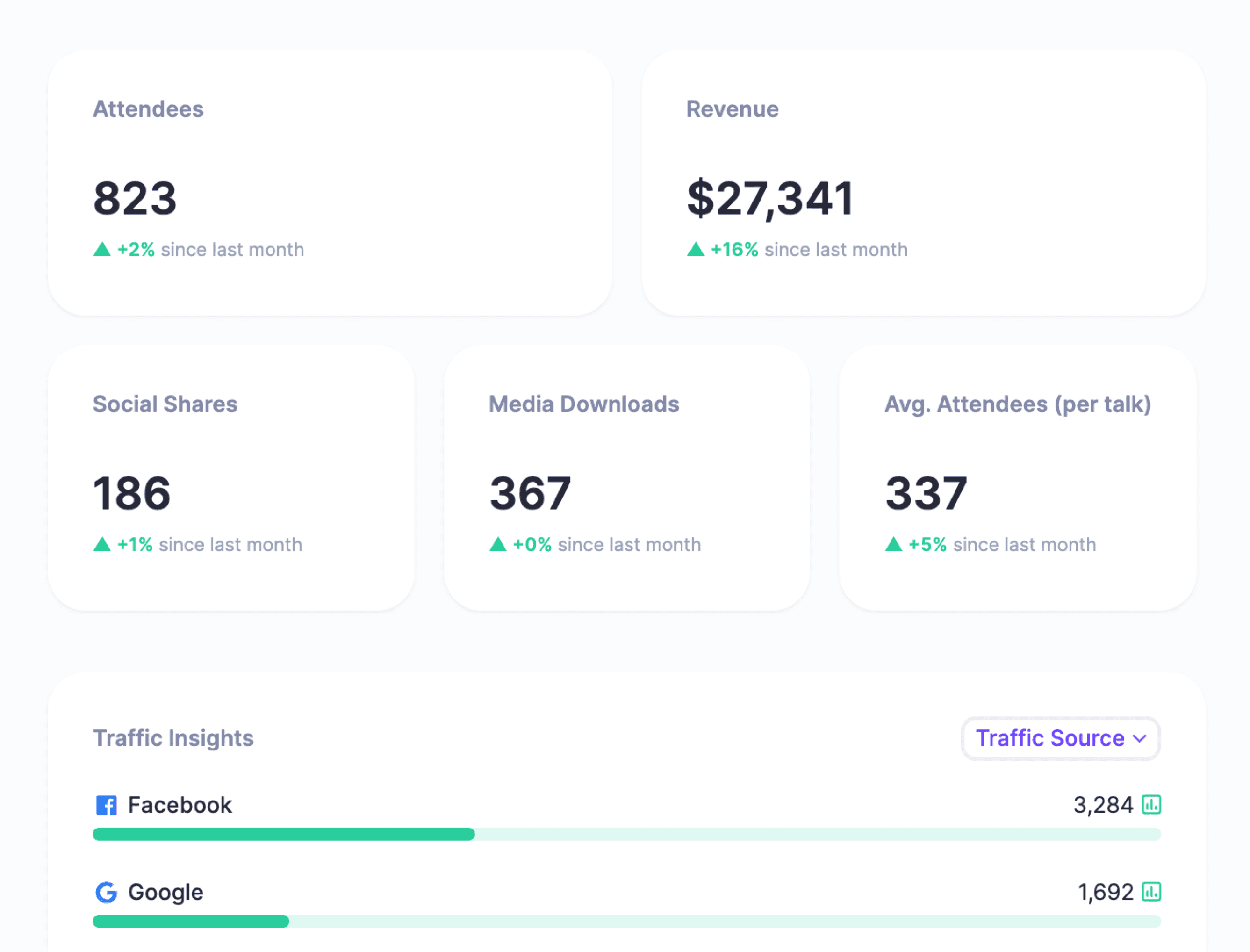
Review:
- Traffic sources and registration conversion.
- Email open, click, and attendance signals.
- Live attendance rate and drop-off points.
- Replay views and replay-driven actions.
- Paid ticket revenue, refunds, upgrades, or add-ons.
- Questions, poll answers, chat themes, and feedback.
- Sponsor, partner, speaker, or affiliate contribution.
- Trials, demos, purchases, donations, or community joins after the event.
Then write a short debrief: what worked, what did not, what surprised you, what you would repeat, and what you would change. The goal is not a perfect dashboard. The goal is to make the next virtual event easier to plan and more likely to produce the outcome you wanted.
Examples by event type
Here is how the workflow changes across common virtual event formats:
| Event type | Primary focus | Planning priority | Follow-up priority |
|---|---|---|---|
| Creator workshop | Teach one practical skill. | Clear paid/free registration, worksheet, live Q&A, and replay. | Send the replay, resources, and relevant offer or next session. |
| Educator summit | Bring multiple experts together around one topic. | Speaker prep, session schedule, topic tracks, and attendee reminders. | Package sessions into replay access and topic-based resources. |
| Community event | Create connection and participation. | Introductions, discussion prompts, moderation, and accessibility. | Move attendees into the community, mailing list, or next gathering. |
| Paid training day | Deliver a specific transformation. | Ticketing, attendee prep, strong facilitation, and support roles. | Share recordings, materials, bonus access, and upgrade paths. |
| Product education event | Help prospects or customers understand a workflow. | Demo scenarios, audience qualification, Q&A, and proof points. | Segment follow-up by intent: trial, demo, customer education, or nurture. |
Final checklist before you go live
- The event has one primary goal and one primary success metric.
- The landing page explains who it is for, what they get, when it happens, and how replay access works.
- The event platform and video provider are tested together.
- Speakers know the audience, timing, role, tech setup, and handoff points.
- Promotion assets, reminder emails, and partner/speaker copy are ready.
- The rehearsal checks joining, hosting, presenting, captions, recording, chat, Q&A, and backup access.
- Engagement prompts are built into the run of show.
- Accessibility, time zones, and replay access are clear before registration.
- Follow-up emails are written before the event starts.
- Reporting is ready to review registrations, attendance, replay activity, revenue, and next actions.
A successful virtual event does not need to be complicated. It needs to be intentional. Choose the outcome, design the workflow around that outcome, make attendance easy, and learn from the data before planning the next one.
If you want one place to manage event pages, registration, custom event emails, ticketing, video integrations, replay access, and reporting, HeySummit can help you run online events without stitching every step together by hand.
Frequently asked questions
Table of Contents
What counts as a virtual event?The virtual event workflow that matters most1. Set one goal and one success metric2. Choose the audience, promise, and format3. Pick the platform and video stack4. Build a registration page that answers the real questions5. Prepare speakers and sessions before promotion peaks6. Promote with enough lead time to learn7. Rehearse the technical flow and backup plan8. Design engagement before the event starts9. Plan accessibility, time zones, and replay access10. Turn follow-up and replay into part of the event11. Measure what happened and improve the next eventExamples by event typeFinal checklist before you go liveFrequently Asked QuestionsTry HeySummit free
HeySummit is the easiest way for creators and educators to grow their audience, authority and revenue with professional online events created in minutes, not weeks.
Share this article on:
Recent Posts
Loading feed...