Online Event Tech Stack for Online Summits: Registration, Video, CRM, Replays, and Reporting
-1690817315934-652794559.png&w=96&q=75)
Benjamin Dell
Founder, HeySummit
An event tech stack is the connected set of tools you use to plan, promote, register, deliver, monetize, follow up, and measure an event. For an online summit, that stack usually has to do more than host a live video room. It has to turn interest into registrations, keep speakers and attendees on track, protect access, sell tickets or replay passes, connect with your marketing systems, and show what worked afterward.
The hard part is not choosing the trendiest event software. The hard part is deciding which parts of the workflow should live in one event platform, which specialist tools should stay connected around it, and where handoffs are likely to break when real attendees, speakers, sponsors, and payments are involved.
This guide walks through the layers of a practical event tech stack for online summits, webinars, workshops, and hybrid event programs, with a bias toward setups that reduce operational drag rather than adding more tools for their own sake. When the stack must serve a venue and remote audience together, use this hybrid event planning guide to define the two attendee journeys and production handoffs first.
| Stack layer | What it handles | Why it matters |
|---|---|---|
| Event hub | Event site, sessions, agenda, access, speaker and attendee workflows | Keeps the event experience coherent instead of scattering it across separate tools. |
| Registration and checkout | Forms, tickets, payments, coupons, access rules, confirmation pages | Turns interest into attendees and revenue with fewer manual handoffs. |
| Video and delivery | Webinar rooms, livestreams, pre-recorded talks, embeds, replay access | Gets the right attendee into the right session without forcing the video tool to run the whole event. |
| Promotion and communication | Email, reminders, speaker sharing, affiliate links, CRM or marketing automation | Helps the event reach people before, during, and after the live window. |
| Measurement and follow-up | Registrations, attendance, revenue, content engagement, exports, analytics | Makes the event useful as a growth channel, not just a one-time broadcast. |
What is an event tech stack?
An event tech stack is the collection of software and workflows an organizer uses to run an event from first promotion through post-event follow-up. In a simple webinar, the stack might be a landing page, a registration form, an email tool, and Zoom. In a multi-speaker online summit, the stack often expands to include tickets, speaker onboarding, session scheduling, webinar integrations, sponsor placements, affiliate tracking, replay access, CRM handoff, and event reporting.
Event Tech Live describes a modern event tech stack as a connected system that spans registration, delivery, analytics, and revenue intelligence. That connected-system idea is the important part. A stack is not just a list of apps; it is the way attendee data, access, communication, content, and reporting move between tools.
For online summits, the stack should answer five practical questions:
- How will people discover the event and decide to register?
- How will attendees get the right access based on free tickets, paid tickets, add-ons, or replay passes?
- How will speakers, sponsors, affiliates, and partners know what to do?
- How will live sessions, pre-recorded sessions, and replays be delivered?
- How will the team see registrations, revenue, attendance, content engagement, and follow-up opportunities?
The core layers of an online event tech stack
A strong stack does not need a different product for every line item. In fact, for many creator-led, educator-led, and small team events, the best stack uses an event platform as the hub and connects specialist tools only where they add real value.
1. Event website and registration path
Your event page has to explain the promise, agenda, speakers, ticket options, and next step quickly. A generic landing page builder can work for a very simple event, but online summits usually need event-aware details: session pages, speaker profiles, date and time handling, registration states, ticket access, and post-registration routing.
If your event page and registration form are separate from your event platform, pay close attention to what happens after signup. The common failure points are duplicate forms, missing attendee records, unclear ticket access, and confirmation emails that do not match the actual event schedule.
For a product-led stack, this is where a platform like HeySummit's event landing page builder can reduce glue work: the page, registration path, agenda, and attendee access all belong to the same event rather than being stitched together afterward.
2. Ticketing, payments, and access control
Even when an event is free, it still needs access rules. Paid events add more complexity: ticket tiers, coupons, refunds, tax or payment-provider setup, replay upgrades, VIP access, and confirmation flows. If you sell replays, add-ons, donations, subscriptions, or premium sessions, checkout becomes part of the event experience, not just a payment link.
A practical stack should make it clear which ticket or registration unlocks which content. That matters before the event, during the live sessions, and after the event when replay access begins. It also matters for support: if attendees cannot find what they paid for, the stack has created work instead of removing it.
Use a dedicated event ticketing workflow when access rules, paid tiers, or replay packages need to stay connected to the event itself.
3. Video, webinar, livestream, and replay delivery
The live room is only one part of the delivery layer. You may use Zoom, YouTube, Vimeo, StreamYard, Webex, Wistia, BigMarker, or another provider for the actual video experience. The event stack still has to manage session pages, attendee access, reminders, speaker instructions, and replays around that provider.
That is why webinar tools often feel strong for a single session but thin for a summit. They can host the room, but they rarely manage the full event business layer: agenda, speakers, ticket access, sponsor visibility, affiliate promotion, replay monetization, and event-level analytics.
HeySummit's video and streaming integrations are built around that hub model: keep using the video tools that fit your delivery needs while the event platform coordinates sessions, access, and attendee communication.
4. Speaker, sponsor, and partner workflows
Online summits often grow through contributors. Speakers need profile details, talk information, deadlines, promotional assets, and clear session instructions. Sponsors may need booth content, visibility, lead capture, or placement across event pages. Affiliates and partners may need tracking links, commission rules, and performance reporting.
If these workflows live in email threads and spreadsheets, the operational load grows quickly. The stack should help participants do their part without the organizer manually chasing every bio, headshot, link, and reminder.
For multi-speaker events, connect speaker operations to a dedicated speaker dashboard or equivalent workflow. For partner-led promotion, make sure the stack can track referrals and registrations rather than relying on vague attribution.
5. Email, CRM, and marketing automation
Event communication has several jobs: invitation, registration confirmation, reminders, live-session alerts, replay announcements, sponsor or offer follow-up, and post-event nurturing. Some of that can happen inside the event platform. Some of it may need to sync to your email service provider or CRM.
The key is to avoid double entry. Your stack should capture the right attendee data once, then pass it to the systems that need it. For many teams, this means native email tools for event-specific messages plus integrations to CRM, email marketing, pixels, webhooks, or Zapier for broader lifecycle work.
If your event is part of a wider funnel, connect the stack to your CRM and revenue integrations early enough that post-event follow-up is not an afterthought.
6. Analytics, reporting, and ROI visibility
Reporting is where the stack proves whether the event worked. You need more than a registration total. Useful reporting should connect promotion, registration, attendance, ticket revenue, content engagement, speaker or affiliate contribution, and follow-up opportunities.
Bizzabo's 2026 State of Events benchmark page highlights that proving event ROI remains a common challenge for event teams, which is a good reminder that reporting belongs in the stack from the beginning. Even if you do not publish a formal ROI report, you need enough data to decide what to repeat, improve, or stop.
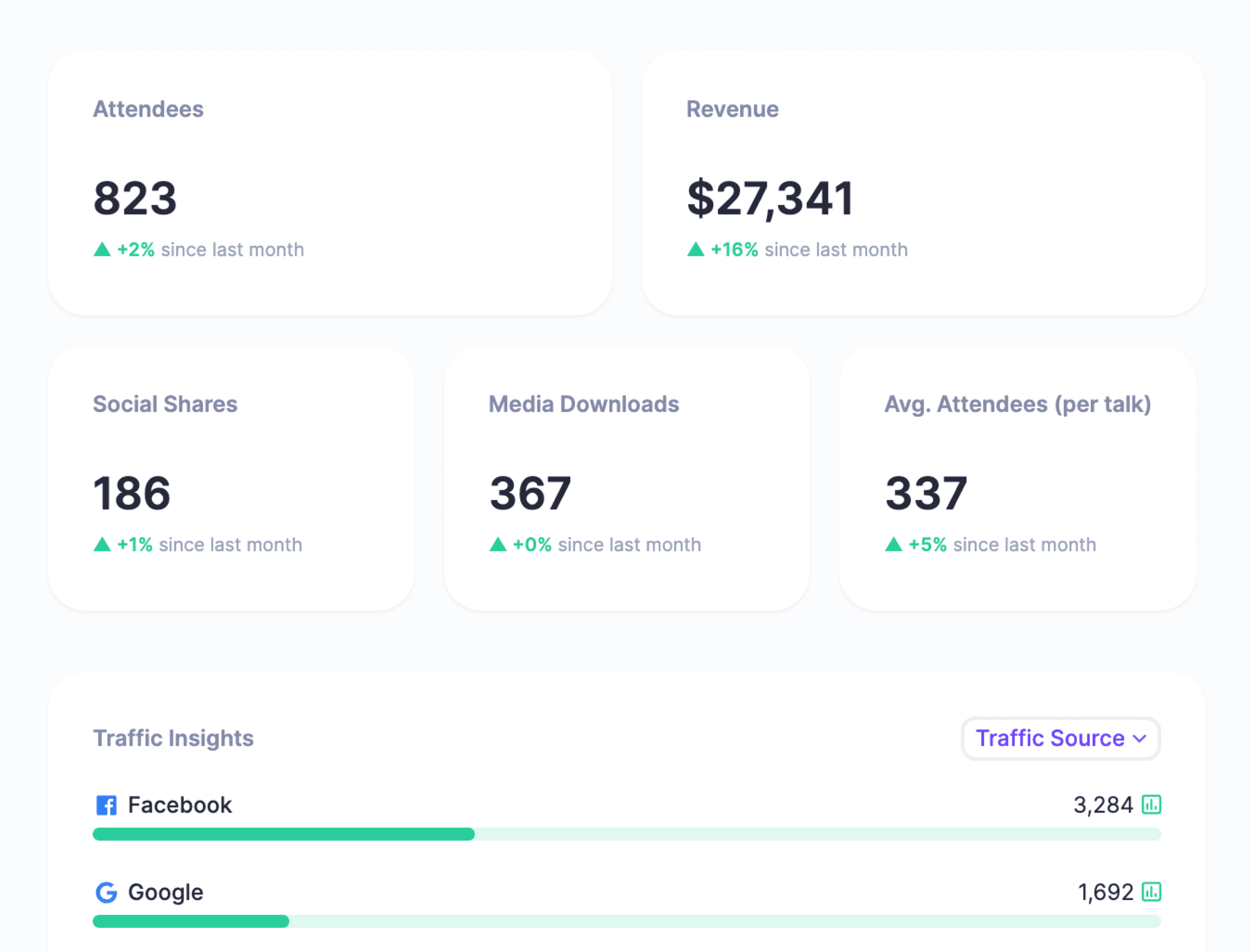
Use event reporting and analytics to answer operational questions: Which sessions attracted attention? Which ticket types sold? Which channels or partners drove registrations? Which replays or follow-ups deserve more promotion?
A practical event tech stack for an online summit
Here is a simple reference architecture for a summit where the organizer wants registration, paid access, speaker workflows, webinar delivery, replay access, and follow-up without building a fragile patchwork system.
| Need | Stack choice | What to check before launch |
|---|---|---|
| Event site and agenda | Event platform hub | Pages, speakers, dates, session descriptions, and registration CTAs are current. |
| Registration and tickets | Event registration plus payment provider | Free, paid, coupon, replay, and VIP access rules match the offer. |
| Live video | Connected webinar or streaming provider | Each session has the right provider, room, access window, and speaker instructions. |
| Speaker operations | Speaker dashboard or contributor portal | Speakers can update profiles, see talk details, and find promotional guidance. |
| Promotion | Event emails, partner links, affiliate tracking, CRM handoff | Registration data flows into the follow-up systems that will use it. |
| Replay access | Event platform or on-demand content area | Replay availability, expiration, ticket access, and email announcements are clear. |
| Reporting | Event analytics plus exports or CRM reports | Registrations, attendance, revenue, content engagement, and source data are visible. |
This setup gives the organizer one event hub and a small number of connected specialist systems. It also keeps the important workflows close to the attendee record, which matters when you need to answer questions like "Who registered?", "What did they buy?", "Which sessions can they access?", and "What should we send them next?"
DIY stack vs. event platform hub
A DIY stack can be the right choice when your event is simple, your team is technical, and you already have strong systems for pages, checkout, email, video, CRM, and analytics. The tradeoff is that you become responsible for every handoff between those systems.
An event platform hub is usually a better fit when the event has multiple sessions, speakers, paid access, replays, sponsors, affiliates, or reporting needs. It does not eliminate every specialist tool, but it gives the event a central operating layer.
| Decision point | DIY stack may work when... | Event platform hub is stronger when... |
|---|---|---|
| Event complexity | You have one or two simple sessions. | You have multiple speakers, tracks, tickets, sponsors, or replay rules. |
| Team capacity | Someone owns integrations, QA, and support. | The organizer needs a reliable workflow without becoming a systems integrator. |
| Revenue model | The event is free and access is simple. | You sell tickets, add-ons, replay passes, or sponsor packages. |
| Attendee experience | Separate links and emails are acceptable. | You need a polished journey from registration through replay access. |
| Reporting | Basic counts are enough. | You need registration, revenue, source, content, and follow-up data in one view. |
The best stack is not always the smallest stack. It is the stack where the event-critical data and workflows are connected enough that the organizer can launch, support attendees, and learn from the result without constant manual repair.
Integration checklist before you launch
Before publishing your event page or opening ticket sales, walk through the stack from the attendee's point of view and the organizer's point of view.
- Can someone register from the public event page without hitting duplicate forms?
- Does the confirmation email match the ticket, session access, and next step?
- Are paid tickets, add-ons, replay access, coupons, and refunds handled in the same operational view?
- Does each session have the right video provider, join link, access window, and fallback plan?
- Can speakers see what they need to prepare without searching email threads?
- Do sponsor, affiliate, and partner links track the activity you care about?
- Does attendee data flow to your CRM, email tool, or export process with the fields you need?
- Can you see registrations, revenue, attendance, engagement, and source data after the event?
- Are replay rules clear for free attendees, paid attendees, VIPs, and late buyers?
If any answer depends on a spreadsheet, manual copy-paste, or someone remembering to reconcile two systems after the event, that is a stack risk. It might be acceptable for a small test. It is dangerous for a flagship summit or paid event.
Where HeySummit fits in the stack
HeySummit is designed to act as the event hub for organizers who want the business and operations of the event in one workflow while still connecting to the tools they already use. It brings together event pages, registration, ticketing, speaker management, webinar and video integrations, email, affiliates, sponsorships, analytics, and replay access.
That makes it especially useful when your event is more than a single webinar room: a creator summit with multiple speakers, a paid workshop with replay access, a hybrid event with tickets, or an evergreen content experience that needs registration and follow-up.
The practical advantage is not that one platform replaces every specialist tool. It is that the event has one operating layer: attendees register in the event, tickets control access to event content, speakers and partners participate through event-specific workflows, video tools connect to sessions, and reporting reflects the event rather than one disconnected app.
If you are planning an online event and want to see the full workflow, start with the HeySummit product tour or the online events solution page.
The takeaway
A good event tech stack should make your event easier to run and easier to learn from. If every tool solves one tiny problem but creates another handoff, the stack is working against you. If the event hub keeps registration, tickets, sessions, speakers, video, replays, integrations, and reporting connected, the organizer can spend more energy on the audience and less energy on repair work.
For a simple webinar, a lightweight stack may be enough. For an online summit, paid event, replay library, or repeatable event program, choose a stack that supports the whole lifecycle: promotion, registration, delivery, monetization, follow-up, and measurement.
Frequently asked questions
Table of Contents
What is an event tech stack?The core layers of an online event tech stackA practical event tech stack for an online summitDIY stack vs. event platform hubIntegration checklist before you launchWhere HeySummit fits in the stackThe takeawayFrequently Asked QuestionsTry HeySummit free
HeySummit is the easiest way for creators and educators to grow their audience, authority and revenue with professional online events created in minutes, not weeks.
Share this article on:
Recent Posts
Loading feed...