Eventzilla Alternatives: Compare Event Platforms by Workflow and Team Fit
-1690817315934-652794559.png&w=96&q=75)
Benjamin Dell
Founder, HeySummit
The best Eventzilla alternative is not the platform with the longest feature list. It is the one that replaces the workflow your team actually depends on: straightforward ticket sales, speaker-led online sessions, marketplace discovery, mobile and onsite operations, an enterprise event programme, or an immersive virtual venue.
Eventzilla itself covers much more than a registration form, so switching only makes sense when another operating model materially improves the event you are building. This guide starts with the case for staying, then compares alternatives by fit, total cost, and the work your team will still own.
HeySummit publishes this comparison and appears in it. To keep the recommendation useful, each platform gets the same treatment: strongest fit, important trade-off, and the questions you should verify before buying.
Eventzilla alternatives: the short answer
| Platform | Strongest fit | Typical event shape | Delivery or onsite model | Pricing model | Watch-out |
|---|---|---|---|---|---|
| Stay with Eventzilla | Broad registration plus virtual, mobile, and onsite workflows | Conferences, training, fundraisers, hybrid events, and webinars | Event Hub, live streaming options, organiser and attendee apps, check-in, kiosks, and badges | Registration-led plans with separate payment processing and optional capabilities | Confirm which plan or add-on includes each workflow you need |
| HeySummit | Speaker-led, multi-session, paid, sponsor, affiliate, and replay programmes | Online summits, webinar series, workshops, hybrid programmes, and on-demand libraries | Manages the event layer and connects to a video or webinar provider | Subscription plans with current allowances and transaction terms | Not a native badge-printing, venue-sourcing, or exhibitor lead-retrieval suite |
| Ticket Tailor | Ticketing-first events | Classes, performances, community events, attractions, and straightforward paid admission | Hosted box office, attendee communications, check-in app, and links to external virtual delivery | Per-ticket usage with the organiser's payment provider | Speaker, sponsor, replay, and multi-session content workflows may need other tools |
| Eventbrite | Marketplace discovery and public ticket sales | Public classes, performances, festivals, community events, and experiences | Event pages, marketplace promotion, ticketing, payments, and mobile check-in | Free events plus market-specific ticketing and payment fees for paid events | Model the fees and any separate content, partner, or replay systems |
| Whova | Mobile-first conference engagement and onsite participation | Associations, academic meetings, conferences, and sponsor-led events | Attendee app, agendas, networking, check-in, badges, sponsors, and exhibitors | Quote-led | Confirm package boundaries, integrations, virtual scope, and implementation ownership |
| Cvent | Enterprise event portfolios and governance | Multi-team, multi-region, onsite, virtual, hybrid, and hospitality-heavy programmes | Modular registration, attendee hub, mobile, onsite, badging, travel, reporting, and integrations | Quote-led, modular | Scope modules, users, services, hardware, implementation, and support in the proposal |
| vFairs | Immersive virtual events, expos, and trade shows | Virtual fairs, exhibitions, recruiting events, conferences, and hybrid experiences | Branded virtual environments, booths, networking, mobile, and onsite options | Quote-led | Confirm the exact environment, service level, integrations, mobile, and onsite scope |
Use this as a shortlist, not a ranking. A public festival, a speaker-led summit, and an enterprise conference can all need “event software” while placing risk in completely different parts of the workflow.
What Eventzilla already does well
Eventzilla should not be dismissed as a simple ticketing tool. Its current platform overview spans registration, event websites, multi-day and multi-track agendas, speaker submissions, attendee networking, mobile apps, check-in, kiosks, badge printing, virtual delivery, surveys, reporting, and integrations.
That breadth makes staying entirely rational when the existing setup already handles the difficult parts of your event. A move can create more work if you replace Eventzilla with a narrower ticketing product and then have to rebuild agendas, speakers, onsite operations, virtual delivery, or reporting elsewhere.
Capability and commercial packaging are separate questions. The current Eventzilla pricing comparison distinguishes registration plans, payment processing, recurring-event capabilities, virtual delivery, mobile and onsite tools, badges, kiosks, and lead-capture options. Do not compare one headline fee. Ask which plan, add-on, device, or service owns every requirement in your event.
Stay with Eventzilla when its registration economics and its agenda, mobile, onsite, badge, or virtual workflow already fit. Switch when another platform reduces a material operational burden or supports an event experience that Eventzilla is not the best fit to run.
Decide what you are replacing before comparing platforms
Start with the event, not the vendors. Write down the workflows that would fail if you removed your current platform tomorrow:
- Event model and cadence: one conference, recurring workshops, a multi-day online summit, a webinar series, or a mixed portfolio.
- Registration, tickets, and payments: free and paid tiers, taxes, refunds, discounts, instalments, add-ons, capacity, and approval rules.
- Sessions and delivery: tracks, speakers, schedules, live video, recordings, captions, access windows, and replays.
- Partners: speakers, sponsors, exhibitors, affiliates, lead capture, assets, tasks, offers, and reporting.
- Mobile and onsite: attendee app, networking, check-in, walk-ins, badge printing, kiosks, scanners, venue data, and weak-connectivity plans.
- Data and follow-up: consent, source tracking, CRM sync, email, reporting, exports, deletion, and historical access.
- Ownership: what your team configures, what a provider implements, and who supports the live event.
A real alternative must replace the workflows you rely on. It does not need to match every Eventzilla feature, and a broader platform is not automatically a better one.
Six Eventzilla alternatives, compared by fit
1. HeySummit: for speaker-led and content-led event programmes
HeySummit is worth evaluating when the event itself is an audience, authority, or revenue programme. It keeps event pages, registration, ticketing and access controls, speakers, sponsors, affiliates, emails, analytics, and replays in one event workflow. That suits creators, educators, communities, nonprofits, expert-led businesses, and lean marketing teams running multi-session or repeatable content-led events.
The video boundary matters. HeySummit's Help Center explains that it manages the event experience around each session while a connected webinar, streaming, or video provider supplies the live delivery. That can reduce event-layer tool sprawl without pretending the platform replaces Zoom or another broadcast product.
Tickets can control more than payment. The current HeySummit ticket setup guidance describes free and paid ticket choices and access rules, while the public product page shows how tickets can gate live, replay, and other event access. This is useful when the commercial model depends on VIP access, replay windows, bundles, or distinct attendee paths.
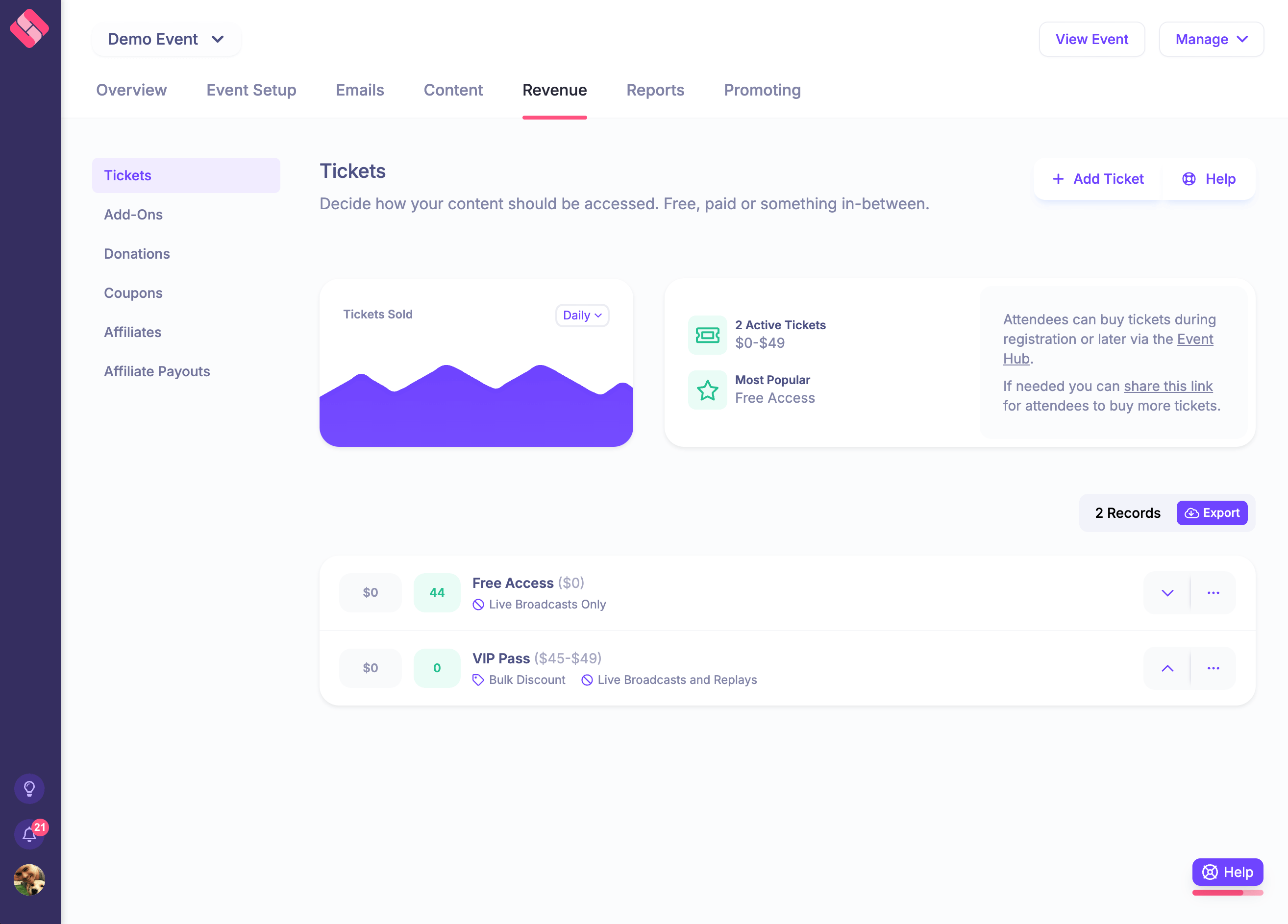
Choose HeySummit when: speakers, sessions, paid access, sponsors, affiliates, replays, and audience follow-up belong in one connected programme. Keep Eventzilla or compare another option when: a native attendee app, self-service badge printing, accommodation, venue sourcing, exhibitor lead retrieval, or enterprise procurement is central.
If that fit sounds close, use the HeySummit product tour to inspect the complete workflow rather than judging from a comparison table.
2. Ticket Tailor: for ticketing-first events
Ticket Tailor is a useful benchmark when the main job is selling admission and checking people in. Its official feature overview covers hosted event pages, multiple ticket types, payments through connected providers, attendee communications, reporting, a check-in app, reserved seating, integrations, and links for online or hybrid events.
Its pricing model is usage-led rather than a broad event-programme licence. That can be attractive when ticketing is the centre of gravity, but total cost still includes payment processing and any separate tools needed for speakers, sponsors, video, replays, CRM, or complex onsite work.
Choose Ticket Tailor when: the event is ticketing-first and the surrounding operational system can stay simple. Keep Eventzilla when: its agenda, speaker, virtual, mobile, badge, or broader event-management workflow would otherwise need rebuilding.
3. Eventbrite: for marketplace discovery and public ticket sales
Eventbrite is different because distribution is part of the product. Its current organiser offering combines marketplace visibility, event pages, multiple ticket types, payments, promotion, attendee communications, an organiser app, and mobile check-in.
That makes it relevant for public classes, performances, festivals, community events, and experiences whose buyers may already browse Eventbrite. It is less obviously the operating centre for a deep speaker, sponsor, affiliate, multi-session, and replay programme.
Choose Eventbrite when: public discovery and straightforward ticket sales matter most. Keep Eventzilla when: you rely more heavily on its broader agenda, virtual, mobile, onsite, or event-management capabilities. Verify the fee structure for your market and model who absorbs each charge before deciding.
4. Whova: for mobile-first conferences and onsite participation
Whova belongs on the shortlist when the attendee app is central to the experience. Its official event platform and attendee app emphasise agendas, networking, announcements, check-in, badges, speakers, sponsors, exhibitors, surveys, and mobile participation.
Choose Whova when: a conference or association event depends on mobile agendas, attendee networking, sponsors, exhibitors, and onsite engagement. Keep Eventzilla when: its current mix already fits or when changing platforms would not materially improve that attendee experience. Ask Whova to scope registration, virtual delivery, integrations, implementation, and the exact app package in the quote.
5. Cvent: for enterprise portfolios and governance
Cvent extends beyond a single event into meetings and event-programme management. Its current feature catalogue covers registration, event sites, sessions, speakers, exhibitors, attendee communications, roles, reporting, integrations, travel, an attendee hub, and onsite check-in and badging.
The breadth is modular. Cvent's pricing path is quote-led, so the proposal must identify the included products, users, services, devices, support, implementation, and limits.
Choose Cvent when: several teams, regions, event types, permission models, onsite workflows, or procurement requirements need enterprise governance. Keep Eventzilla when: a lighter registration-led model already covers the programme without the organisational overhead of a larger suite.
6. vFairs: for immersive virtual events and expos
vFairs is the most distinct option in this shortlist. Its virtual event platform centres on branded environments, virtual halls, exhibitor booths, networking, sessions, and engagement. Its broader event offer also reaches mobile and onsite use cases.
The current vFairs pricing path is quote-led, so experience design, service support, virtual environment, integrations, mobile, onsite hardware, and implementation responsibility all need to be explicit.
Choose vFairs when: the environment itself—an expo, fair, recruiting event, or immersive venue—is a core part of the brief. Keep Eventzilla when: its registration, Event Hub, streaming, mobile, and onsite workflow is sufficient without a more customised virtual experience.
Compare total cost without being misled by the headline price
A lower platform fee can still create a more expensive system. Complete this worksheet with the same event volume and assumptions for every vendor:
| Cost component | Current Eventzilla setup | Alternative | Volume assumption | Included, add-on, or external | Owner | Verified on |
|---|---|---|---|---|---|---|
| Subscription or licence | Events and users | |||||
| Registration or ticket fees | Free and paid tickets | |||||
| Payment processing | Orders, currency, and refunds | |||||
| Video or virtual delivery | Sessions, attendees, and recordings | |||||
| Mobile and onsite | Apps, devices, badges, and entrances | |||||
| Sponsors, exhibitors, or lead capture | Partners and leads | |||||
| Email, CRM, and integrations | Contacts, sends, and workflows | |||||
| Implementation and support | Setup, live days, and training | |||||
| Migration and staff time | Build, QA, cutover, and recovery |
Use current proposals and live pricing rather than copied figures. For HeySummit, review current plans and allowances and include the separate video provider in the model. For every platform, ask whether a line is native, integrated, an add-on, service-assisted, or unavailable.
Stay with Eventzilla, switch, or choose neither
Stay with Eventzilla if
- Its current registration, agenda, virtual, mobile, check-in, badge, and reporting workflow already fits.
- Your team understands the plan and add-on boundaries and the total cost is acceptable.
- The migration risk is larger than the operational improvement another platform would create.
Switch if
- A speaker-led content programme needs tighter tickets, speakers, sponsors, affiliates, and replay operations.
- Marketplace discovery is more valuable than a broad event-management layer.
- A mobile-first conference, enterprise portfolio, or immersive virtual environment is the true centre of the event.
- A representative demo proves that another platform removes work rather than moving it into spreadsheets and integrations.
Choose neither if
Your requirement belongs to a different category. A dedicated webinar production tool may be better when broadcast is the whole job. A simple payment link may be enough for a tiny private session. A specialist venue, badge, or lead-retrieval system may be necessary when onsite hardware is the dominant risk. Do not buy a broad platform merely because the category name sounds right.
Migration checklist before changing event platforms
- Inventory live and upcoming events. Identify the pages, domains, sessions, speakers, sponsors, tickets, emails, forms, and automations that cannot be interrupted.
- Export and map data. Preserve attendees, lawful consent fields, orders, refunds, access rights, source values, historical reports, and any records required for support or finance.
- Rebuild the event model. Recreate ticket rules, access windows, schedules, speakers, sponsors, pages, emails, and replay behaviour in the new system.
- Reconnect the stack. Configure payments, video, CRM, analytics, domains, UTMs, webhooks, and integrations with named owners.
- Test complete journeys. Run free and paid checkout, refunds, confirmation, authentication, reminders, live access, mobile or onsite flows, replay access, exports, and exception handling.
- Communicate the cutover. Tell attendees, speakers, sponsors, and the support team what changes, what does not, and where to get help.
- Keep a recovery path. Preserve read-only historical records, define rollback conditions, and monitor the first bounded event before retiring the old workflow.
Give each shortlisted vendor the same event and the same exception cases. A confident “yes” in a sales call is not the same as a tested checkout, access rule, badge flow, integration, or report.
Choose the operating model that fits your event
Eventzilla remains a credible choice when its broad registration, virtual, mobile, and onsite workflow already fits. Ticket Tailor is stronger when ticketing is the whole job. Eventbrite adds public marketplace discovery. Whova leads with the attendee app and conference engagement. Cvent addresses enterprise programme governance. vFairs suits immersive virtual and expo experiences.
HeySummit belongs on the shortlist when a lean team is building a speaker-led, multi-session, paid, sponsor, affiliate, or replay programme and wants the event layer to stay connected. Explore how that works for online events, then see the HeySummit product tour.
If your needs point elsewhere, continue through the event platform comparison hub with a clearer list of requirements. The right decision is the one that improves a material workflow without hiding the cost or moving operational risk somewhere new.
Frequently asked questions
Table of Contents
Eventzilla alternatives: the short answerWhat Eventzilla already does wellDecide what you are replacing before comparing platformsSix Eventzilla alternatives, compared by fitCompare total cost without being misled by the headline priceStay with Eventzilla, switch, or choose neitherMigration checklist before changing event platformsChoose the operating model that fits your eventFrequently Asked QuestionsTry HeySummit free
HeySummit is the easiest way for creators and educators to grow their audience, authority and revenue with professional online events created in minutes, not weeks.
Share this article on:
Recent Posts
Loading feed...