Webinar Attendance Certificate Template and Checklist
-1690817315934-652794559.png&w=96&q=75)
Benjamin Dell
Founder, HeySummit
A webinar attendance certificate should tell the recipient what the issuer can confirm. Use the editable template below to record a person's attendance, then use the checklist to review evidence, send the right document and handle corrections.
If you attended a webinar and need your own certificate, contact the event organizer or check its signed-in attendee area. The blank downloads here are for organizers preparing certificates.
Get the editable webinar attendance certificate template
- Download the editable attendance certificate template, DOCX, 37,066 bytes.
- Download the matching printable certificate, PDF, 52,849 bytes.
Both downloads are free and available without an account or email address. The document uses editable text and replacement fields. The PDF is a blank print companion, rather than a fillable form. Neither file is an awarded certificate.
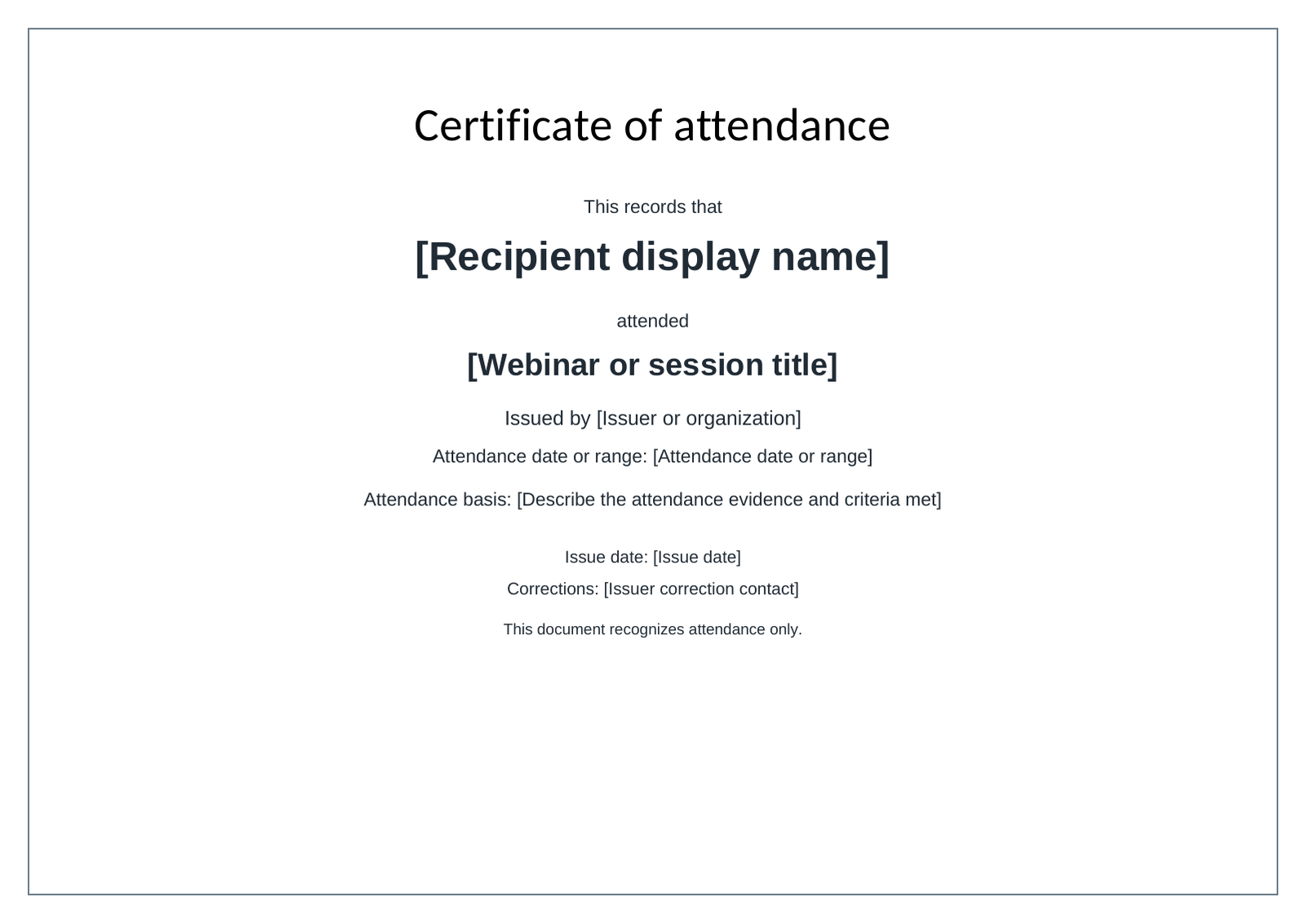
Save a master copy, then replace every bracketed field for each approved recipient. Check longer names and session titles after editing, because extra lines can change the layout. Export the finished document to PDF and inspect it before sending. For printing, use A4 landscape or fit to page on US Letter landscape.
W3C's guidance on accessible event materials recommends formats people can adapt. The editable document and selectable wording below accompany the PDF so recipients and organizers have another way to use the content.
Copy the certificate wording
Certificate of attendance
This records that
[Recipient display name]
attended
[Webinar or session title]Issued by [Issuer or organization]
Attendance date or range: [Attendance date or range]Attendance basis: [Describe the attendance evidence and criteria met]
Issue date: [Issue date]
Corrections: [Issuer correction contact]This document recognizes attendance only.
For example, an issuer might write: "Attendance basis: live attendance confirmed against the session report and the event's published eligibility policy." Use that sentence only when those checks actually support it. Replace it with an accurate description when you use another evidence source.
Choose the right kind of recognition
Start with the claim you can support, then choose the wording. A paid ticket or a decorative seal does not establish a qualification.
On a small screen, swipe sideways to read every column.
| Recognition | What it records | What to check first |
|---|---|---|
| Attendance | Attendance under the issuer's stated criteria. | Relevant attendance evidence and the policy applied. |
| Participation | An activity the organizer actually observed. | The specific activity and how it was recorded. |
| Assessed completion | Meeting stated program requirements, including assessment where required. | Completion and assessment records, rather than registration alone. |
| Accredited or professional credit | Credit under a particular body's or provider's framework. | The applicable provider, accreditation and acceptance rules. |
IACET distinguishes a CEU from an accredited CEU by whether the awarding organization's continuing education practices have undergone independent review against its standard. That is a specific framework, not a rule for every country or profession. Check the relevant body's requirements before describing a webinar as eligible for CPD, CE or accredited credit.
This template recognizes attendance. It does not establish learning, competence, verified identity or professional-body acceptance.
Fill in the fields you can support
Use the recipient's preferred display name, the exact webinar or session title and an issuer name the recipient can recognize. Confirm those details against your approved recipient record before creating the final file.
The attendance date describes when the qualifying attendance happened. The issue date records when you issued the document. They can differ, especially when replay viewing qualifies. For multiple sessions, use a clear date range and identify what that range covers.
Describe the attendance basis without inflating it. A session's scheduled length is not a measurement of how long a particular person watched. Omit watched minutes if your evidence cannot establish them. If the record supports joining but not duration, do not turn it into a statement of full-session attendance.
Add an issuer-owned correction contact that will still work after the event. An optional issuer reference or document version can help your team reconcile requests. It does not provide public verification or prevent someone from copying a PDF.
Following the UK ICO's data minimisation principle, collect and retain only the personal data needed for the purpose. Keep delivery email addresses and internal attendee identifiers in the private issuance record. The certificate itself rarely needs a phone number, home address, date of birth or student identifier.
Decide who qualifies before sending anything
Publish the eligibility policy before the webinar where possible. Specify which sessions qualify, whether live attendance and replay viewing count, what evidence you use, the closing date for review and who decides exceptions. If you are still preparing the event, use the workshop planning guide to plan an online workshop alongside those requirements.
Choose criteria that you can check with the available records. A registration, payment or invitation acceptance is not an attendance record. Where tracking is incomplete, put the case into review instead of assuming either attendance or absence.
A fictional eligibility review
Suppose Example Learning Studio accepts either live attendance or confirmed replay viewing for one named session, with replay evidence due by 30 October. Its event coordinator reviews exceptions. This is an illustrative policy, not a HeySummit default or an accredited-credit requirement.
- Alex has a live attendance record that meets the studio's policy. The coordinator approves an attendance certificate using the live session date.
- Morgan viewed the replay within the permitted period, and the available viewing evidence meets the policy. The coordinator approves a certificate using the relevant replay viewing date.
- Casey joined through an external webinar provider, but the available record does not establish the duration required by the studio's policy. The coordinator requests the provider report and leaves the decision under review.
A filled wording example for Alex could read: "This records that Alex Example attended Planning a Community Workshop. Issued by Example Learning Studio. Attendance date: 20 October 2026. Attendance basis: live attendance confirmed against the session report and the studio's published eligibility policy. Issue date: 21 October 2026. Corrections: certificates@example.org. This document recognizes attendance only." All names, dates and contact details in this example are fictional.
Issue certificates with an evidence and delivery checklist
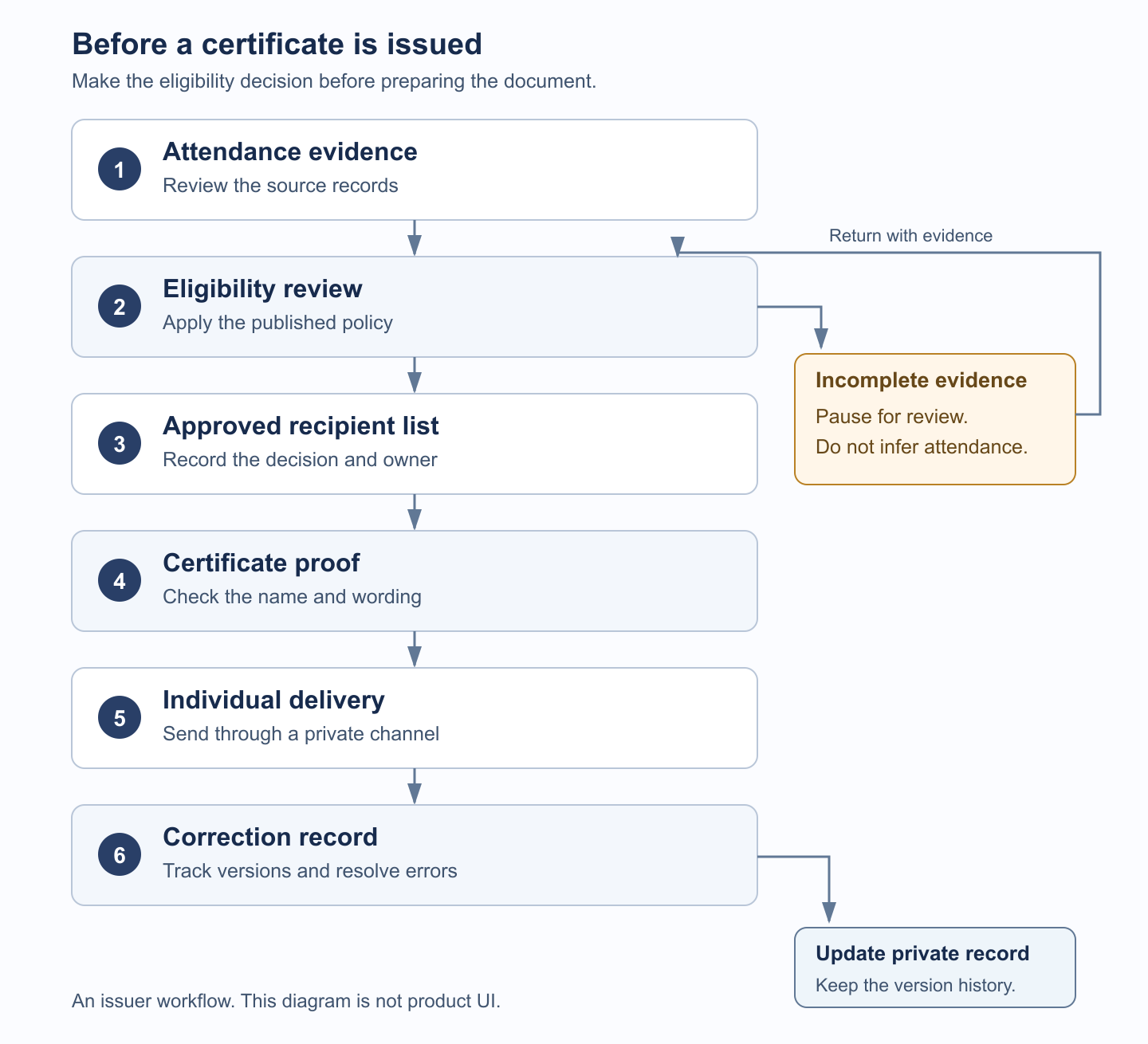
- Reconcile the attendance evidence with the correct recipient and session. Keep the source report or reference available to the reviewer.
- Resolve exceptions against the published policy. Assign an owner to cases still awaiting evidence.
- Approve the recipient list and record who made each decision. Keep pending cases separate from approved ones.
- Populate and proof one certificate. Check the name, title, attendance date, issue date, evidence wording and correction contact against the private record.
- Test your intended private delivery route with a sample addressed to your own team. Open the file and check that the message and attachment contain only the intended recipient's details.
- Issue certificates individually through your approved communication workflow. Avoid public folders or group messages that expose recipients' documents or addresses.
- Record what was issued and whether delivery succeeded. Link later corrections to that record.
Copy a private issuance record
Create one record per recipient and session, or adapt it to a clearly defined multi-session award. Keep this ledger private. Store the delivery address separately in your controlled contact list and join it through the attendee reference.
On a small screen, swipe sideways to read both columns.
| Field | Value to record |
|---|---|
| Attendee reference | [Private reference linked to the recipient] |
| Event and session | [Exact title or defined session set] |
| Evidence reference | [Report, relevant row and attendance date] |
| Eligibility decision and reason | [Approved, pending review or declined; policy and reason] |
| Approver | [Person responsible for the decision] |
| Document version or issuer reference | [Reference used to reconcile this document] |
| Issued date | [Date the final document was issued] |
| Delivery status | [Pending, sent, failed or resent; date] |
| Correction status | [Open issue, replacement version and resolution] |
Use HeySummit for the attendance and certificate handoff
There are two routes: use the native attendance certificate where your plan and event settings provide it, or create an independent document from reviewed attendance evidence. The downloads above support the second route. They are not an import format for HeySummit's native certificate.
Native attendance certificates
HeySummit's attendance and certificate guide identifies detailed attendance insights and attendance certificates as Success-level features. Check availability for your own plan before building the attendee handoff around them.
Go to Event Settings > Event Experience > Attendance Tracking to review the event's settings. Certificate enablement and ticket eligibility are separate checks. Attendees also need access to the certificate page; hiding that page blocks attendee access without changing the attendance record or ticket eligibility.
Your team can open an attendee's Attendance Certificate from the attendee's actions. Eligible attendees can open their own Attendance Certificate area after signing in, when the page is available to them. The Print action opens the browser's print dialog, where they can print or save a PDF copy. The independent template in this article does not change that native design.
Credits configured by an organizer describe the event's credit settings. They do not, by themselves, establish accredited credit or acceptance by a professional body.
Certificates created outside HeySummit
The external certificate workflow starts in Content & Schedule > Reports > Session Attendees. Review the actual attendance columns before using attendee details to prepare certificates. Registration rows alone are insufficient.
For attendees redirected to an external webinar provider, HeySummit can record joining without measuring how long they stayed at that provider. Obtain the provider's own duration evidence when your eligibility policy requires it. Duration insights in HeySummit are also plan-dependent.
Use reporting and analytics to explore the available event evidence, then prepare this independent certificate from the approved list and deliver it through your own email workflow. This process does not imply a native template-import or bulk certificate-mailing feature.
Missing or disputed records
As the attendance guide explains, browser extensions, network restrictions and connection issues can prevent tracking from recording attendance fully. Review the attendee's account of the issue and any other relevant evidence. A tracking test can help diagnose whether tracking works for them, but does not reconstruct a past session's watched duration.
Where other evidence justifies a correction, the attendee's Manage Sessions actions can mark a broadcast attended or a replay watched. Those actions record full attendance for the selected broadcast or replay. Use them only after review; they must not turn an unknown duration into a claim of measured viewing time.
Correct a certificate without creating a conflicting record
For a spelling change, confirm the requested display name with the recipient, update the document and record the replacement version. Keep the attendance decision unless the correction also changes the underlying eligibility evidence.
If the wrong person received a certificate, investigate the recipient match and delivery record before resending. If a replay becomes eligible later, review that evidence against the same policy and record the new decision. For failed email delivery or a duplicate request, check the existing record before generating another document.
Tell the recipient which version to use and mark the previous version as superseded in your private register. That register helps your team reconcile documents; it cannot revoke copies of a PDF already shared or provide public credential verification.
Publish a realistic response window for corrections and name the team or person responsible. Provide an adaptable text or document copy when a recipient needs one, while keeping the wording and attendance basis consistent with the issued certificate.
Finish the certificate task, then plan the next event
Before issuing, confirm that the evidence meets your published policy, the recipient and session details are correct, the attendance wording is supportable, the final file opens and prints clearly, and a correction contact and private record are ready.
When you are preparing the next webinar or workshop, explore HeySummit's online workshop platform to connect registration, access and follow-up. The certificate downloads remain available above without signing up.
Frequently asked questions
Table of Contents
Get the editable webinar attendance certificate templateChoose the right kind of recognitionFill in the fields you can supportDecide who qualifies before sending anythingIssue certificates with an evidence and delivery checklistUse HeySummit for the attendance and certificate handoffCorrect a certificate without creating a conflicting recordFinish the certificate task, then plan the next eventFrequently Asked QuestionsTry HeySummit free
HeySummit is the easiest way for creators and educators to grow their audience, authority and revenue with professional online events created in minutes, not weeks.
Share this article on:
Recent Posts
Loading feed...