30 Virtual Meeting Icebreakers That Aren't Awkward

Astley Cervania
Content Contributor, HeySummit
A virtual meeting icebreaker is a short, optional activity that gives people an easy way to participate before the main work begins. The least awkward options have a clear purpose, take only a few minutes, let people pass or use chat instead of speaking, and avoid questions that demand personal disclosure.
Use this guide to choose among 30 virtual icebreakers for remote teams, online workshops and webinars, or online and hybrid event sessions. Each activity includes timing, group size, preparation, interaction mode, camera guidance, and a caution so you can match it to the people in the room.
What makes a virtual icebreaker work?
A useful icebreaker lowers the cost of joining in. It gives participants a small, predictable first action—typing one word, choosing between two options, or speaking for 20 seconds—without pretending that every group wants instant intimacy.
Start by deciding what the activity needs to do. A new team may need names and roles. An established team may need energy after a break. A webinar audience may need a low-pressure way to test the chat or poll. A workshop may need a prompt that leads directly into the subject.
Then check five constraints: available time, group size, whether people know one another, which interaction tools are accessible, and how much personal disclosure the prompt invites. If the activity does not fit all five, choose a simpler one.
Choose an icebreaker in 30 seconds
| Activity | Best use | Time and group | Mode and prep | Camera and access |
|---|---|---|---|---|
| 1. Name, role, and one light detail | New teams and workshops | 3–8 min; 3–12 | Voice or chat; none | Camera optional; allow a pass |
| 2. One-word check-in | Quick team opening | 1–3 min; any size | Chat, poll, or voice; none | No camera; never demand an explanation |
| 3. This-or-that vote | Strangers and webinars | 2–4 min; any size | Poll, chat, or reactions; prompts | No camera; provide text choices |
| 4. Emoji arrival | Large groups | 1–2 min; any size | Chat or reactions; none | No camera; offer a word alternative |
| 5. Meeting weather | Established teams | 2–5 min; 3–20 | Voice or chat; none | Camera optional; keep it work-safe |
| 6. Introduce the prompt, not yourself | Host-led webinars | 1–2 min; any size | Voice plus chat; one prompt | No camera; model a short answer |
| 7. Where are you joining from? | Global events | 2–5 min; any size | Chat or voice; none | No camera; city or time zone is optional |
| 8. Current small favourite | New or mixed groups | 3–6 min; 3–20 | Voice or chat; prompt | Camera optional; avoid status-heavy topics |
| 9. Recent tiny win | Established teams | 3–8 min; 3–15 | Voice or chat; none | Camera optional; passing is normal |
| 10. Low-stakes recommendation | Networking | 4–8 min; 3–20 | Voice or chat; category | No camera; use inclusive categories |
| 11. One thing within reach | Small remote teams | 3–7 min; 3–12 | Voice or chat; none | Camera not needed; do not require a home tour |
| 12. Skill you can share | Communities and cohorts | 5–10 min; 4–20 | Voice, chat, or breakout; none | Camera optional; keep claims modest |
| 13. Would you rather? | Strangers and large groups | 2–5 min; any size | Poll, chat, or reactions; choices | No camera; avoid identity-sensitive choices |
| 14. If you could add one feature | Product or planning teams | 4–8 min; 3–20 | Chat then voice; prompt | No camera; separate play from decisions |
| 15. Imaginary superpower for today | Creative workshops | 3–6 min; 3–20 | Voice or chat; none | Camera optional; give examples |
| 16. Safe “never have I ever” | Established teams only | 3–6 min; 4–15 | Poll or chat; vetted prompts | No camera; anonymous poll is safest |
| 17. Micro escape puzzle | Established teams | 8–15 min; 4–20 | Breakout or shared doc; puzzle | Camera optional; provide accessible clues |
| 18. Three-question quiz | Webinars and events | 3–6 min; any size | Poll or quiz; questions | No camera; avoid speed-only scoring |
| 19. Opening poll | Large webinars | 1–3 min; any size | Poll; one question | No camera; read choices aloud |
| 20. Mini bingo | Longer workshops | 5–12 min; 6–40 | Card plus chat; template | No camera; do not rely on visual scanning alone |
| 21. Desk-safe scavenger hunt | Established teams | 5–8 min; 4–20 | Voice, chat, or camera; item list | Camera optional; no proof required |
| 22. Future wish list | Cohorts and communities | 5–10 min; 4–20 | Chat, board, or breakout; prompt | No camera; avoid money or family assumptions |
| 23. Two facts and a fiction | New small teams | 8–15 min; 4–12 | Voice plus poll/chat; none | Camera optional; work-themed version available |
| 24. Reaction spectrum | Large groups and hybrid rooms | 2–4 min; any size | Poll, chat, or reactions; scale | No camera; do not rely on hand-raising |
| 25. Paired topic exchange | Networking sessions | 8–12 min; 6–50 | Breakout; prompt and roles | Camera optional; give a main-room alternative |
| 26. Silent brainstorm | Workshops and hybrid groups | 5–10 min; 4–40 | Shared doc or chat; question | No camera; keyboard-accessible tool required |
| 27. Choice-based stretch break | Energizer, not an opener | 2–4 min; any size | Voice plus text instructions; none | Camera off; seated and no-movement options |
| 28. Example-first feedback | Working session | 8–15 min; 4–15 | Voice and shared doc; sample | Camera optional; critique the work, not the person |
| 29. Mini reflection | Wrap-up, not an opener | 2–5 min; any size | Chat, poll, or voice; prompt | No camera; private note option |
| 30. One-word description | Opening or wrap-up | 1–3 min; any size | Chat, poll, or voice; prompt | No camera; describe any image in text |
Quick and no-prep
Choose a one-word check-in, this-or-that vote, emoji arrival, opening poll, reaction spectrum, or one-word description. Each can be completed in under four minutes and works without cameras.
Large groups and webinars
Use a poll, chat prompt, emoji arrival, three-question quiz, or reaction spectrum. Ask one clear question, show the response method, and close the activity as soon as the pattern is visible. Avoid a spoken round-robin.
New teams and groups of strangers
Start with name, role, and one light detail; a low-stakes recommendation; this-or-that; or a work-themed two-facts-and-a-fiction round. Avoid prompts about family, health, travel, religion, politics, alcohol, finances, or personal history.
Online and hybrid event audiences
Use an opening poll that connects to the session topic, a one-word expectation in chat, a three-question knowledge check, or a short paired exchange. In a hybrid room, give online and in-person participants the same response options instead of treating the online chat as a separate audience.
How to facilitate without making it awkward
Introduce the purpose before the prompt: “This will help us learn names,” “This is a quick tool check,” or “This will give me a sense of what the room needs.” Then model an answer at the level of detail you expect. A 15-second example is a better time limit than “Keep it brief.”
Make passing ordinary. Say that people may answer aloud, use chat, choose an equivalent response, or skip. Do not ask anyone to explain why they passed. For hybrid meetings, name both the room and online response routes so neither group has to compete for attention.
- Before: State the purpose. Choose a low-risk prompt. Test the poll, chat, shared document, or breakout setup. Put the instructions in text.
- Run: Model one answer. Name the interaction mode. Set a visible timebox. Offer chat, nonverbal, and pass options. Watch for access problems.
- Close: Thank the group without ranking disclosures. Summarize one pattern if useful. Connect it to the session, then move on cleanly.
30 virtual meeting icebreakers
Quick introductions and check-ins
1. Name, role, and one light detail
Ask each person to share their name, role, and one low-risk detail such as a favourite desk snack or the kind of work they enjoy. Model a 20-second answer, then call on volunteers or follow the participant list.
- Best for: new teams, workshops, and small groups of strangers.
- Time and size: 3–8 minutes; 3–12 people.
- Tools and mode: voice or chat; no preparation.
- Camera and access: camera optional; put the prompt in chat and allow a pass.
- Caution: do not turn “fun fact” into a test of novelty or personal disclosure.
2. One-word check-in
Ask everyone for one word that describes their energy, focus, or expectation for the session. Collect answers in chat or a poll, read back a few without demanding explanations, and use the pattern to adjust pace if needed.
- Best for: quick team openings and recurring meetings.
- Time and size: 1–3 minutes; any size.
- Tools and mode: chat, poll, or voice; no preparation.
- Camera and access: no camera; accept words, emoji, or a private note.
- Caution: never treat the answer as a public wellbeing assessment.
3. This-or-that vote
Offer two harmless options—morning or evening, structured agenda or open discussion, audio book or paper book—and ask people to vote. Invite one or two volunteers to explain, but keep explanation optional.
- Best for: strangers, webinars, and hybrid groups.
- Time and size: 2–4 minutes; any size.
- Tools and mode: poll, chat, or reactions; prepare two or three choices.
- Camera and access: no camera; show both choices in text and read them aloud.
- Caution: avoid choices that reveal identity, health, politics, religion, or money.
4. Emoji arrival
Invite participants to post one emoji—or one word—that represents how they are arriving. This doubles as a quick chat test for a large event. Acknowledge the range and move into the agenda.
- Best for: large webinars, community calls, and hybrid sessions.
- Time and size: 1–2 minutes; any size.
- Tools and mode: chat or reactions; no preparation.
- Camera and access: no camera; always offer a word alternative because emoji meaning and screen-reader output vary.
- Caution: do not interpret an emoji more deeply than the participant intended.
5. Meeting weather
Ask established teammates to describe their current working weather: clear, cloudy, changeable, stormy, or something of their own. Let them add one sentence only if they want to.
- Best for: established remote teams and project check-ins.
- Time and size: 2–5 minutes; 3–20 people.
- Tools and mode: voice or chat; no preparation.
- Camera and access: camera optional; list example words in text.
- Caution: keep it focused on the working session, not private circumstances.
6. Introduce the prompt, not yourself
For a host-led webinar, skip the long host icebreaker. Give one short answer to the same prompt attendees will use, then invite responses in chat. For example: “I hope to leave with one better way to run Q&A; what would make this useful for you?”
- Best for: webinars and online event sessions.
- Time and size: 1–2 minutes; any size.
- Tools and mode: host voice plus attendee chat; prepare one topic-linked prompt.
- Camera and access: no attendee camera; display and read the prompt.
- Caution: the host answer should model brevity, not become another introduction.
Low-risk conversation prompts
7. Where are you joining from?
Invite people to share a city, region, country, or time zone in chat. For privacy, explicitly say that a broad region or “somewhere sunny” is enough. A host can reflect the spread without reading every location aloud.
- Best for: global events and distributed teams.
- Time and size: 2–5 minutes; any size.
- Tools and mode: chat or voice; no preparation.
- Camera and access: no camera; text is the primary route.
- Caution: never require a precise location or infer nationality from it.
8. Current small favourite
Choose one category—song, snack, keyboard shortcut, book, walking route, or free app—and ask for a current favourite. Keep the category broad enough for the audience and invite short answers.
- Best for: new teams, communities, and mixed groups.
- Time and size: 3–6 minutes; 3–20 people.
- Tools and mode: voice or chat; prepare a category.
- Camera and access: camera optional; allow “pass” or “nothing at the moment.”
- Caution: avoid categories that assume disposable income, travel, family, or shared culture.
9. Recent tiny win
Ask for one small work-related win from the last week: closing a task, learning a shortcut, getting useful feedback, or making a difficult decision. Model something genuinely small so participants do not feel pressured to perform success.
- Best for: established teams and project groups.
- Time and size: 3–8 minutes; 3–15 people.
- Tools and mode: voice or chat; no preparation.
- Camera and access: camera optional; passing is normal.
- Caution: do not use this when the group is processing layoffs, crisis, or failure without acknowledging that context.
10. Low-stakes recommendation
Ask each person to recommend something small within a chosen category, such as a useful browser extension, lunch idea, podcast episode, or five-minute break. Capture answers in chat so people can revisit them.
- Best for: networking, cohorts, and community calls.
- Time and size: 4–8 minutes; 3–20 people.
- Tools and mode: voice or chat; prepare one inclusive category.
- Camera and access: no camera required.
- Caution: avoid turning recommendations into unsolicited health, financial, or professional advice.
11. One thing within reach
Ask participants to name—rather than show—one object within reach that helps them work, rest, or stay organised. They can type the object and one short reason in chat.
- Best for: small remote teams that already have some trust.
- Time and size: 3–7 minutes; 3–12 people.
- Tools and mode: voice or chat; no preparation.
- Camera and access: camera not needed; descriptions work better than a visual-only show-and-tell.
- Caution: never require a home tour, camera pan, or proof.
12. A skill you can share
Invite people to name one small skill they could teach in ten minutes and one they would like to learn. In a community or cohort, collect the pairs in a shared document for later networking.
- Best for: learning communities, cohorts, and established teams.
- Time and size: 5–10 minutes; 4–20 people.
- Tools and mode: voice, chat, or breakout; no preparation.
- Camera and access: camera optional; provide a written response route.
- Caution: frame skills broadly so formal credentials are not the price of joining in.
Choice and imagination prompts
13. Would you rather?
Ask one harmless either-or question and collect votes before inviting comments. Topic-linked choices—live demo or worked example, questions during or after—can also help a facilitator shape the session.
- Best for: strangers, large groups, webinars, and hybrid rooms.
- Time and size: 2–5 minutes; any size.
- Tools and mode: poll, chat, or reactions; prepare two clear choices.
- Camera and access: no camera; show choices in text.
- Caution: avoid false dilemmas and prompts that make one identity, ability, or circumstance the joke.
14. If you could add one feature
Give the group an imaginary brief: add one feature to the office, meeting, product, community, or workshop. Ask for ideas silently in chat first, then invite two people to explain.
- Best for: product, planning, and creative teams.
- Time and size: 4–8 minutes; 3–20 people.
- Tools and mode: chat followed by voice; prepare the object of the prompt.
- Camera and access: no camera; silent entry supports more thinking styles.
- Caution: label it as play unless the ideas will enter a real decision process.
15. Imaginary superpower for today
Ask what temporary, fictional ability would make today’s session easier: perfect recall, instant translation, a pause button, or unlimited whiteboard space. Connect the answers lightly to the agenda.
- Best for: creative workshops and established teams.
- Time and size: 3–6 minutes; 3–20 people.
- Tools and mode: voice or chat; no preparation.
- Camera and access: camera optional; offer examples in text.
- Caution: do not use disability or mental health as a fantasy punchline.
16. Safe “never have I ever”
If the group already knows one another, use an anonymous or low-pressure poll with vetted work-safe statements such as “used the wrong mute button” or “joined a call in the wrong time zone.” Let people respond without being identified.
- Best for: established teams only.
- Time and size: 3–6 minutes; 4–15 people.
- Tools and mode: anonymous poll or chat; prepare and review every prompt.
- Camera and access: no camera; anonymous response is safest.
- Caution: avoid alcohol, relationships, health, religion, politics, illegal acts, money, family, and embarrassing disclosures. Choose another activity if trust is uncertain.
Interactive games
17. Micro escape puzzle
Give small groups one accessible puzzle with a single answer rather than a full commercial escape room. Assign a reader, recorder, and reporter; allow eight minutes; then bring everyone back for the solution.
- Best for: established teams and longer workshops.
- Time and size: 8–15 minutes; 4–20 people.
- Tools and mode: breakout rooms or shared document; prepare the puzzle and answer.
- Camera and access: camera optional; provide clues as selectable text and describe images.
- Caution: do not make speed or visual pattern recognition the only way to contribute.
18. Three-question quiz
Ask three questions connected to the session topic, organisation, or a neutral theme. Reveal the answer after each question and use the responses to introduce what the group will learn.
- Best for: webinars, conferences, and training.
- Time and size: 3–6 minutes; any size.
- Tools and mode: poll or quiz tool; prepare questions and explanations.
- Camera and access: no camera; read questions aloud and keep answer text visible.
- Caution: avoid a speed leaderboard when connection speed, language, or assistive technology affects response time.
19. Opening poll
Ask one question that helps the facilitator understand the room: experience level, desired outcome, current challenge, or preferred example. Share the results and state how they will shape the session.
- Best for: large webinars, online events, and hybrid sessions.
- Time and size: 1–3 minutes; any size.
- Tools and mode: poll; prepare one concise question.
- Camera and access: no camera; read choices aloud and provide chat if the poll is inaccessible.
- Caution: collect only information you genuinely need and can use.
20. Mini bingo
Create a small 3×3 card with session-safe experiences or observations. Participants mark their own card and type “line” in chat when complete. Use it across a longer workshop rather than pausing for a drawn-out game.
- Best for: longer workshops, cohorts, and established groups.
- Time and size: 5–12 minutes total; 6–40 people.
- Tools and mode: accessible card plus chat; prepare the template.
- Camera and access: no camera; provide the grid as structured text, not only an image.
- Caution: avoid personal or exclusionary squares and do not require visual scanning alone.
21. Desk-safe scavenger hunt
Name two or three common, optional categories such as something blue, something that helps you focus, or something recyclable. Participants can fetch, name, describe, or simply pass. Keep the boundary to the immediate workspace.
- Best for: established teams and informal community sessions.
- Time and size: 5–8 minutes; 4–20 people.
- Tools and mode: voice, chat, or optional camera; prepare a short list.
- Camera and access: camera optional; naming or describing counts equally.
- Caution: do not assume mobility, a private home, a particular room, or ownership of specific objects.
22. Future wish list
Ask participants to add one low-stakes future wish related to the session: a skill to learn, a community activity to try, or a workflow to simplify. Cluster similar answers on a shared board or in chat.
- Best for: cohorts, communities, and planning workshops.
- Time and size: 5–10 minutes; 4–20 people.
- Tools and mode: chat, accessible board, or breakout; prepare the prompt.
- Camera and access: no camera; ensure the board is keyboard accessible or offer chat.
- Caution: avoid “bucket list” framing when it invites assumptions about money, health, travel, or family.
23. Two facts and a fiction
Each person shares three short statements and the group guesses which is invented. For a lower-disclosure version, make all statements about work preferences, tools, or harmless fictional scenarios.
- Best for: new small teams and cohort introductions.
- Time and size: 8–15 minutes; 4–12 people.
- Tools and mode: voice plus poll or chat; no preparation, though advance notice helps.
- Camera and access: camera optional; show statements in text.
- Caution: do not reward shocking disclosures or pressure people to reveal which personal story is true.
24. Reaction spectrum
Give a scale with named points—for example, “new to this / tried it once / use it often”—and ask participants to respond through a poll, number in chat, or reaction. Use the result to choose examples or pacing.
- Best for: large groups, webinars, and hybrid rooms.
- Time and size: 2–4 minutes; any size.
- Tools and mode: poll, chat, or reactions; prepare a clear scale.
- Camera and access: no camera; provide equivalent response routes for both online and in-room participants.
- Caution: do not rely on visual hand-raising, which may exclude remote or keyboard-only participants.
Collaborative activities, energizers, and wrap-ups
25. Paired topic exchange
Put pairs or trios into breakout rooms with one prompt and two roles: first speaker and timekeeper, then switch. Give a main-room chat option for anyone who cannot or does not want to enter a breakout room.
- Best for: networking sessions, workshops, and established communities.
- Time and size: 8–12 minutes; 6–50 people.
- Tools and mode: breakout rooms supplied by the meeting provider; prepare the prompt, roles, and broadcast instructions.
- Camera and access: camera optional; include a main-room alternative and extra transition time.
- Caution: do not send people into rooms without written instructions or a way to ask for help.
26. Silent brainstorm
Pose one question and give everyone two quiet minutes to add ideas to chat or a shared document. Group similar ideas before inviting discussion. Silent entry prevents the first speaker from setting the whole direction.
- Best for: workshops, planning sessions, and hybrid groups.
- Time and size: 5–10 minutes; 4–40 people.
- Tools and mode: shared document, accessible board, or chat; prepare one focused question.
- Camera and access: no camera; choose a keyboard-accessible tool and accept private submissions where possible.
- Caution: this is a working activity, not a personal introduction; label it accurately.
27. Choice-based stretch break
Offer a two-minute pause with several options: stand and stretch, remain seated and roll shoulders, rest eyes, change position, or do nothing. Put the options in text and make cameras unnecessary.
- Best for: an energizer during longer sessions, not an opening icebreaker.
- Time and size: 2–4 minutes; any size.
- Tools and mode: voice plus text instructions; no preparation.
- Camera and access: cameras off; seated, stillness, and off-screen choices are equal.
- Caution: do not prescribe movement, comment on bodies, or present stretching as medical advice.
28. Example-first feedback
Show a neutral sample created for the session and ask the group to identify one strength and one possible improvement. Model specific, respectful feedback before anyone shares their own work.
- Best for: working sessions and learning cohorts, not a first-minute opener.
- Time and size: 8–15 minutes; 4–15 people.
- Tools and mode: voice and shared document; prepare an accessible sample.
- Camera and access: camera optional; provide the sample in a format participants can inspect directly.
- Caution: critique the work, not the person, and never volunteer someone else’s work.
29. Mini reflection
At the end of a section or meeting, ask for one useful idea, one open question, or one next action. Collect responses in chat, a poll, or private notes, then explain what will happen with them.
- Best for: a wrap-up or transition, not an opening icebreaker.
- Time and size: 2–5 minutes; any size.
- Tools and mode: chat, poll, voice, or private note; prepare one prompt.
- Camera and access: no camera; allow a private response or no submission.
- Caution: do not call it feedback if nobody will review or act on the answers.
30. One-word description
Ask for one word that describes an expectation, concept, image, or takeaway. If you use an image, describe its relevant content in text first. Display the words, acknowledge the range, and move on.
- Best for: openings, transitions, and wrap-ups with any group size.
- Time and size: 1–3 minutes; any size.
- Tools and mode: chat, poll, or voice; prepare the prompt or accessible image description.
- Camera and access: no camera; text response is sufficient.
- Caution: avoid prompts such as “describe your career in one word” when the answer could expose insecurity or employment risk.
If the paired or group formats fit your agenda, these virtual networking event ideas offer more ways to structure purposeful attendee connection.
Make participation accessible and optional
The W3C guidance on accessible remote meetings recommends advance materials, captions, accessible interaction alternatives, clear host responsibilities, and alternatives when features such as hand-raising are not usable by keyboard or assistive technology. Apply the same standard to an icebreaker: put the prompt and time limit in text, describe important visuals, test the tool, and offer a chat or nonverbal route.
Do not make cameras compulsory. A four-week field experiment reported in the Journal of Applied Psychology found that camera use was linked to greater daily fatigue among participants in that study. That does not mean cameras harm everyone or should never be used. It does mean “camera on” is a poor universal participation rule. Let people choose camera, voice, chat, poll, or pass wherever the activity permits.
Send the agenda, joining instructions, activity materials, and access options in advance. Enable captions for spoken content. Use clear timings, keyboard-accessible tools, and a text alternative to visual-only reactions. Avoid forced disclosure, and review every prompt for assumptions about family, health, travel, religion, politics, alcohol, money, housing, and culture.
Run icebreakers in an online event workflow
For a public workshop, webinar, or multi-session event, the icebreaker is only one part of the attendee experience. Organisers also need to set expectations before registration, remind people how they can participate, choose a session-delivery provider, support speakers, and review what happened afterward.
An online event platform can coordinate event pages, registration, ticketing, schedules, speakers, emails, session access, integrations, and reporting around the live or recorded session. Use an event landing page builder to publish the agenda and access expectations, then use custom event emails to share the prompt, accessibility options, joining instructions, and any materials before the session.
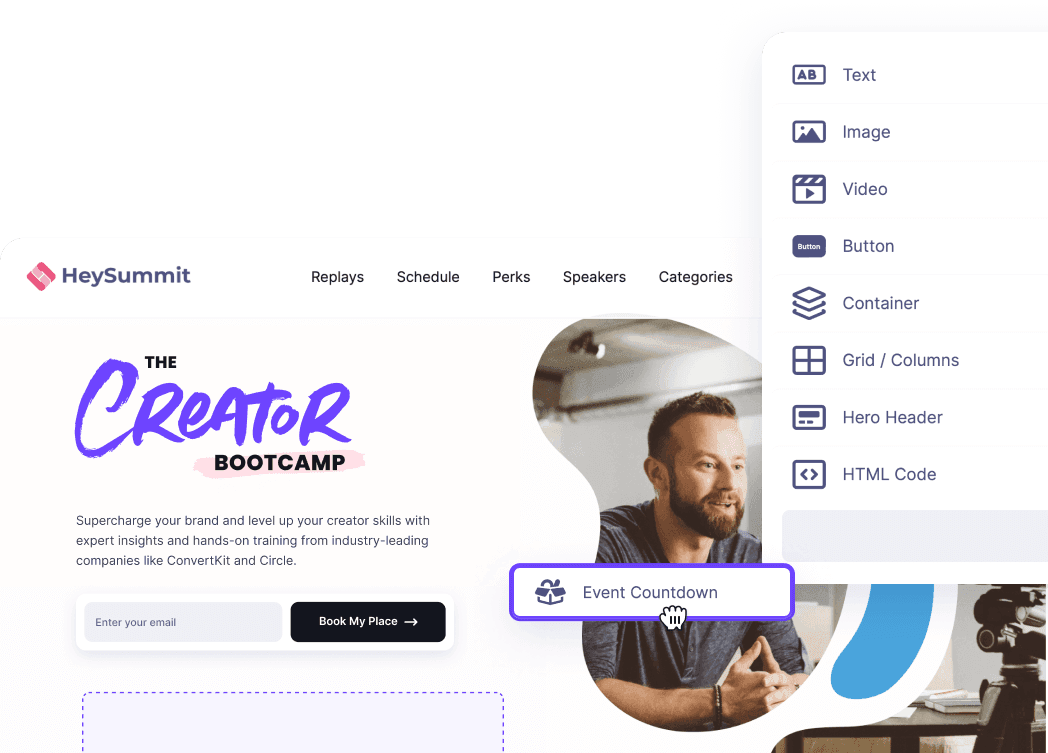
HeySummit’s interactive chat, Q&A, and polls can support low-pressure participation when the event, talk, and plan are eligible. The current Help Center guidance for session Q&A and live polls says these features apply to embedded live streams or pre-recorded video when interactive features are included and enabled. Public Access talks do not show chat, Q&A, or polls, so confirm the access model before promising a poll-based icebreaker.
Breakout rooms and participant microphone or camera interaction come from the connected meeting or webinar provider, not from the event-management layer. Choose among HeySummit’s video and streaming integrations based on the delivery experience you need. HeySummit’s current attendee networking guidance likewise recommends a connected provider when scheduled networking requires breakout rooms.

Give speakers the prompt, timing, opt-out wording, and interaction route in advance through a speaker dashboard. After the session, use reporting to understand participation patterns without treating an icebreaker response as proof of engagement, wellbeing, or event success.
Pick the smallest activity that works
A good virtual icebreaker is not the loudest or most original game. It is the smallest activity that helps this group enter this session with less uncertainty. Match it to the purpose, make the instructions visible, give people more than one way to respond, and stop while it is still useful.
If you are organising a webinar, workshop, summit, or online community event, see how HeySummit coordinates the event journey from registration and speaker preparation to session delivery, interaction, and reporting.
Frequently asked questions
Table of Contents
What makes a virtual icebreaker work?Choose an icebreaker in 30 secondsHow to facilitate without making it awkward30 virtual meeting icebreakersMake participation accessible and optionalRun icebreakers in an online event workflowPick the smallest activity that worksFrequently Asked QuestionsTry HeySummit free
HeySummit is the easiest way for creators and educators to grow their audience, authority and revenue with professional online events created in minutes, not weeks.
Share this article on:
Recent Posts
Loading feed...