7 RSVPify Alternatives for Paid and Multi-Session Events
-1690817315934-652794559.png&w=96&q=75)
Benjamin Dell
Founder, HeySummit
The best RSVPify alternative is the platform that takes ownership of the hardest part of your event. Keep RSVPify when invitations, guest lists, seating and arrival are central. Consider HeySummit when tickets, speakers, partners, external video and replays need to work as one content-event journey. Shortlist a specialist when public discovery, independent ticketing, a native attendee app or enterprise onsite operations matter more.
That distinction is more useful than a long feature count. RSVPify is not simply an RSVP form: its current feature set spans registration, paid tickets, guest management, event pages, seating, check-in, badge printing, reporting, integrations and API access. An alternative makes sense when the event's centre of gravity has moved—not because RSVPify cannot manage a professional event.
RSVPify alternatives at a glance
On a phone, swipe sideways to see all columns in this comparison.
| Platform | Best fit | Registration and privacy | Ticketing | Sessions and content | Speakers, sponsors and partners | App and onsite | Commercial check | Main non-fit or question |
|---|---|---|---|---|---|---|---|---|
| Keep RSVPify | Invitations, private guest lists, seating and check-in | Strong guest, plus-one, form, privacy and communication workflows | Paid tickets, donations and Stripe payments | Multiple tiers or sessions and secondary events; verify the exact access model | More guest-led than speaker- or partner-led | Check-in app and badge printing | Confirm plan limits and ticket fees for your event | Can the current setup support the content, partner or portfolio workflow you now need? |
| HeySummit | Paid, speaker-led, multi-session and replay events | Event pages, registration, ticket access and attendee emails | Free and paid tickets, access levels, add-ons and donations | Schedules, external video providers and replay access | Speaker dashboards, sponsors and affiliate tracking | Useful hybrid registration and check-in; not a native attendee-app or badge platform | Confirm plan limits, transaction fees and video-provider costs | Not a native production studio, matchmaking app or enterprise onsite suite |
| Eventbrite | Public discovery and mainstream ticket sales | Public or private event pages and attendee registration | Marketplace-led ticketing with region-dependent fees and payouts | Suitable for event listings and tickets; verify deeper content access | Not centred on speaker, sponsor, affiliate and replay operations | Organizer app and check-in tools | Confirm regional fees, payout timing and paid promotion | Will marketplace discovery matter more than owning the full content journey? |
| Ticket Tailor | Independent, branded ticketing and timed entry | Hosted or embedded box office with public and private events | Direct payment-processor model and usage-based ticketing | Event schedules and timed entry; verify multi-session access depth | Lighter content and speaker operations | Check-in app; badge workflows may involve partners | Confirm credits, processor fees, white label and regional support | Do you need a ticketing engine or a broader event-content platform? |
| Whova | App-led conferences, associations and academic events | Registration connected to agenda and attendee profiles | Registration and payment tools; confirm the package | Multi-track agendas, sessions and hybrid participation | Speakers, sponsors, exhibitors and lead retrieval | Strong attendee app, networking, check-in and badges | Quote-led; confirm modules, hardware and implementation | Will your audience use the app and onsite depth you are buying? |
| Swoogo | Configurable corporate registration and reusable event programs | Flexible sites, forms, logic and data capture | Payment and registration workflows; confirm event-specific needs | Agenda, event hubs and integrations | Speaker and event-program workflows | Confirm app, onsite and badge modules | Quote-led; confirm admin, module and service scope | Is a configurable corporate platform proportionate to your team and event? |
| Accelevents | Conferences and trade shows spanning onsite and virtual activity | Registration and attendee management | Paid registration; confirm terms and processor setup | Agendas, virtual hub and streaming workflows | Speakers, exhibitors, sponsors and lead capture | Mobile app, check-in, badges and onsite tools | Confirm contract, hardware, services and integrations | More platform than a simple private event or guest-list workflow may need |
| Cvent | Enterprise event portfolios, governance and complex onsite programs | Configurable registration across programs and attendee types | Registration and payment capabilities within a wider suite | Agenda, speaker, content and engagement modules | Sponsors, exhibitors and lead capture across the portfolio | Attendee app, check-in, badges and onsite solutions | Quote-led; confirm modules, implementation, hardware and renewal | Will enterprise control justify the procurement and operating weight? |
Words such as “supports” and “includes” can hide important commercial differences. A capability may be native, integrated, supplied by a partner, limited to a plan or sold as an add-on. Use the table to build a shortlist, not to skip a product demonstration.
When keeping RSVPify is the smarter choice
Stay with RSVPify if the event begins with a known guest list and the difficult work is invitation logic, plus-ones, private registration, seating, dietary information, communications and arrival. Those are not minor features: they shape the organizer's data model and the guest experience.
RSVPify also supports paid events. Its current pricing table describes plan-dependent features and limits, while its pricing and packaging should be checked against your number of events, invitees and event types. RSVPify's help centre separately explains its ticketed-event fee model. Verify the values shown for your account, currency and region rather than carrying a figure from an older comparison article into a budget.
There is also a real cost to switching. Guest records, form fields, tags, seating assignments, ticket orders, check-in history, message templates, integrations and staff habits all have to move or be rebuilt. Do not accept that cost unless a named workflow remains constrained after you have checked the appropriate RSVPify plan, integration or implementation route.
Six signals that your shortlist should widen
- Public discovery has become the growth engine. You need an event marketplace and broad ticket-buyer reach, not primarily invitations to a known list.
- Ticketing is the product. Branded embedded checkout, timed entry, direct payment-provider economics or very high ticket volume matters more than a wider event workflow.
- The event is built around speakers and reusable content. Speaker onboarding, partner promotion, sponsors, affiliates, external live delivery and replay access now have to work together.
- The attendee app or onsite operation is central. Networking, exhibitor lead retrieval, badge printing, access hardware or a multi-track venue experience carries the greatest risk.
- Registration logic and data reuse have become complex. Your team needs deep conditional forms, integrations, event cloning, portfolio templates or tightly governed data flows.
- Enterprise coordination outweighs self-service speed. Venue sourcing, spending controls, security review, global governance, implementation services and a long-running event portfolio justify a larger suite.
These are shortlist triggers, not proof that RSVPify has failed. Write down the one or two signals that apply before you open another vendor tab.
Map the event workflow before comparing platforms
- Invitation and registration: who can register, which fields and plus-one rules apply, and how private must the experience be?
- Ticketing and payment: what is sold, who processes the payment, who absorbs the fees, and how are refunds handled?
- Sessions and access: which attendee can enter which live, onsite or replay experience?
- Speakers and partners: who collects profiles and talk details, manages sponsors, and tracks partner referrals?
- Delivery and replay: which system runs the live session, controls access and makes recordings available later?
- Onsite and app: do you need check-in only, or badges, networking, exhibitor leads, floor plans and access hardware?
- Reporting and data: where do registration, attendance, orders, referrals, engagement and consent return after the event?
For a wider taxonomy of these operating models, the guide to event registration software explains where forms, ticketing and event platforms overlap. The point here is narrower: which platform should own the highest-risk workflow for this event?
1. HeySummit: for speaker-led events, partners and replays
HeySummit's product tour shows an event workflow connecting public pages, registration, tickets, sessions, speakers, sponsors, affiliates, email, external video providers, access and reporting. That centre of gravity suits creators, educators, communities and event-led businesses running paid workshops, multi-speaker summits, hybrid programmes or on-demand content.
The important boundary is delivery. HeySummit manages the event around the live room; it is not a native production studio. Its video and streaming integrations let organizers connect providers to sessions while keeping registration, attendee access and replay packaging in the event platform.
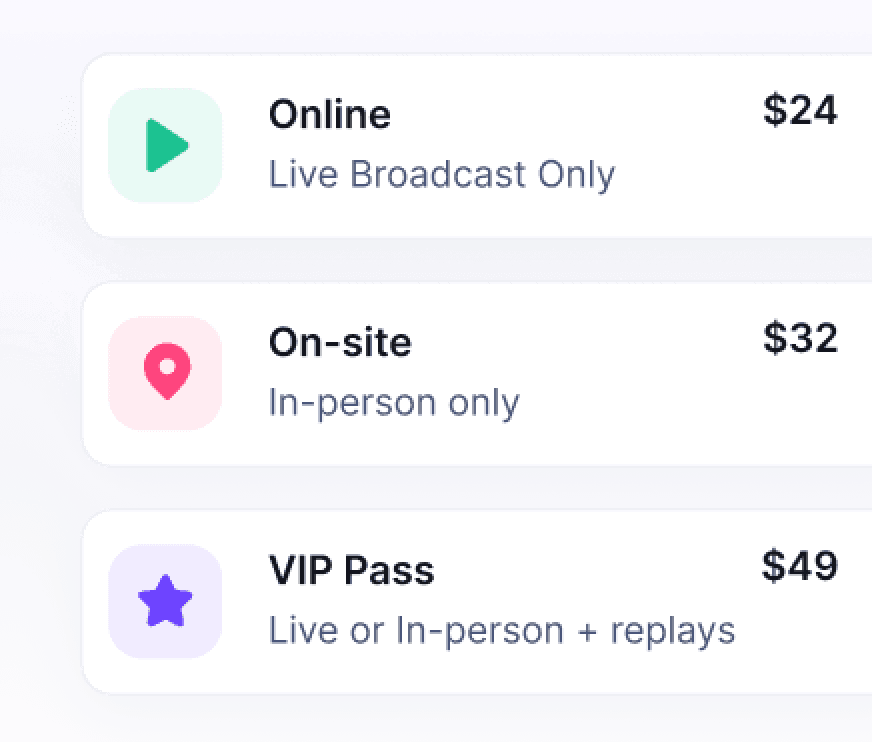
HeySummit is also built around people who help grow and deliver the programme. A speaker dashboard helps collect approved speaker and talk details, while sponsor pages and affiliate tracking can connect partners to the event. The organizer remains responsible for affiliate payouts; tracking a commission is not the same as paying it automatically.
Shortlist HeySummit when: the event earns its value through sessions, speakers, tickets, sponsors, partners and replays, and you want those elements close to the attendee journey.
Do not assume parity when: you need a native attendee app, AI matchmaking, exhibitor lead retrieval, badge printing, venue sourcing, onsite access hardware or a built-in broadcast studio. Check the current event ticketing and access controls, provider requirements and plan limits with your real event.
2. Eventbrite: for public discovery and mainstream ticket sales
Eventbrite's organizer offering is the clearest alternative when public discovery and familiar consumer ticket-buying are central. It combines event listings, registration, ticket sales, organizer tools and attendee check-in around a marketplace model.
Shortlist Eventbrite when: attracting buyers through a public marketplace is more valuable than a private invitation workflow or a deep speaker-content operation.
Verify: regional ticket fees, who pays them, payout timing, refunds, paid promotion, privacy controls, data export and the depth of session-level access you require. A marketplace can help discovery, but it also changes where the attendee relationship begins.
3. Ticket Tailor: for independent branded ticketing
Ticket Tailor's feature set centres on a hosted or embedded box office, ticket types, orders, time slots, check-in and event data. Its pricing model is built around ticket usage and direct connections to supported payment processors rather than a broad enterprise suite.
Shortlist Ticket Tailor when: branded, independent ticketing is the main product and you will supply the surrounding content, speaker, email or app workflow separately.
Verify: ticket credits, payment processing, currencies, taxes, white-label requirements, seating or badge partners, virtual delivery and how a ticket maps to multi-session or replay access. Ticket Tailor may be the right engine without being the entire event stack.
4. Whova: for an attendee app and conference operations
Whova's registration platform sits within a wider conference product that includes agendas, attendee engagement, speakers, exhibitors, sponsors, check-in and app-led participation. That makes it relevant when the attendee experience continues well beyond a registration form.
Shortlist Whova when: networking, a multi-track agenda, exhibitors, lead retrieval, an attendee app, check-in and badges are core requirements for an association, academic conference or trade show.
Verify: the exact package, app adoption plan, add-ons, hardware, hybrid delivery, integrations and implementation. A strong app is only valuable if the event team has the programme and adoption work to make attendees use it.
5. Swoogo: for configurable corporate registration
Swoogo's platform overview positions the product around flexible event sites, registration, integrations, data, reusable event programmes and connected attendee experiences. It belongs on a shortlist where configuration and portfolio reuse matter more than a lightweight invitation workflow.
Shortlist Swoogo when: corporate registration logic, brand control, integrations, APIs and repeatable event setup are the hard problems.
Verify: the pricing basis, administrator limits, event hub, video, attendee app, onsite and badge modules, services and support. Ask the vendor to distinguish native capabilities from integrations and separately priced modules.
6. Accelevents: for conferences and trade shows
Accelevents' event platform brings registration, agenda, speakers, exhibitors, sponsors, onsite check-in, badge workflows, a mobile app, lead capture and virtual participation into a conference-oriented system.
Shortlist Accelevents when: you are running a conference or trade show that must work across registration, onsite participation, exhibitors and a virtual or hybrid content layer.
Verify: contract scope, event size, hardware, lead retrieval, streaming, integrations, implementation and support. That operating depth can be valuable, but it may be unnecessary for a private dinner, simple guest list or small online workshop.
7. Cvent: for enterprise event portfolios
Cvent's event marketing and management suite covers enterprise event programmes across registration, attendee engagement, speakers, sponsors, exhibitors, data and integrations. Its onsite solutions extend that model into check-in, badges, attendee apps and lead capture.
Shortlist Cvent when: governance across a portfolio, enterprise integrations, procurement, venue or spending workflows, onsite operations and services justify a large platform.
Verify: every required module, the implementation plan, hardware, data ownership, service levels, support, contract length and renewal terms. A capable enterprise suite can still be the wrong choice when a lean team values self-service speed over portfolio control.
A five-question shortlist
- Are private invitations, guest rules, seating and check-in still the event's hardest job? Keep RSVPify on the shortlist.
- Is marketplace discovery the main route to ticket buyers? Compare Eventbrite.
- Is independent ticketing the product, with other systems handling content? Compare Ticket Tailor.
- Does value come from speaker-led sessions, partners, external video and replays? Compare HeySummit.
- Are a native app, onsite exhibitors, deep registration configuration or enterprise governance non-negotiable? Compare Whova, Swoogo, Accelevents and Cvent by the exact job.
There is a legitimate “none of these” answer. Weddings, venue operations, academic peer review, association-management systems, hosted-buyer programmes and bespoke live production can require a specialist whose core data model matches that job.
Compare total first-year cost, not the headline plan
Model the same representative event for every vendor. Include the subscription or contract, organizer seats, attendee and event tiers, ticket and payment fees, taxes, refunds, payout timing, email, advertising, domains, white label, app access, integrations, API use, onsite hardware, badges, lead retrieval, implementation, migration, training, support, renewal and overages.
For tickets sold to US consumers, the FTC's fee rule requires live-event ticket sellers to show the total price, including mandatory fees, clearly and up front. That is an attendee-facing display obligation, not a reason to treat every platform fee as identical. Test the published price, checkout, receipt, refund and payout journey for your geography, and get legal advice if your specific obligations are unclear.
Run comparable demos and score proof
Give each vendor the same paid, multi-session event and one edge case. Ask them to demonstrate:
- a real registration form with a private and a public path;
- two ticket or access levels and the full checkout;
- session selection, capacity and attendee access;
- a speaker update and a sponsor or partner workflow;
- a reminder, live-delivery handoff and replay release;
- onsite check-in or the exact app requirement, if relevant;
- a refund, payout reconciliation, report and data export;
- the integrations, service commitments and renewal terms included in the quoted package.
Score demonstrated evidence, not promises. Test on a phone, with assistive technology where possible, and under the connectivity conditions your venue or audience will face. The W3C's tables guidance explains why comparison tables need semantic relationships between headers and data cells; apply the same accessibility discipline to forms, check-in and attendee content.
Migrate one low-risk event before the flagship
- Inventory events, guests, plus-ones, form fields, tags, seating, tickets, orders, refunds, emails, sessions, check-ins, integrations and consent records.
- Confirm which records can be exported, which must be retained in the old system and which should not be copied.
- Rebuild one low-risk event with representative tickets, sessions, speakers, partners and communications.
- Test registration, payment, access, mobile, email, delivery, replay, check-in, reporting and integrations end to end.
- Reconcile payments and attendee records, train the event team and document support ownership.
- Keep a rollback path and appropriate read access to the old system until the pilot has been verified.
A migration is complete when the operational journeys and records reconcile—not when the new event page looks finished.
The final rule
Keep the platform that owns your highest-risk workflow with the least dangerous gap beside it. Write five non-negotiables, test the same event in two or three products, total the first-year cost and decide from demonstrated evidence.
If tickets, speakers, sponsors, partners, external video and replays are the centre of your event, see how HeySummit connects the event workflow. Then compare HeySummit with other event platforms and review current plan details before committing.
Frequently asked questions
Table of Contents
RSVPify alternatives at a glanceWhen keeping RSVPify is the smarter choiceSix signals that your shortlist should widenMap the event workflow before comparing platforms1. HeySummit: for speaker-led events, partners and replays2. Eventbrite: for public discovery and mainstream ticket sales3. Ticket Tailor: for independent branded ticketing4. Whova: for an attendee app and conference operations5. Swoogo: for configurable corporate registration6. Accelevents: for conferences and trade shows7. Cvent: for enterprise event portfoliosA five-question shortlistCompare total first-year cost, not the headline planRun comparable demos and score proofMigrate one low-risk event before the flagshipThe final ruleFrequently Asked QuestionsTry HeySummit free
HeySummit is the easiest way for creators and educators to grow their audience, authority and revenue with professional online events created in minutes, not weeks.
Share this article on:
Recent Posts
Loading feed...