Webinar vs Workshop: Which Online Event Format Fits Your Goal?
-1690817315934-652794559.png&w=96&q=75)
Benjamin Dell
Founder, HeySummit
A webinar is usually the better format when your main job is to explain, demonstrate, or present to an audience. A workshop is usually better when participants need to practise, make decisions, receive feedback, or leave with something they have completed.
That is a useful starting point, not a fixed rule. Webinars can include polls, chat, questions, and guided exercises. Workshops can still contain presentation. Choose the format from the outcome participants need, then design the interaction, facilitation, access, and follow-up around it.
Webinar vs workshop: the short answer
Choose a webinar when the session can succeed through clear explanation, demonstration, or a shared presentation. Choose a workshop when success depends on participants applying the material during the session and getting enough support to make progress.
| Decision | Webinar | Workshop |
|---|---|---|
| Primary job | Explain, present, or demonstrate | Practise, decide, build, or improve |
| Participant role | Follow the presentation and join selected interactions | Actively complete tasks and contribute |
| Expected output | Understanding, awareness, or a next step | A draft, plan, decision, skill attempt, or reviewed piece of work |
| Interaction design | Often one-to-many, with Q&A, chat, polls, or short exercises | Activities, discussion, feedback, and time to apply the material |
| Facilitation load | Usually centred on the presenter and moderator | Rises as more participants need useful feedback |
| Practical capacity | Can support a larger audience when individual feedback is not required | Depends on activity design, group structure, tools, and facilitator capacity |
| Preparation | Presentation, demonstration, questions, and technical run-through | Instructions, materials, activities, examples, timing, and feedback plan |
| Access and pricing | Can be free or paid | Can be free or paid |
| Replay value | Often useful as a standalone recording | May need worksheets, examples, or follow-up to retain its value |
| Best success measure | Did people understand and take the intended next step? | Did people complete the intended task or make meaningful progress? |
Use the labels to set expectations. Do not let the label make the design decision for you.
What counts as a webinar?
A webinar is a presentation-led online session. The presenter may teach a concept, demonstrate a product, interview a guest, share research, or answer questions. The audience can still participate, but the session does not depend on every person completing an activity or receiving individual feedback.
A webinar does not have to be passive. Polls can test understanding. Chat can surface examples. Q&A can make the content more relevant. A short guided exercise can help people apply one idea. The format remains webinar-led when the presentation is still the main vehicle for the outcome.
Live and on-demand are delivery choices rather than complete definitions. A live webinar can create urgency and conversation. A replay can extend access and give people a chance to revisit the explanation. Decide whether the recording should work on its own when you plan the session, not after it ends.
What counts as a workshop?
A workshop is practice-led. Participants might draft a campaign, plan an event, configure a workflow, critique an example, rehearse a skill, solve a problem, or leave with a decision. Presentation supports the activity, but the participant's work is the centre of the session.
In its professional-education model, AAPC distinguishes webinars from workshops by the amount of hands-on exercise, discussion, and participant questioning involved. That is a useful real-world example, but its duration and delivery conventions are not universal rules for every workshop.
A workshop can be online or in person, free or paid, and small or relatively large. The practical limit comes from what participants need to do and how quickly they need feedback. A worksheet completed privately can support more people than a live critique where every participant expects individual guidance.
The difference that matters: what must participants do before they leave?
Begin with one sentence: “By the end of this session, participants will…”
- If the sentence ends with understand, recognise, see, compare, or decide what to explore next, a webinar may be enough.
- If it ends with draft, practise, configure, assess, revise, or complete, you probably need a workshop.
- If it contains several stages, multiple experts, or a substantial change over time, one session may not be the right container.
Interaction sits on a spectrum. A broadcast can become a guided webinar through questions and exercises. A guided webinar can become workshop-like when participants spend meaningful time applying the material. A collaborative workshop needs enough facilitator capacity, clear boundaries, and a safe way for people to share unfinished work.
Feedback is often the hidden constraint. Ask how many participant outputs the facilitation team can review properly, how long that review takes, and whether peer feedback is appropriate. If the answer does not fit the expected audience, reduce the promise, add facilitators, split people into groups, or choose a webinar with an optional follow-up workshop.
Choose your format in five questions
- Is the main job explanation or application? Use a webinar to make an idea clear. Use a workshop to help people apply it.
- Does each person need feedback? Q&A can support a webinar. Individual or small-group feedback points toward a workshop.
- What must participants leave with? Name the output. If there is no output beyond understanding, do not add workshop complexity for appearance's sake.
- Can the facilitation team support the expected participation? Match the activity, audience, group size, and tools to the people available to guide it.
- Should the session stand alone as a replay? Presentation-led content often transfers more easily. A workshop replay may need materials, examples, and a way to complete the exercise without live feedback.
If your answers are mixed, build a hybrid session: a concise webinar-style explanation followed by a bounded activity. Make the switch explicit so participants know when listening ends and their work begins.
Four common webinar and workshop scenarios
A creator introducing a framework to a broad audience
Start with a webinar. Explain the framework, show an example, use a poll or Q&A to make the session responsive, and give people one clear next step. Offer a separate workshop when a smaller group wants to apply the framework to its own work.
An educator teaching a skill with a worksheet or critique
Choose a workshop when the promise depends on practice. Send prerequisites and materials early, demonstrate the task briefly, protect enough working time, and explain how feedback will work. If the audience is large, use breakout groups, peer review, additional facilitators, or a narrower output.
A community running member onboarding or Q&A
Choose from the participation need. A recurring interactive webinar works when members need orientation, updates, demonstrations, and questions answered. Use a workshop when members must configure something, make a plan, or work through a shared exercise before they leave.
A marketing team launching product education
Use a webinar for a launch story, product demonstration, or use-case education. Choose a workshop only when participants need to configure the product, plan an implementation, or practise a workflow. Calling a demonstration a workshop can create expectations the session is not designed to meet.
When neither format is enough
A single webinar or workshop is the wrong unit when the outcome needs several learning stages, multiple experts, different tracks, repeated practice, or a collection of replay assets. Consider a webinar series, bootcamp, cohort experience, or online summit instead.
HeySummit's multiple event formats page shows how different talks in one programme can use different delivery methods. If the programme needs a multi-session structure, this virtual conference agenda template can help you turn the decision into a workable schedule.
Plan the format you chose
Webinar planning checklist
- Write one clear promise for the session.
- Define presenter and moderator roles.
- Decide where questions, polls, chat, or a short exercise improve the explanation.
- Choose and test the webinar, meeting, streaming, or video provider.
- Set registration, access, reminders, and calendar details.
- Plan whether the replay should stand alone and what follow-up it needs.
- Measure understanding and the intended next step, not activity for its own sake.
Workshop planning checklist
- Name the output participants should complete.
- Send prerequisites, worksheets, examples, and tool access early.
- Break the activity into instructions, working time, feedback, and reflection.
- Choose a group structure that supports participation without creating noise.
- Match capacity to facilitator availability and feedback depth.
- Test the room, provider, materials, permissions, and attendee journey.
- Plan what participants receive afterward, including replay, examples, or next steps.
Plan accessibility alongside the session rather than as a final check. The W3C Web Accessibility Initiative's media guidance covers captions, transcripts, descriptions of important visual information, and accessible media players. Apply the guidance to your specific event and audience; it is practical planning support, not a guarantee of legal compliance.
How HeySummit supports either event format
The session format and the event-management layer are separate decisions. HeySummit is not the webinar, meeting, livestream, or video provider. It manages the event experience around the session: pages, registration, tickets and access, schedules, emails, speakers, replays, sponsors, affiliates, and reporting.
For a webinar or workshop, you set the session up as a talk and choose its delivery method. The current HeySummit virtual workshop guide explains the available routes: a supported webinar or meeting provider, HeyStream or another live stream, an external room, or a pre-recorded source. Interaction can happen through HeySummit chat, Q&A, and polls, inside the external provider, or through a deliberate combination.
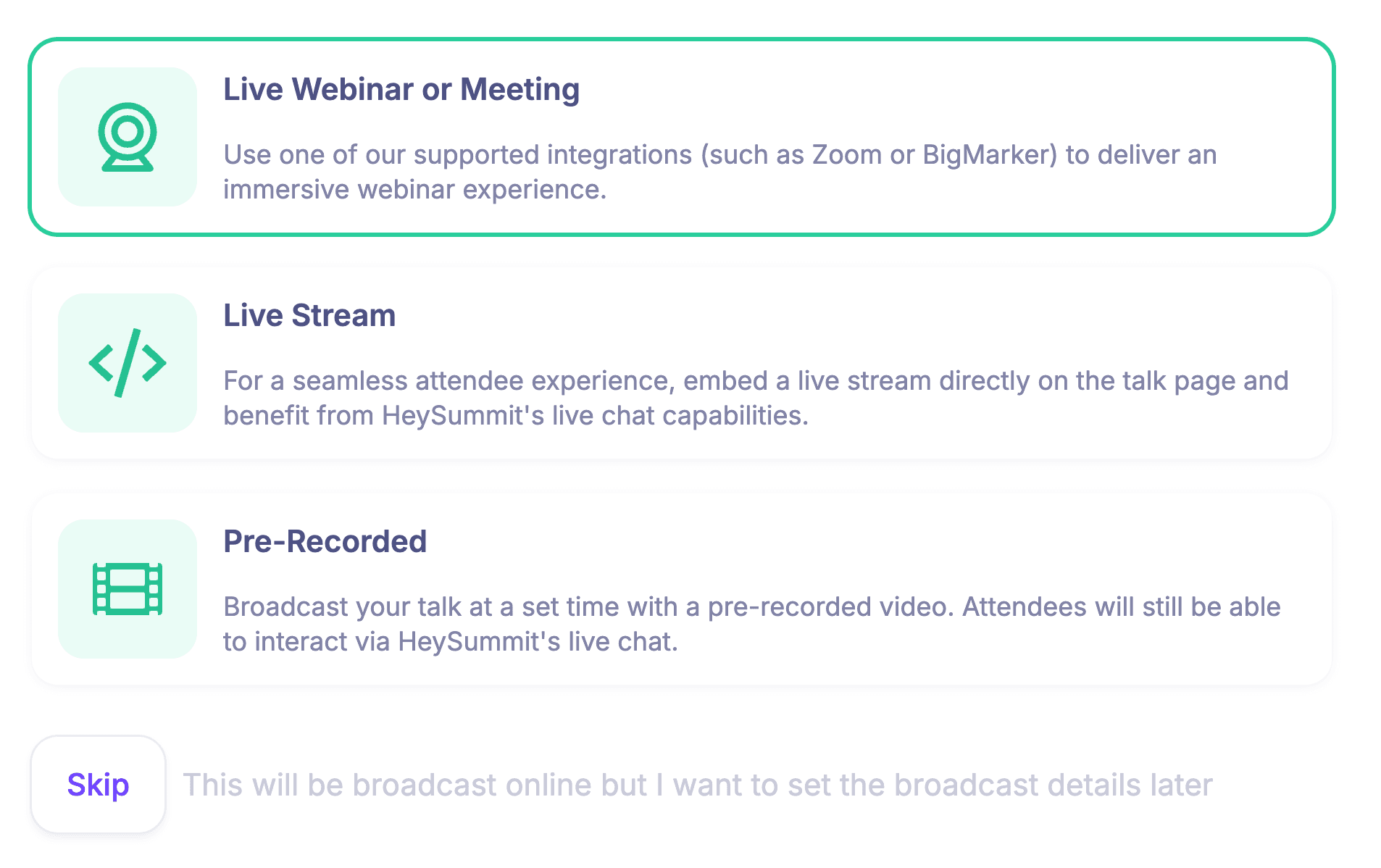
This separation lets you choose the room that fits the session while keeping registration, ticket access, reminders, and follow-up connected. If you are still deciding where a webinar tool ends and an event platform begins, read the webinar tool vs event platform comparison.
For a workshop-led plan, explore how HeySummit supports one-off workshops. For a programme that mixes talks, workshops, recordings, and in-person sessions, use the format options above to plan each talk deliberately.
Make the decision from the outcome
Neither format wins in every situation. A webinar is the simpler choice when a clear presentation, demonstration, and selected interaction can deliver the result. A workshop earns its extra preparation and facilitation when participants must do the work during the session.
Write the participant outcome, name the required output, and test whether your facilitation plan can support it. Once the format is clear, choose the event workflow and delivery provider around that decision—not the other way round.
If your programme needs several formats or sessions, see how HeySummit works across the full event journey.
Frequently asked questions
Table of Contents
Webinar vs workshop: the short answerWhat counts as a webinar?What counts as a workshop?The difference that matters: what must participants do before they leave?Choose your format in five questionsFour common webinar and workshop scenariosWhen neither format is enoughPlan the format you choseHow HeySummit supports either event formatMake the decision from the outcomeFrequently Asked QuestionsTry HeySummit free
HeySummit is the easiest way for creators and educators to grow their audience, authority and revenue with professional online events created in minutes, not weeks.
Share this article on:
Recent Posts
Loading feed...