Virtual Conference Agenda Template for Online Summits
-1690817315934-652794559.png&w=96&q=75)
Benjamin Dell
Founder, HeySummit
A virtual conference agenda gets complicated long before the event goes live. Dates and speaker names are only the starting point. You also need to coordinate time zones, parallel tracks, breaks, delivery links, ticket access, recording ownership, and what attendees can watch later.
This copyable virtual conference agenda template gives you one place to plan those decisions. Use it for an online summit, multi-day conference, webinar series, or hybrid programme, then turn the approved rows into the public schedule your attendees will actually use. The agenda is the attendee-facing view; your production team should keep detailed cues and contingency steps in a separate event run-of-show template.
How to use the worksheet: copy the table into your preferred document or spreadsheet, delete fields you do not need, and keep one named owner responsible for changes. Publish only the attendee-facing fields; keep production ownership, recording status, and internal notes in the working version.
| Date | Start | End | Time zone | Stage / track | Session type | Session title | Audience promise | Speaker / host | Room or delivery destination | Attendee join note | Ticket / access rule | Sponsor / CTA cue | Accessibility / buffer note | Recording owner | Replay status | Internal owner / status |
|---|---|---|---|---|---|---|---|---|---|---|---|---|---|---|---|---|
| Day and date | 09:00 | 09:45 | Europe/London | Main Stage | Keynote | Clear, specific title | What the attendee will learn or decide | Name and role | Stage, webinar room, venue, or link owner | Where and when access appears | Included ticket, day, or category | Optional partner or next-step moment | Captions, break, transition, or access need | Name | Planned, ready, or unavailable | Name and draft / confirmed / published |
What belongs in the public agenda?
An attendee agenda should answer five questions quickly: what is happening, when it starts and ends, who is involved, where or how to join, and what access applies. Publish the session title and promise, speaker, time zone, stage or track, format, location or delivery guidance, relevant access note, and replay availability when that information helps attendees choose.
Keep operational fields in the working version. Recording owners, approval status, link owners, contingency notes, sponsor cues, and unresolved access questions are useful for your team but create noise on the public schedule. If an internal field changes the attendee experience, convert it into clear public guidance rather than exposing the project note.
The worksheet works best as a bridge between planning and publishing. It is not a replacement for talk records, speaker profiles, ticket rules, broadcast settings, or production checks. Build it early enough to guide those systems, then define which one becomes authoritative after the schedule is published.
Agenda, schedule, and run of show are different tools
| Tool | Primary reader | Job | Typical detail |
|---|---|---|---|
| Agenda | Attendees and speakers | Explain what happens, when, who is involved, where or how to join, and what access applies | Session promise, time, speaker, track, access, and replay state |
| Published schedule | Attendees | Present active session records in chronological, date, category, or stage views | Live public titles, filters, pages, links, and availability |
| Run of show | Producer and delivery team | Coordinate how each moment is delivered | Cues, handoffs, technical checks, contingencies, and precise timing |
A single document can contain all three views during early planning, but separate them before launch. Attendees need a calm, scannable schedule. Producers need detail that would distract an attendee. Your event platform needs structured session, speaker, access, and delivery records that can power the live experience.
Decide the constraints before filling time slots
Start with the event promise and the outcome you want attendees to reach. Then list the fixed points: dates, keynotes, speaker availability, venue or delivery limitations, sponsor commitments, ticket differences, and any sessions that must happen in a particular order. If you are still deciding when each planning task belongs, use an event planning timeline alongside this agenda.
Choose one canonical event time zone and label it everywhere in the planning worksheet. Collect speaker availability in local time, but convert approved sessions into the canonical zone before publishing. Do not assume an event platform, calendar file, or attendee device will convert every time correctly. Test the public view from representative locations.
Decide whether each row is live, pre-recorded, in person, hybrid, or replay-only. If your event uses several formats, the multiple event formats you choose will affect delivery destinations, transitions, access notes, and replay ownership.
Plan accessibility at the same time as timing. The W3C Web Accessibility Initiative event checklist recommends asking about participant access needs, choosing accessible remote platforms and materials, and considering accessibility when planning breaks and transitions. UK government guidance also recommends including multiple breaks and sharing agenda timings early. These are planning principles, not a substitute for advice about your legal obligations.
Finally, separate schedule visibility from content access. A session can appear in a public agenda without being available to every ticket holder. Write the intended ticket, category, day, live, and replay rules in the working sheet so they can be configured and tested deliberately.
Build your virtual conference agenda in seven passes
- Place fixed moments and breaks. Add keynotes, opening and closing sessions, meals, accessibility breaks, sponsor commitments, and immovable speaker times first.
- Add flagship sessions with audience promises. Write what someone will learn, decide, or make—not just an internal working title.
- Add parallel tracks only when they create a useful choice. Give each track a clear audience, theme, or delivery purpose. Avoid overlaps that force the same audience to choose between two essential sessions.
- Assign speakers, hosts, and moderators. Mark missing biographies, approvals, availability, or handoff details so silence is not mistaken for confirmation.
- Add delivery, access, and replay fields. Record who owns the room or link, which ticket applies, whether the session is recorded, and when a replay should become available.
- Check the joins. Review overlaps, time-zone labels, travel or room changes, technical transitions, captioning needs, buffers, and the path from one session to the next.
- Publish a preliminary view and assign change ownership. Mark information that may change, set a cutoff for major edits, and keep one person responsible for updating the worksheet and public schedule together.
Filled agenda examples
One-day virtual workshop series
| Time | Session | Delivery and access | Planning note |
|---|---|---|---|
| 09:00–09:20 GMT | Welcome and programme orientation | Main room; all tickets | Captions tested; explain breaks and replay policy |
| 09:30–10:15 GMT | Workshop: define your event promise | Main room; all tickets | Worksheet shared in advance |
| 10:15–10:35 GMT | Break | Schedule-only agenda item | No sponsor audio; keep timing visible |
| 10:35–11:20 GMT | Workshop: map the attendee journey | Main room; all tickets | Replay planned; recording owner assigned |
| 11:25–11:45 GMT | Questions and next steps | Main room; all tickets | Product or community CTA after the recap |
Multi-day online summit
| Day and time | Main Stage | Creator Track | Operations Track | Access and replay |
|---|---|---|---|---|
| Day 1, 09:00 GMT | Opening: choose the event outcome | — | — | All tickets; replay after live session |
| Day 1, 10:00 GMT | — | Build an audience promise people can repeat | Design a registration and access workflow | Live included; replay access follows ticket rules |
| Day 1, 11:00 GMT | Break and partner spotlight | Break | Break | Public schedule; no registration action |
| Day 2, 09:00 GMT | Keynote: turn sessions into a connected programme | — | — | All tickets; captions and transcript planned |
| Day 2, 10:00 GMT | — | Speaker-led promotion clinic | Run-of-show and contingency lab | Separate rooms; owners confirm links before publish |
| Day 2, 11:15 GMT | Closing and 30-day action plan | — | — | All tickets; next-step CTA after recap |
Hybrid conference
| Time | Format | Room or destination | Attendee note | Transition check |
|---|---|---|---|---|
| 09:00–09:40 local | In person + streamed | Hall A and online Main Stage | Join instructions appear with the session | Room audio, captions, and stream checked |
| 09:50–10:30 local | Parallel sessions | Hall B or online Workshop Room | Choose the delivery route that matches your ticket | Allow movement time between rooms |
| 10:30–10:55 local | Break | Venue foyer and public schedule | Remote attendees see the restart time | Keep venue and online clocks aligned |
| 10:55–11:35 local | Online-only expert session | Online Specialist Track | Venue attendees need a quiet viewing area or replay plan | Confirm Wi-Fi, headphones, and access |
These examples are structures, not timing rules. Change the length, number of tracks, and transitions to suit the content, speakers, audience needs, venue, and delivery setup.
Turn the worksheet into a HeySummit event
Once the planning sheet is stable, use HeySummit as the publishing and operations layer for your online event. Create talks with clear titles and descriptions, assign speakers, and choose whether the organiser schedules manually or speakers help through availability windows or open slots. The current speaker settings guide explains those three workflows and how open slots are checked against the existing schedule.
Use categories for themes and filtering. Use stages when talks form concurrent tracks, rooms, or continuous streams. HeySummit’s stage guidance shows how linked talks can appear in a stage-aware public schedule and how stage broadcast behaviour can be configured separately.
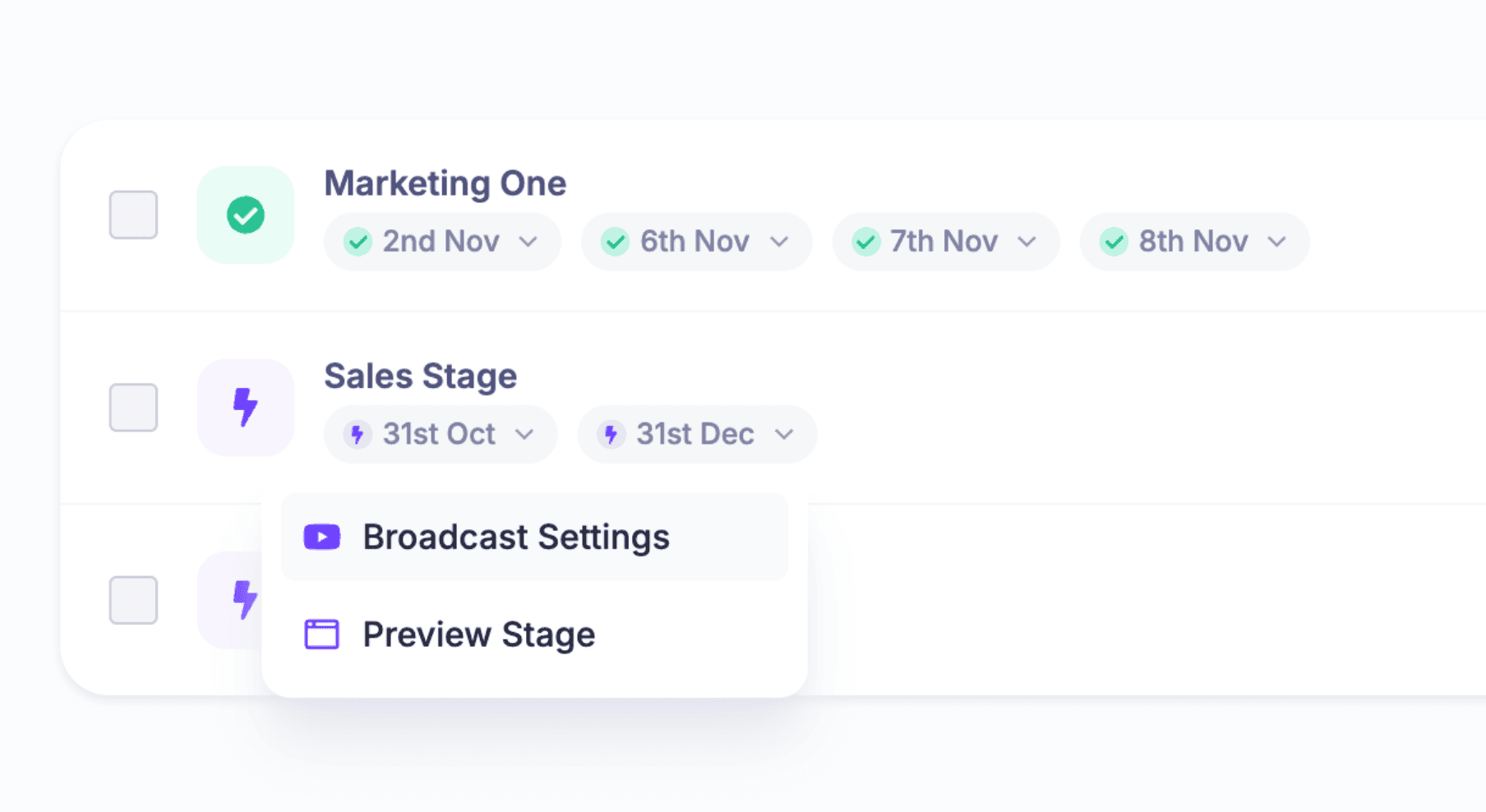
Breaks, doors-open moments, meals, networking blocks, and schedule notices do not need to become pretend talks. Agenda items in HeySummit can place those moments alongside talks while keeping them outside speaker, registration, and reminder workflows.
Configure the public Schedule page after the records are in place. The current schedule display guide documents grouping by date or category, tabbed date or category views, a single list, and stage-aware grouping for date schedules. Multi-day events may also show list and calendar views. Preview the result on desktop and mobile, and check that end times, summaries, stage labels, and session promises help rather than clutter.
Set delivery and replay details for each talk or stage, then configure event ticketing separately. HeySummit’s ticket permission guide documents access by live or replay type, talks, categories, days, and expiry. Adding a session to My Schedule records interest; it does not override the attendee’s ticket access.
Final agenda quality check
- Every session has a complete start time, end time, and canonical time zone.
- Overlaps are intentional, and parallel choices serve clearly different needs.
- Breaks, buffers, room changes, and technical transitions are visible where attendees need them.
- Every title includes a useful audience promise, not just an internal label.
- Speakers, hosts, and moderators have confirmed their role and timing.
- Each room, stream, webinar, or delivery destination has an owner.
- Ticket, live, replay, day, and category rules match the intended attendee experience.
- Stage and category labels are understandable without insider knowledge.
- Accessibility needs, captions, materials, and breaks have owners.
- The public schedule has been tested as an attendee on desktop and mobile.
- One person owns changes, the cutoff, and the final sync between worksheet and platform.
This is the schedule-specific check. Before registration campaigns or event day, run the wider virtual event pre-launch checklist across pages, checkout, emails, integrations, delivery, and attendee access.
A good agenda reduces uncertainty for both attendees and the team delivering the event. Keep the public view simple, keep ownership explicit behind the scenes, and test the handoff between them. When your worksheet is ready, explore how HeySummit can turn your agenda into a live online event, or take the HeySummit product tour.
Frequently asked questions
Table of Contents
What belongs in the public agenda?Agenda, schedule, and run of show are different toolsDecide the constraints before filling time slotsBuild your virtual conference agenda in seven passesFilled agenda examplesTurn the worksheet into a HeySummit eventFinal agenda quality checkFrequently Asked QuestionsTry HeySummit free
HeySummit is the easiest way for creators and educators to grow their audience, authority and revenue with professional online events created in minutes, not weeks.
Share this article on:
Recent Posts
Loading feed...