WebinarJam Alternatives for Paid Webinars and Events
-1690817315934-652794559.png&w=96&q=75)
Benjamin Dell
Founder, HeySummit
The most useful WebinarJam alternative depends on what you need to change. HeySummit is worth considering for event tickets, speaker operations, and replay access. Crowdcast suits ticketed interactive sessions. Zoom Events belongs on a multi-session shortlist. eWebinar is an option for prerecorded education sold through an external payment workflow.
Before switching, follow one purchaser all the way from checkout to the session and replay. A payment receipt, an attendee registration, and permission to watch are separate things. Finding the gap between them can tell you whether to repair your setup, add event management, or replace the delivery tool.
HeySummit publishes this comparison and is one of the options. We reviewed the official documentation on 19 October 2026. This is a workflow comparison, not a report of hands-on purchases across all four products. Your own account, country, plan, and event settings still need a representative pilot.
Which WebinarJam alternative fits your paid event?
Start with the job that takes the most work. A creator selling a single workshop has different requirements from an educator coordinating guest speakers, ticket tiers, and a replay library. Use the matrix to choose which option to investigate, then test that option against your actual event.
Swipe sideways to read all four columns on a small screen. You can also focus the table area and use the arrow keys.
| Option | Paid-event job | Payment and registration | Boundary to test |
|---|---|---|---|
| HeySummit | Event pages, ticket access, multiple speakers, and replay packages. | Event registration and ticket settings sit in HeySummit; connect a supported payment processor and configure delivery separately. | WebinarJam delivery uses an external link. Check any further registration or login and access in both systems. |
| Crowdcast | Ticketed interactive sessions with fixed or sliding-scale prices. | Built-in ticket setup connects to Stripe. External ticket imports have a different confirmation path. | Verify fees, the access each ticket actually grants, and replay availability. |
| Zoom Events | Multi-session programs with event-wide navigation and sponsor spaces. | Demonstrate paid admission for the exact product, country, and processor you will use. | Separate Events capabilities from a Meetings or basic Webinars license. |
| eWebinar | Repeated delivery of prerecorded paid education. | External checkout; registration depends on the selected redirect or automation route. | Check Zapier and email dependencies. Prerecorded delivery does not replace a live guest presentation. |
Keeping WebinarJam is a valid outcome. If its current delivery, payment-to-registration flow, and replay setup pass your requirements, migration needs a specific benefit to justify the work.
Check the final registration step before switching
WebinarJam's paid-registration guide describes an external checkout followed by a return page where the attendee clicks Register and submits the form. It documents how a purchaser can pay without completing registration, and how to help them finish privately.
Follow the handoff, then check the access
A. WebinarJam's documented paid-registration flow
- Registration page
- External checkout
- Post-payment return page
- Register button and final form
- Confirmed registration and attendee access link
B. Your pilot acceptance checks
- Payment evidence
- Attendee registration record
- Correct ticket and session access
- Confirmation and successful joining
- Replay access within the promised window
Check each item separately. This is an organizer's test model, not a claim that every platform implements the same sequence.
First verify the charge and the intended attendee's identity. Then use the vendor's recovery instructions for that purchaser. Keep the post-payment return URL private because it can bypass payment. Do not publish it as a general join link or ask a verified purchaser to pay again.
Check the event configuration too. WebinarJam's event-type guide distinguishes planned paid events from its free Right Now and Always On rooms. It supports multiple sessions and recurring series; replay and email behavior depend on setup. Express configuration starts with replay disabled.
Record which step failed, which system owns it, and who will fix it. For the broader setup work after that diagnosis, use our guide to planning a paid webinar.
Stay, repair, add an event layer, or switch
Stay when the current setup handles the event you intend to sell, including its live session, payment, registration, and replay requirements. Familiarity has practical value when the workflow works.
Repair when you can point to a defined problem. Check that the checkout success destination is correct, the attendee finishes registration, and the confirmation reaches the intended address. Assign the fix to the checkout owner, webinar administrator, or email owner rather than treating every missing registration as a reason to migrate.
Add event management when the difficult work is ticket rules, several speakers, partner operations, or replay packages. With HeySummit and WebinarJam, delivery still uses an external link and can retain an extra registration or login step. That boundary belongs in your decision. Our guide to choosing between a webinar tool and an event platform explains the wider category choice.
Switch delivery when a requirement remains unmet after checking configuration and plan entitlements. Write that requirement down before a sales demo. For example, ask the vendor to show how a paid attendee reaches the correct sessions and what happens when their replay access expires.
Four alternatives to test against the same event
Give every vendor the same event scenario. Specify who pays, who attends, which sessions each ticket includes, whether speakers need preparation tools, and how long recordings remain available. A feature name alone cannot answer those questions.
HeySummit for event-level tickets, speakers, and replays
Consider HeySummit when your paid webinar is part of a wider event workflow. Its event ticketing and access rules let organizers configure what tickets cover, including live and replay access. Payments connect to a supported processor such as Stripe or PayPal. Check availability and entitlements for your account before designing the offer.
For a workshop, you might want a live-only ticket and another that includes the recording. Those are access requirements to configure and verify. The ticket name or price does not establish what a purchaser can watch.
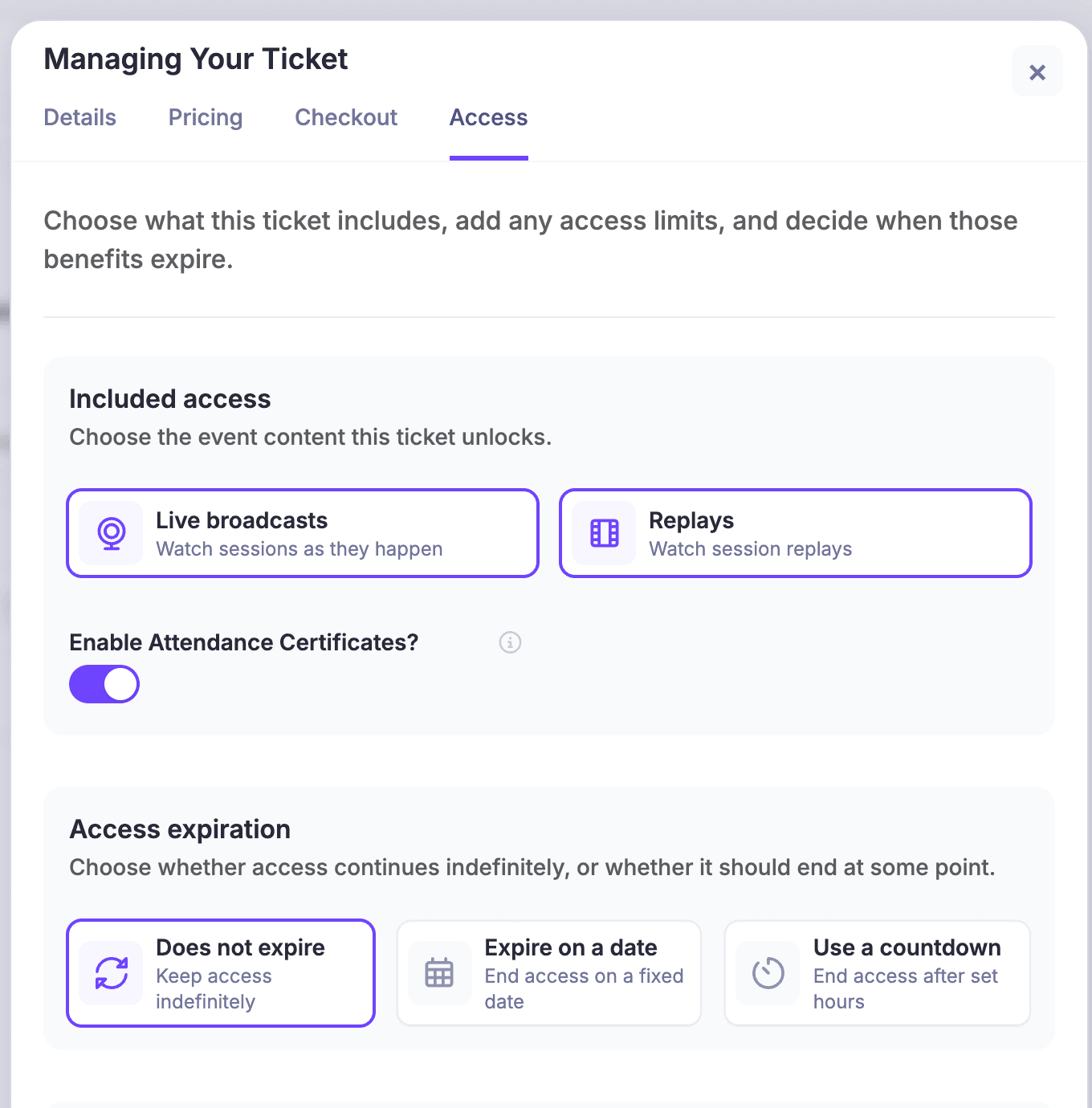
HeySummit's WebinarJam setup guide uses External URL to send attendees from the talk page to WebinarJam. They may need to register, sign in, or confirm access there. This does not provide native registration sync or embedded playback. Use an attendee link, keep host and presenter credentials private, and avoid an emergency bypass link.
If keeping playback inside the event page matters, examine the supported video and streaming integrations and verify the chosen provider's behavior. For contributor administration, the speaker dashboard gives speakers a place to manage profiles and session details. That is a separate job from assigning someone a presenter role in the live room.
Budget for HeySummit's plan and applicable transaction fees, the payment processor, and any separate delivery subscription. In the pilot, check both ticket access in HeySummit and entry into the external room. A HeySummit access setting does not prove that a previously shared external link has stopped working.
Crowdcast for ticketed interactive sessions
Crowdcast's ticketed-event guide describes Stripe-connected tickets with fixed, sliding-scale, and free pricing, including multiple ticket types. This is a relevant option when selling access to an interactive session is the main job.
The guide separates Crowdcast transaction fees from Stripe processing fees. It also says new Crowdcast attendees imported from an external ticketing system receive an email to confirm registration. Choose the route you intend to run before comparing its steps with WebinarJam.
Ask for a pilot showing the exact access each ticket grants. Multiple price tiers alone do not establish different session entitlements. Check replay availability, the purchaser's confirmation, and the refund procedure. Include the subscription, platform fee, processor fees, and possible currency conversion in the cost review, and give attendees a clear support contact.
Zoom Events for multi-session programs in the Zoom ecosystem
Zoom's virtual-event overview describes multi-session programming, an event lobby, and sponsor expo spaces. Zoom Events is worth investigating when navigating a program of sessions is central to the event.
Keep the product name precise. A Zoom Meetings subscription or basic Webinar license is not evidence that you have the Events capabilities described on that page. Ask the vendor to demonstrate paid admission for your country, processor, ticket types, and replay rules on the exact package being quoted.
For the pilot, have a test attendee find the event, complete the required account or confirmation steps, and reach the sessions included with their ticket. Then repeat on mobile and check the replay path. Budget for the relevant license, host and attendee requirements, payment costs, and event administration. Avoid comparing a basic meeting price with a complete event workflow.
eWebinar for prerecorded education sold repeatedly
eWebinar delivers prerecorded sessions rather than replacing a live guest presentation. Its purchase setup guide documents external payment routes, including a redirect where purchasers still register afterward and automated routes that need Zapier and an email service.
The documented automation distinguishes replay registration from a scheduled-session route using Eventbrite. The simple redirect also leaves a registration URL that can be shared. Switching tools therefore needs a workflow decision, even when the presentation itself is automated.
Use the pilot to confirm that the buyer gets the intended replay or session, the email arrives, and an interrupted automation has a recovery owner. Budget for the eWebinar subscription, checkout, processor, and any required automation and email services. Check the selected route rather than assuming a native payment checkout.
Run a purchase-to-replay test before committing
Use a demo event and test-mode payments where available. Keep real attendee details and live payment credentials out of the worksheet. These are organizer-defined test states, not universal analytics event names.
Copy the worksheet and replace the suggested owner with a named person and system. Record the actual result, evidence reference, and pass or fail for each row. Keep sensitive receipt details and attendee links in your private operations record.
Swipe sideways for the evidence, owner, and recovery columns, or focus the table area and use the arrow keys.
| Test or state | Expected evidence | System and owner | Recovery or decision |
|---|---|---|---|
| Payment pending, failed, or canceled | The processor shows the actual status. Retrying causes no duplicate charge or unintended paid access. | Processor and payment owner: ___ | Define the retry instructions and when to escalate: ___ |
| Paid; registration incomplete | Verified payment and identity; the missing attendee record is identified. | Checkout and registration owners: ___ | Use the documented private recovery path without another charge: ___ |
| Registered; access unconfirmed | Attendee identity, selected ticket, and permitted sessions match the offer. | Event platform and access owner: ___ | Reconcile the ticket assignment and external-room requirements: ___ |
| Confirmation and joining | The intended recipient gets the attendee link. Mobile, signed-out, and second-device behavior are understood. | Email, delivery tool, and support owner: ___ | Provide a safe resend or sign-in procedure; keep host links private: ___ |
| Live participation | Attendee and presenter roles work. Required captions and keyboard tasks pass. The reporting system records the expected activity. | Delivery tool and production owner: ___ | Record the fallback and which attendance evidence is available: ___ |
| Replay access | The right ticket opens the recording within the promised window and expires as intended. | Recording host, event platform, and content owner: ___ | Fix availability, permissions, or purchaser communication separately: ___ |
| Refund, cancellation, duplicate, or change | Money, ticket status, access, scheduled messages, and audit notes agree. | Processor, event platform, external tools, and support owner: ___ | Verify revocation in every relevant system; record exceptions: ___ |
Run one normal purchase first. Then deliberately interrupt the post-payment return, use different purchaser and attendee email addresses, and repeat a submission. Test free or VIP access, an expired replay, and a refund. A refund in one system does not prove that an external room link or another system's access has been revoked.
Baymard's ecommerce checkout research identifies account creation and complicated checkout among shoppers' reasons for leaving. That research concerns ecommerce, not a measured webinar loss rate. Use it to choose your own test prompts: can someone tell whether they have finished, what happens next, and whom to contact?
W3C's accessible-events checklist covers accessible platforms, materials, and media. Apply it to keyboard navigation, captions or transcripts, readable instructions, and the recording experience. Test the time zones and accessibility requirements your event actually has; a vendor logo is no substitute for those checks.
For example, an educator selling a workshop with two guest speakers might give the payment owner responsibility for receipts, the event administrator responsibility for ticket rights, and the producer responsibility for session entry and recordings. This is a fictional assignment of responsibilities. Each person still needs to check the handoff to the next system.
Compare the whole workflow cost and migration work
Ask each vendor to quote the same scenario and billing period. For HeySummit, start with the current HeySummit pricing, then confirm the account-specific requirements. Record these inputs for every option:
- Subscription period, billing commitment, hosts, presenters, and expected live attendees.
- Event and session counts, platform transaction fees, processor fees, and currency conversion.
- Automation and email tools, replay hosting, storage, captions, and any required add-ons.
- Migration time, rehearsal work, and who answers payment and access questions.
Check current EverWebinar packaging before assuming automation always requires another subscription. Keep registration-fee reports, live-offer attribution, processor settlement, and net revenue separate in your cost review. A sales report does not settle the accounting question.
If switching still solves a clear requirement, migrate in a controlled order:
- Retain the source exports you need, with the relevant permission and retention context.
- Map events, sessions, tickets, attendee identities, and replay rights. Identify anything that cannot transfer.
- Rebuild confirmations and access links, then rehearse them with test identities.
- Run a small representative pilot and reconcile payments, registrations, permitted access, and recordings.
- Agree on rollback and support responsibilities before canceling the old service.
Do not assume passwords, purchase history, attendee accounts, integrations, or ticket rights transfer automatically. Verify the records and access you must preserve while the old system is still available.
Make the decision with your next paid event
Write the decision as a requirement you can demonstrate: the right purchaser receives the right session access, the promised replay works, and a named person can resolve an exception. Keep WebinarJam if it meets that requirement. Repair a defined gap before taking on a migration.
If the missing piece is managing tickets, speakers, and replay packages around the delivery tool, explore HeySummit's event workflow. See how HeySummit works, then bring the same purchase-to-replay worksheet to your pilot.
Frequently asked questions
Table of Contents
Which WebinarJam alternative fits your paid event?Check the final registration step before switchingStay, repair, add an event layer, or switchFour alternatives to test against the same eventRun a purchase-to-replay test before committingCompare the whole workflow cost and migration workMake the decision with your next paid eventFrequently Asked QuestionsTry HeySummit free
HeySummit is the easiest way for creators and educators to grow their audience, authority and revenue with professional online events created in minutes, not weeks.
Share this article on:
Recent Posts
Loading feed...