7 Zoho Backstage Alternatives for Different Event Workflows
-1690817315934-652794559.png&w=96&q=75)
Benjamin Dell
Founder, HeySummit
The best Zoho Backstage alternative depends on the workflow you need to change. HeySummit suits content-led, multi-speaker events built around audience growth, partners, paid access, external video, and replays. Eventbrite is strongest when public ticket discovery matters. Whova fits app-led association and academic conferences. Swoogo focuses on configurable registration. Bizzabo, Accelevents, and Cvent address progressively deeper B2B, onsite, trade-show, and enterprise portfolio needs. Keeping Zoho Backstage is often the right answer when its Zoho integrations, native webcasting, attendee apps, check-in, badging, exhibitors, abstracts, or onsite tools already cover the hard part of your event.
A feature-count leaderboard will not tell you whether switching is worth the cost. Start with the job that no longer fits, then ask each vendor to demonstrate the same event. This guide gives Zoho a fair baseline, shows where seven alternatives differ, and gives you a practical way to compare total cost and migration risk.
Jump to the comparison matrix, fit guide, total-cost checklist, or migration checklist.
What Zoho Backstage already covers
Zoho Backstage is broader than a basic webinar or registration tool. Its current plan and feature comparison documents event websites, registration, ticketing, sessions, speakers, built-in and third-party webcasting, organizer and attendee apps, check-in, badges, sponsors, exhibitors, lead capture, abstracts, networking, analytics, and integrations. Some capabilities depend on the plan or an add-on, so “available in the product” does not mean “included in the package you have.”
The Zoho Backstage hybrid-events page also describes branded sites, ticketing, virtual and onsite participation, rehearsals, integrations, and mobile check-in and badging. That matters because several alternatives articles still describe Zoho as if it only handled simple online sessions.
Before you replace the platform, separate four possible causes: a feature is genuinely absent, your plan or add-on does not include it, implementation has stalled, or the event team has not adopted the workflow. Only the first two are primarily product-selection problems.
Define the switching trigger before you compare tools
Write one sentence that names the failed or newly important workflow. “We need a better platform” is too vague. These are useful triggers:
- Partners and speakers now drive registration, but onboarding and referral tracking take too much manual work.
- Public marketplace discovery matters more than owning a private registration journey.
- Conditional registration, event cloning, and integrations have become the hardest part of the programme.
- The attendee app, check-in, badges, exhibitors, or lead retrieval now carry the greatest operational risk.
- Security, procurement, reporting standards, and governance across an event portfolio matter more than fast self-service setup.
A new product should remove the named constraint without creating a more expensive one beside it. A polished feature page is not proof. Demonstrate the real workflow, in the package you would buy, with the people who will operate it.
Zoho Backstage alternatives comparison
On a phone, swipe sideways to see every column in this comparison.
| Option | Best workflow | Delivery model | Strongest fit | Verify in a live demo | Pricing motion |
|---|---|---|---|---|---|
| Keep Zoho Backstage | Broad online, hybrid, and onsite events connected to the Zoho ecosystem | Built-in webcasting plus third-party delivery, attendee apps, and onsite tools | Teams that value Zoho integrations, abstracts, exhibitors, check-in, badges, and broad event coverage | Plan and add-on fit, app scope, exhibitor entitlements, abstract credits, webcasting, integrations, and support | Subscription or pay per event, with plan limits and optional add-ons |
| HeySummit | Content-led, multi-speaker audience growth, monetization, partners, and replay | Event experience around external live or recorded video providers | Creators, educators, communities, and brands using events as a content and audience-growth engine | Ticket access, speaker permissions, provider setup, replay rules, sponsor delivery, affiliate tracking, exports, and hybrid check-in | Published plans with limits and transaction terms that should be checked for the event |
| Eventbrite | Public marketplace discovery and mainstream ticket sales | Marketplace listing, ticket checkout, organizer tools, and mobile check-in | Public events that benefit from consumer discovery and a familiar purchase flow | Regional fees, payout and refund handling, attendee data, branding, integrations, and session complexity | Ticket and payment fees for paid events, with optional marketing services |
| Whova | App-led association, academic, and multi-track conferences | Registration, attendee app, abstracts, exhibitors, networking, hybrid delivery, and onsite tools | Programmes where the app, call for speakers, exhibitors, networking, check-in, and badges work together | App publishing and adoption, abstract review, exhibitor and lead tools, hardware, integrations, exports, and support | Request a scenario-specific quote |
| Swoogo | Configurable registration and repeatable corporate event programmes | Flexible sites and forms, session and speaker workflows, apps, onsite check-in, data, and integrations | Teams that need conditional registration, reusable programmes, brand control, APIs, and connected data | Bundle contents, administrator access, app and onsite scope, payments, support, integrations, and ownership | Pricing page and sales-led package selection |
| Bizzabo | Enterprise B2B event marketing and onsite measurement | Registration, marketing, mobile app, onsite technology, sponsors, lead capture, and reporting | B2B teams connecting event engagement to marketing and sales systems across event formats | Premium add-ons, SmartBadge and hardware dependencies, services, integrations, regions, exports, and full contract scope | Personalized quote with premium add-ons and services where needed |
| Accelevents | Conference and trade-show registration, onsite operations, exhibitors, and virtual delivery | Registration, check-in, badges, mobile app, agenda, exhibitors, lead capture, and virtual hub | Teams that want one operating system for onsite or hybrid conferences and exhibitor workflows | Offline behavior, badge hardware and stock, scanner allocation, branding, lead consent and export, streaming, integrations, and support | Published package information plus demo or quote for the complete scenario |
| Cvent | Enterprise portfolios, governance, venue and onsite breadth, and services | Modular enterprise suite spanning registration, apps, onsite, lead capture, reporting, and integrations | Large event programmes that need controls, standardization, deep onsite operations, and service coverage | Required modules, hardware, implementation owner, services, data residency and security, exports, contract, and exit plan | Sales-led modular contract |
The W3C tables tutorial explains why headers and data cells need an explicit structural relationship. That is why this matrix uses real table headers rather than an image or a visual checkmark grid. Use it to build a shortlist, then compare event platforms on the workflows that matter to your event.
1. HeySummit for content-led, multi-speaker audience growth
HeySummit fits events where speakers, sessions, partners, paid access, external video, and replays work together to grow an audience or create revenue. The HeySummit product tour shows the broader event journey, while the speaker self-service dashboard gives approved speakers a place to manage their profile and talk information.
The platform is the event and access layer around the live room. Organizers can connect supported external providers through video and streaming integrations, then control how live and replay content is presented to attendees. It is not a substitute for every provider's production console.
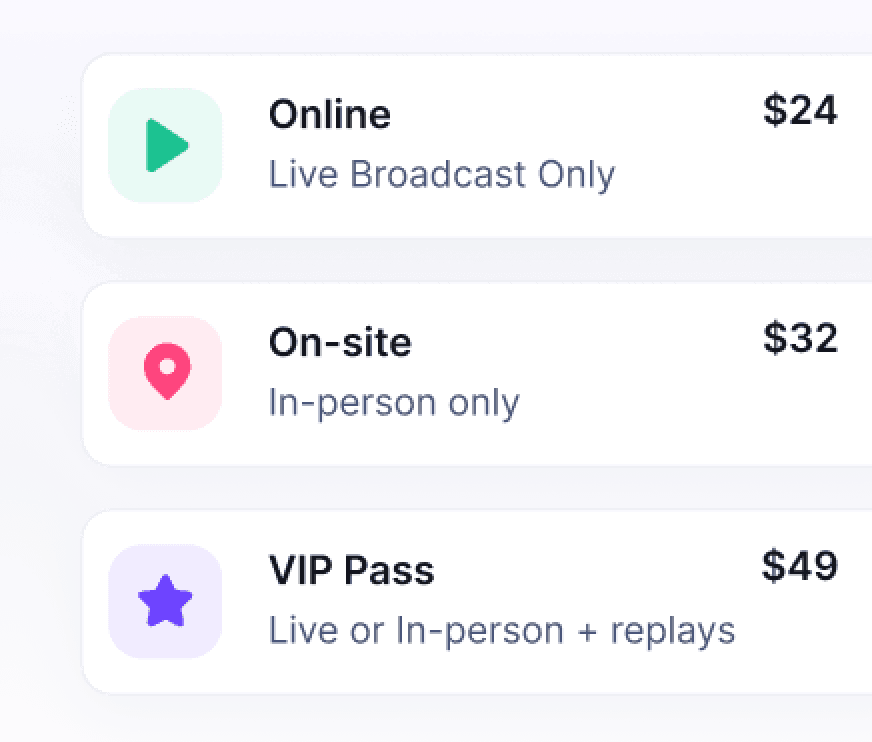
Flexible event ticketing and access can separate online, onsite, and replay experiences. Speaker workflows, sponsor placements, and the event affiliate platform help coordinate people who promote or support the programme. HeySummit tracks affiliate referrals and commission rules; the event host pays affiliates.
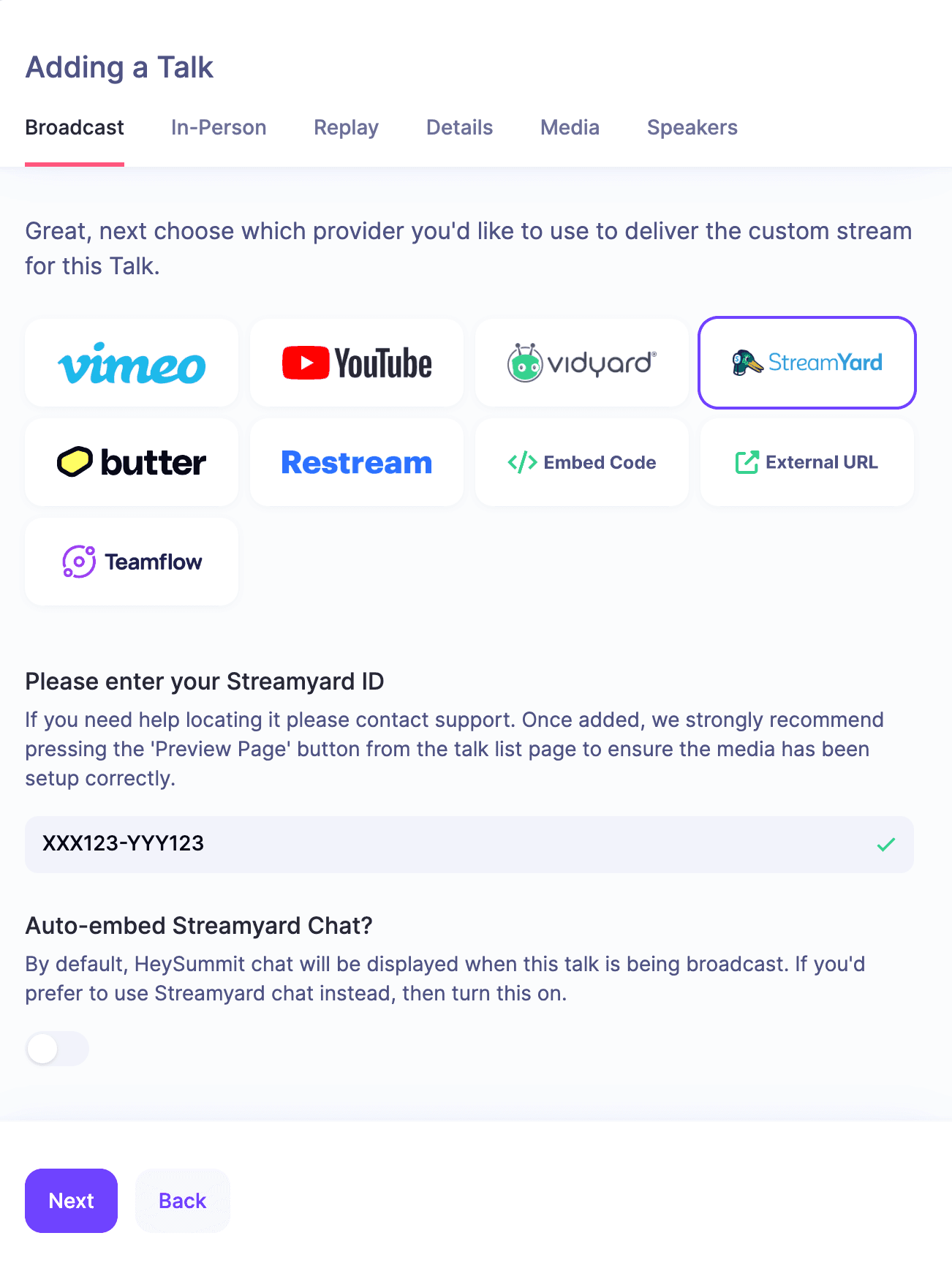
Shortlist HeySummit when: creators, educators, communities, or brands run multi-speaker events as a content, partner, and replay journey.
Do not assume parity when: you need a native attendee app, badge printing, exhibitor lead retrieval, floor plans, abstract management, matchmaking, venue sourcing, or a procurement-heavy enterprise onsite suite. If Zoho's native webcasting, app, and onsite tools are central, demonstrate both products with the same event.
2. Eventbrite for marketplace discovery and ticket sales
Eventbrite makes sense when the event needs a public listing and access to a consumer ticket marketplace. Its current organizer pricing and feature page describes event discovery, ticket checkout, custom registration forms, an organizer app, mobile check-in, reminders, and fees for paid tickets.
Shortlist Eventbrite when: public discovery and a familiar ticket-buying flow matter more than deep speaker, sponsor, affiliate, abstract, or replay operations.
Verify: fees in the buyer's region, whether the organizer or attendee pays them, payment processing, payout timing, refunds, event data export, branding, paid promotion, and the session-level access model. Never carry a fee from an old comparison into a budget.
3. Whova for app-led association and academic conferences
Whova connects event registration with a mobile app, agendas, networking, check-in, badges, abstract management, exhibitors, sponsors, and lead retrieval. The current Whova platform overview links those products together for in-person, hybrid, and virtual events.
Shortlist Whova when: an association or academic programme needs an attendee app, call for speakers, multi-track agenda, exhibitor operations, networking, and onsite participation in one workflow.
Verify: the exact quote and modules, app publishing and branding, adoption support, abstract-review process, exhibitor entitlements, lead retrieval, check-in and badge hardware, integrations, data exports, and hybrid delivery. Buying an app does not make attendees use it, so include the adoption plan in your evaluation.
4. Swoogo for configurable registration and repeatable programmes
Swoogo is aimed at teams that need flexible registration rules, custom fields, event sites, session and speaker management, sponsor workflows, apps, onsite check-in, reporting, and integrations. Its current event management platform emphasizes configurable registration and cross-event data.
Shortlist Swoogo when: conditional forms, corporate data capture, reusable programme setup, APIs, and connected business systems are harder than content delivery.
Verify: what the proposed bundle includes, the number and permissions of administrators, payment handling, mobile and onsite products, badge workflows, integrations, support, professional services, and data ownership. Ask for the cost of the complete operating model, not a base module.
5. Bizzabo for enterprise B2B event marketing
Bizzabo brings registration, event marketing, a mobile app, onsite tools and wearables, sponsors and exhibitors, lead capture, streaming, integrations, and reporting into a B2B event platform. The current Bizzabo platform page also makes clear that pricing is personalized and premium add-ons can form part of the package.
Shortlist Bizzabo when: a marketing team needs registration, onsite engagement, sponsor and exhibitor workflows, lead capture, and measurement connected across in-person, hybrid, virtual, and webinar programmes.
Verify: the registration and mobile package, SmartBadge or other hardware dependencies, exhibitor and lead tools, CRM and marketing automation integrations, regional support, professional services, data export, and the complete contract. Do not evaluate an onsite experience without the hardware and service assumptions written into the quote.
6. Accelevents for conferences and trade shows
Accelevents combines registration, check-in, badge printing, agenda and speaker management, exhibitors, sponsors, a mobile app, lead capture, and a virtual hub. Its event management platform overview makes the conference and trade-show operating model explicit.
Shortlist Accelevents when: one team owns a conference or trade show across registration, onsite arrival, badges, exhibitors, lead collection, the attendee app, and virtual or hybrid delivery.
Verify: offline check-in behavior, kiosk and scanner allocation, printers and badge stock, app branding, exhibitor access, lead consent and export, integrations, streaming and recording, implementation, and the support plan. Ask whether every required workflow is native, an add-on, or a manual service.
7. Cvent for enterprise portfolios and onsite breadth
Cvent is designed for event programmes that need enterprise controls, modular products, integrations, services, and substantial onsite operations. Its current onsite solutions include attendee apps, check-in, on-demand badging, lead capture, and attendance tracking.
Shortlist Cvent when: governance across many events, standardized reporting, security review, venue or onsite breadth, service coverage, and enterprise integrations justify a larger suite.
Verify: every module, implementation responsibility, hardware, onsite staffing, integration owner, security and data residency, reporting, contract length, renewal terms, data exports, and the exit plan. A capable enterprise platform can still be too much operating weight for a lean event team.
Which option fits your event workflow?
- Keep Zoho Backstage when Zoho CRM, OnAir, attendee apps, badges, abstracts, exhibitors, floor planning, and current operating knowledge are central.
- Choose HeySummit when the event is a creator, educator, community, or brand content funnel built around speakers, partners, ticket access, external video, and replay.
- Choose Eventbrite when marketplace discovery and public ticket sales are the main growth route.
- Choose Whova when an association or academic conference needs an app, abstracts, networking, exhibitors, and onsite tools.
- Choose Swoogo when configurable registration and repeatable corporate programme data are the hard problems.
- Choose Bizzabo when an enterprise B2B team connects event marketing, onsite engagement, sponsor operations, and measurement.
- Choose Accelevents when a conference or trade-show team needs registration, badges, an attendee app, exhibitors, lead capture, and virtual delivery together.
- Choose Cvent when portfolio governance, enterprise controls, onsite breadth, and services outweigh simplicity.
Shortlist no more than three. If your decision is still broad, use the guide to the best virtual event platforms to narrow the product category before booking demonstrations.
Compare total first-year cost, not headline price
Hold the event assumptions constant and request written proposals. Include:
- subscription, per-event, organizer, attendee, and usage charges;
- ticket, platform, and payment-processing fees, plus refunds and chargebacks;
- attendee and organizer apps, white labeling, app-store work, and support;
- check-in devices, kiosks, printers, badge stock, shipping, scanners, and onsite staff;
- exhibitor tools, lead retrieval, floor plans, abstracts, matchmaking, and appointment modules;
- streaming, recording, storage, captions, replay, and external provider costs;
- integrations, APIs, webhooks, SSO, security review, warehouse work, and data export;
- implementation, design, migration, training, professional services, and internal staffing;
- affiliate commissions and payout operations;
- currency, tax, regional payment methods, contract uplift, renewal, and exit costs.
Separate “included,” “add-on,” “integration,” “professional service,” “manual work,” and “not supported.” A single checkmark hides too much. The cheapest base plan can become the most expensive implementation once hardware, people, integrations, and migration are included.
Run the same representative-event demo
Use a real upcoming or recent event. Keep the attendee count, ticket mix, sessions, speakers, sponsors, exhibitors, event format, integrations, support assumptions, and reporting needs identical across vendors.
Ask each team to demonstrate:
- building the public page and a conditional registration route;
- selling or assigning two access levels and processing a refund;
- adding a speaker, changing a session, and notifying the right people;
- setting up a sponsor, exhibitor, or partner workflow that matters to your event;
- running the attendee journey on a phone, including check-in where relevant;
- handing off to the live session and releasing the replay;
- exporting registration, attendance, orders, consent, referrals, and engagement data;
- showing which parts of the demonstration are included in the written quote.
Operators, finance, data and privacy, speakers, sponsors, exhibitors, and attendees should score only the workflow they own. This avoids a charismatic demo turning a weak operational fit into a false winner.
A migration checklist that protects the next event
- Name the reason and success measure. Define the constraint the move must remove and the evidence that will show it worked.
- Inventory the current system. Include pages, domains, forms, tickets, coupons, taxes, refunds, sessions, speakers, sponsors, exhibitors, abstracts, attendees, affiliates, recordings, files, certificates, automations, roles, integrations, and reports.
- Map data and consent. Preserve stable IDs, Zoho CRM campaigns and fields, ownership, consent records, and suppression lists. A CSV export is not marketing permission.
- Export before changing the plan. Test that files open, fields are complete, recordings work, and finance can reconcile orders and refunds.
- Rebuild one event privately. Use a lower-risk event or a complete clone of the flagship event.
- Validate the full journey. Test registration, payment, confirmation, calendar, email, access, streaming, check-in, badges, app, partners, reporting, and replay.
- Plan links and communications. Redirect old public URLs where possible and update email, ads, partner material, speaker assets, social posts, QR codes, and calendar entries.
- Rehearse and define rollback. Run both systems in parallel when the event risk warrants it, assign support owners, and decide when a rollback would be safer than a late cutover.
- Keep the old platform through reconciliation. Do not cancel until exports, finance, recordings, public URLs, integrations, and handoffs have been verified.
Where HeySummit fits, and where it does not
HeySummit is a strong Zoho Backstage alternative when the event is built around content and audience growth. It connects speaker self-service, ticket access, external video, partners, sponsors, and replay in one attendee journey. That can remove a lot of manual coordination for a creator, educator, community, or brand running a multi-speaker programme.
It is not a like-for-like replacement for every Zoho capability. Teams that need a native attendee app, badge printing, exhibitor lead retrieval, floor plans, abstract review, matchmaking, or extensive enterprise onsite services should keep Zoho or compare the conference and enterprise products in this guide.
The right choice is the platform that removes your named constraint with the least new complexity. Keep Zoho when it does the important job. If you switch, demonstrate no more than three products with the same event, insist on written scope and total cost, and migrate a lower-risk event before the flagship.
If your workflow is content-led, take the HeySummit product tour and compare it with your representative event. Review current HeySummit pricing only after you know which access, partner, video, and support requirements the event needs.
Frequently asked questions
Table of Contents
What Zoho Backstage already coversDefine the switching trigger before you compare toolsZoho Backstage alternatives comparison1. HeySummit for content-led, multi-speaker audience growth2. Eventbrite for marketplace discovery and ticket sales3. Whova for app-led association and academic conferences4. Swoogo for configurable registration and repeatable programmes5. Bizzabo for enterprise B2B event marketing6. Accelevents for conferences and trade shows7. Cvent for enterprise portfolios and onsite breadthWhich option fits your event workflow?Compare total first-year cost, not headline priceRun the same representative-event demoA migration checklist that protects the next eventWhere HeySummit fits, and where it does notFrequently Asked QuestionsTry HeySummit free
HeySummit is the easiest way for creators and educators to grow their audience, authority and revenue with professional online events created in minutes, not weeks.
Share this article on:
Recent Posts
Loading feed...