Best Event Website Builders for Registration, Ticketing, and Multi-Session Events
-1690817315934-652794559.png&w=96&q=75)
Benjamin Dell
Founder, HeySummit
“Event website builder” can mean three distinct products: a flexible website or CMS, a registration-first event tool, or a platform that keeps the public site connected to the rest of the event.
The best choice is not the one with the longest feature list. It is the one that owns the right parts of your workflow without leaving your team to reconcile pages, forms, tickets, schedules, speakers, emails, access rules, and reports by hand.
This guide starts with that ownership decision, then compares eight current options by fit. It also gives you a practical test you can run before committing.
Quick answer: choose the type of builder first
On a phone, swipe sideways to see all columns in this comparison.
| Builder type | Best when | Usually owns | Often remains separate | Examples |
|---|---|---|---|---|
| General website or CMS | You need a permanent business, community, or content site that may host simple events. | Brand, navigation, content, SEO, and reusable site pages. | Complex registration, access, schedules, speakers, attendee communications, and replay rules. | Wix, Squarespace, WordPress |
| Registration-first event builder | Registration, guest lists, tickets, invitations, or check-in are the centre of the event. | Event page, forms, attendee records, tickets, payments, confirmations, and selected onsite tasks. | Content-led programmes, deep CMS needs, replay libraries, or specialist conference experiences. | EventCreate, RSVPify, Eventbrite |
| Full event platform | Pages must stay connected to schedules, speakers, sponsors, tickets, access, communications, and content. | More of the event lifecycle and the structured data behind it. | A permanent corporate CMS, specialist venue systems, or advanced onsite and mobile-app requirements. | HeySummit, Whova, Cvent |
Use a general builder when the event is one part of a larger permanent site and the handoff to registration is simple. Use a registration-first tool when guest data, ticketing, or check-in is the main job. Use a fuller platform when a change to the event should flow through several attendee-facing surfaces without rebuilding each one.
What does your event website need to own?
A polished homepage is only one part of an event site. Before comparing templates, list every system an attendee or organiser will touch from first visit to final replay.
On a phone, swipe sideways to see all columns in this lifecycle map.
| Workflow | Decide who owns it | Test the handoff | Common failure |
|---|---|---|---|
| Public pages | Brand, navigation, agenda, speakers, sponsors, venue, and FAQs. | Change a speaker or session and check every page that uses it. | Conflicting details survive on duplicated pages. |
| Registration | Forms, consent, attendee details, capacity, approval, and confirmations. | Complete the form on mobile, make an error, and correct it. | The page looks good but the form is confusing or inaccessible. |
| Tickets and access | Prices, ticket types, payments, invoices, add-ons, and content permissions. | Buy or assign each access level and confirm what the attendee can see. | The checkout and attendee portal disagree about access. |
| Programme | Schedules, tracks, sessions, speakers, time zones, stages, and changes. | Move a session and check the site, reminders, calendar entries, and delivery system. | A late change updates one surface but not the others. |
| Communications | Confirmations, reminders, updates, joining instructions, and follow-up. | Trigger every message for an attendee in each ticket group. | People receive the wrong link, time, or access instructions. |
| Live and onsite experience | Video room, livestream, venue, check-in, badges, app, networking, and support. | Follow the attendee journey with the devices and connections people will use. | The website promises an experience the delivery tools cannot provide. |
| Replays and reporting | Recording access, expiry, content library, exports, analytics, and CRM handoff. | Publish one replay, restrict it, and export the resulting attendee data. | Post-event content and data become another manual project. |
Give every row an owner, a source of truth, a sync method, a manual fallback, and a named person who fixes failures. That worksheet will tell you more than a feature comparison ever can.
Registration deserves particular attention. The W3C’s accessible forms guidance recommends clear labels, logical grouping, useful instructions, feedback, and collecting only the information people need to complete the process. Its guidance on form notifications also explains why success and error messages must be concise, clear, and connected to a way forward. Accessibility belongs in your builder test alongside branding, payments, and mobile layout.
If registration is the main decision rather than the whole event site, use the separate guide to choose event registration software.
How we compared these event website builders
We reviewed current first-party product and support pages on 17 August 2026. We grouped products by the workflow they are best placed to own, not by self-awarded scores or the number of features on a marketing page.
The comparison looks at public-page design, structured event content, registration, ticketing, schedules and speakers, communications, integrations, replay and access, onsite or app needs, analytics and export, and the work your team still has to maintain.
Features, plans, fees, and limits change. Treat this as a fit guide, then verify your exact event against the vendor’s current plan and run the practical demo later in this article.
Eight event website builders at a glance
On a phone, swipe sideways to see all columns in this comparison.
| Tool | Best fit | Registration and tickets | Structured event programme | Onsite or app strength | Main trade-off to test |
|---|---|---|---|---|---|
| Wix | Permanent branded site with regular or simpler events. | Native event RSVPs and ticketing. | Useful event management, but test complex multi-session and speaker workflows. | Mobile management and guest features. | How much event complexity stays connected without custom site work. |
| Squarespace | Design-led business, creator, or venue site with event pages. | May use scheduling, commerce, or another registration service. | Strong content presentation; event operations may rely on integrations. | Not its core distinction. | Which event tasks live outside the site and who maintains them. |
| EventCreate | Registration, tickets, attendee records, and event pages in one tool. | Native registration, RSVPs, ticket types, forms, and confirmations. | Supports schedules, speakers, sponsors, and sessions; test depth for your programme. | Check-in and other onsite tools are available. | Plan gates and whether its content model fits your event structure. |
| RSVPify | Invite-led, private, corporate, social, or guest-management-heavy events. | Native forms, RSVPs, tickets, payments, and guest lists. | Useful event pages and sub-events; test content-heavy multi-session needs. | Check-in, seating, badges, and attendance tools. | Whether guest operations or programme publishing is your real centre of gravity. |
| Eventbrite | Ticketed events that benefit from a familiar marketplace and registration flow. | Native ticket types, order forms, checkout, and attendee records. | Clear event listings; test deeply branded or content-led programme needs. | Organizer tools support event-day operations. | Marketplace-led experience versus control of the full branded journey. |
| HeySummit | Content-led online, hybrid, in-person, and on-demand events. | Connected registration, tickets, payments, add-ons, and access rules. | Pages can use structured speakers, sponsors, schedules, stages, tickets, and talks. | Useful event workflow; specialist apps and advanced onsite systems may remain separate. | Whether you need its connected lifecycle or a narrower registration tool. |
| Whova | Conferences where attendee app, networking, exhibitors, and onsite experience matter. | Registration and ticketing are part of the broader platform. | Designed for conference agendas and attendee information. | Strong emphasis on mobile app, networking, badges, and check-in. | Whether the app and onsite breadth justify a larger platform. |
| Cvent | Enterprise event programmes with governance, complex registration, and broad operations. | Connected registration websites and event-management workflows. | Broad programme and attendee-management capabilities. | Extensive enterprise and onsite ecosystem. | Sales-led complexity, implementation effort, and fit for your team. |
General website builders
Wix: best for a permanent site with native event tools
Wix Events combines a general website builder with RSVPs, tickets, guest management, schedules, marketing, and mobile tools. It is a sensible place to start when the permanent site matters as much as the event and your team wants one visual website environment.
Best for: businesses, communities, venues, and organisers running simpler or recurring events from an established site.
Not ideal for: assuming a general site automatically solves a complex content-led programme. Test multi-track schedules, speaker and sponsor data, access levels, replay rules, and cross-system changes with a real event.
What may still need another system: specialist broadcast delivery, advanced conference apps, venue systems, or event-specific workflows beyond the Wix setup you have verified.
Squarespace: best for design-led content and simpler event journeys
Squarespace’s own event website guide reflects its natural strength: polished, content-rich sites that can present an event within a broader brand or business. It can work well when the site’s design, editorial content, venue information, and long-term navigation are the priority.
Best for: creators, venues, consultants, and businesses that already use Squarespace and can connect a straightforward registration or commerce path.
Not ideal for: treating several integrations as if they were one event system. Ask where attendee records, schedule changes, confirmations, tickets, access, and replays actually live.
What may still need another system: event registration, ticketing, communications, check-in, attendee access, or structured programme management, depending on your setup.
If you are considering a CMS plus plugins, compare the ongoing ownership of a WordPress plugin stack or event platform, not only the launch-day build.
Registration-first event website builders
EventCreate: best for registration, ticketing, and event-day tools
EventCreate’s current feature set covers event websites, registrations, RSVPs, ticket types, custom forms, confirmations, attendees, schedules, speakers, sponsors, check-in, and other event-day tools.
Best for: organisers who want the website, registration, ticketing, and attendee operations close together without starting from a general CMS.
Not ideal for: choosing from the feature list alone. Verify which capabilities sit on the plan you need and whether the content structure fits a multi-day, multi-track, or replay-led programme.
What may still need another system: specialist video delivery, a permanent editorial site, or deeper content and community workflows.
RSVPify: best for guest management and invitation-led events
RSVPify brings together event pages, forms, RSVPs, ticketing, guest lists, seating, invitations, check-in, badges, and attendance insights. That makes it especially relevant when who is invited, how guests respond, and what happens on arrival are central.
Best for: private, corporate, social, and guest-management-heavy events, including programmes with invitations, plus-ones, seating, sub-events, or check-in needs.
Not ideal for: assuming guest-management depth equals a content-led event platform. Test frequently changing schedules, many speakers and sponsors, replay access, and the attendee content journey.
What may still need another system: broadcast delivery, permanent CMS content, or a larger conference programme layer.
Eventbrite: best for ticketing with marketplace discovery
Eventbrite’s current event-creation guidance covers publishing an event and adding ticket types, while its wider platform provides registration, checkout, attendee records, and promotion within a familiar consumer marketplace.
Best for: public ticketed events that value recognisable checkout and potential discovery alongside straightforward event listings.
Not ideal for: a deeply branded content experience where structured speakers, sponsors, multi-session pages, attendee access, and replays must stay connected.
What may still need another system: the permanent marketing site, specialist programme presentation, content delivery, CRM workflows, or replay access.
Full event platforms
HeySummit: best for connected, content-led event workflows
HeySummit’s event landing page builder sits inside a broader event workflow. Pages can use structured speakers, sponsors, schedules, tickets, featured talks, and FAQs rather than asking an organiser to rebuild the same information in several places.
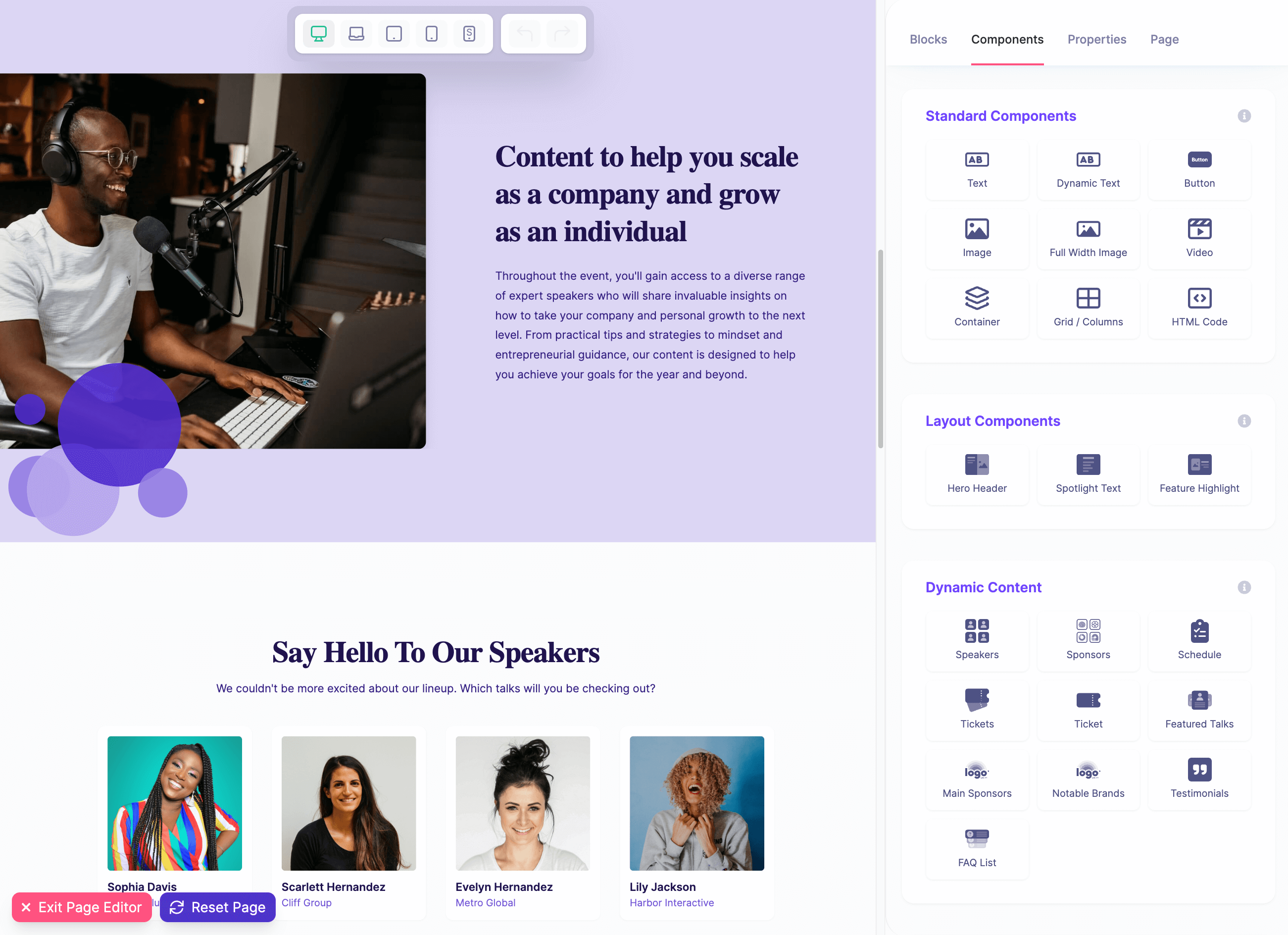
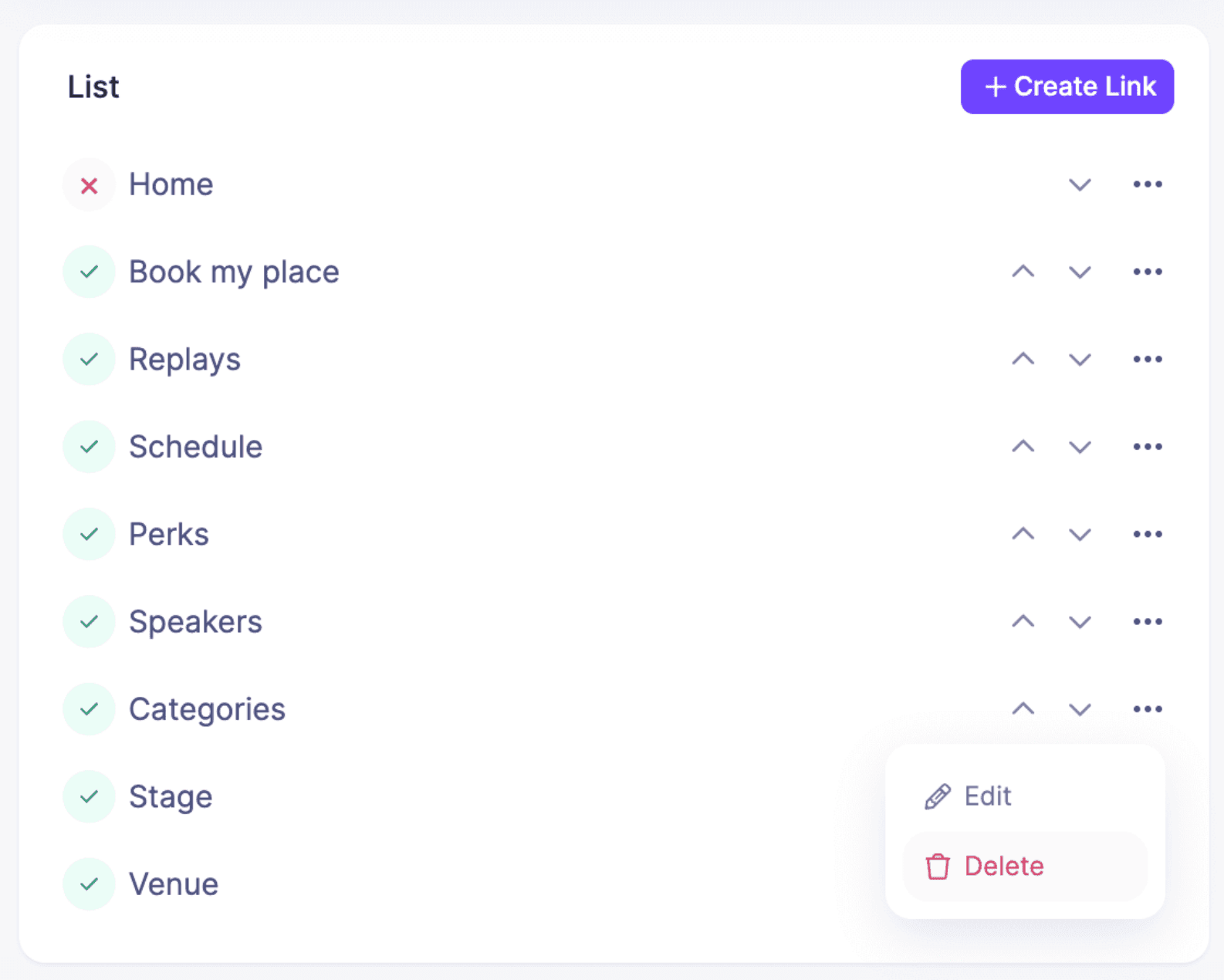
The page manager also makes the wider lifecycle visible. Registration, replays, schedules, speakers, stages, venues, and other event surfaces can be managed as parts of the same event rather than unrelated pages.
Best for: creators, educators, communities, marketers, and event teams running content-led online, hybrid, in-person, or on-demand events with speakers, sponsors, tickets, integrations, emails, affiliates, and replays.
Not ideal for: a bare meeting room, a general corporate CMS, or a programme whose defining need is a bespoke native app, advanced badge printing, lead retrieval, floor plans, or a networking-first expo.
What may still need another system: the webinar or streaming provider, CRM, permanent CMS, venue technology, or specialist onsite tools. HeySummit coordinates the event layer; it does not pretend every specialist tool disappears.
When ticket types and content access are part of the decision, review how event ticketing and access rules connect to the public experience.
Whova: best when the attendee app and conference experience matter
Whova’s event website guidance connects the website to its wider conference platform. Its product emphasis includes registration, agendas, an attendee mobile app, networking, exhibitors, check-in, badges, and hybrid or virtual participation.
Best for: conferences and associations where attendee networking, mobile agenda access, exhibitors, and onsite operations are important parts of the experience.
Not ideal for: paying for conference breadth when your event is a simpler creator-led workshop, summit, or content programme.
What may still need another system: your permanent marketing CMS, specialist broadcast production, or organisation-specific data and venue tools.
Cvent: best for complex enterprise event programmes
Cvent’s custom event website tooling connects branded registration sites with a much broader event-management ecosystem. Its current materials include accessible registration-site controls and workflows aimed at complex organisational events.
Best for: larger organisations with repeatable event programmes, procurement and governance needs, complex registration, broad integrations, and substantial onsite requirements.
Not ideal for: small teams that need to launch a focused event quickly and do not need enterprise implementation or operational breadth.
What may still need another system: a permanent corporate CMS, organisation-specific platforms, or specialist production and venue infrastructure.
A five-question decision tree
- Is this a permanent business or content site first? If yes, begin with a general builder or CMS. If the event is the main product, continue.
- Is registration, ticketing, invitation logic, or check-in the hardest part? If yes, compare registration-first event builders.
- Will schedules, speakers, sponsors, tickets, attendee access, emails, and replays change together? If yes, compare full event platforms and look for one source of truth.
- Do you need a native attendee app, advanced networking, badges, lead retrieval, floor plans, or enterprise onsite operations? If yes, prioritise platforms that are demonstrably strong in those areas. A website builder alone is not enough.
- Who will maintain every integration and fix every failed handoff? If the answer is unclear, reduce the number of systems or assign ownership before launch.
There is also a valid “neither” branch. A simple RSVP form and meeting link may be enough for a small private session. A specialist venue, ticketing, community, learning, or broadcast system may be the real centre of a different event. Choose the smallest stack that can operate the promised experience reliably.
Test the real workflow before you buy
Do not ask for a polished generic demo. Give each shortlisted vendor the same realistic event and ask to see it work.
- Create the event with its real format, dates, time zones, and venue or broadcast setup.
- Add two ticket or access levels, including any replay or restricted content rules.
- Add several sessions, speakers, and one sponsor, then change a session time and speaker bio.
- Complete registration on a phone, make a form error, pay or RSVP, and inspect every confirmation.
- Follow the attendee journey into the event, including check-in or joining instructions.
- Publish one replay or post-event resource and confirm access for each attendee type.
- Export the attendee and engagement data, then show how it reaches your CRM or email system.
Watch for the work between the screens. If the vendor completes a task by updating a spreadsheet, copying data, or asking you to rebuild a page elsewhere, record that as part of the product cost.
Event website builder checklist
- Event model: one event, recurring programme, permanent site, or multi-event portfolio.
- Formats: online, in-person, hybrid, live, recorded, or on demand.
- Programme: days, tracks, sessions, stages, time zones, speakers, sponsors, and venues.
- Registration: public, private, application, approval, group, invite list, capacity, and waitlist.
- Revenue and access: free or paid tickets, payment processing, fees, taxes, invoices, donations, add-ons, and replay access.
- Communications: confirmations, reminders, changes, joining instructions, and follow-up.
- Attendee experience: mobile pages, accessibility, time zones, calendars, app, check-in, badges, networking, and support.
- Content after the event: recordings, expiry, searchable library, resources, and repurposing.
- Data: consent, privacy, retention, exports, integrations, analytics, CRM, and attribution.
- Ownership: source of truth, sync method, manual fallback, named operator, and failure response.
- Total cost: plan, attendee limits, transaction fees, payment fees, email or SMS, plugins, implementation, support, and internal labour.
- Exit path: data export, domain control, content migration, and what happens if you change platform.
After you choose a platform, use the event landing page checklist to audit the page itself. Platform fit and page quality are separate decisions, and both matter.
Choose the platform whose boundaries you understand
A general website builder can be exactly right for a permanent brand site with a clean event handoff. A registration-first tool can remove a large amount of guest and ticketing work. A full event platform earns its place when pages, programme data, access, communications, and content need to move together.
Choose by ownership, not by the promise that one tool does everything. Know what the platform owns, what remains separate, and who fixes the joins.
If your event needs connected pages, registration, tickets, speakers, sponsors, schedules, integrations, emails, and replays, see how HeySummit works. Choose another tool when a permanent CMS, a simple RSVP flow, or a specialist onsite and app experience is the more important job.
Frequently asked questions
Table of Contents
Quick answer: choose the type of builder firstWhat does your event website need to own?How we compared these event website buildersEight event website builders at a glanceGeneral website buildersRegistration-first event website buildersFull event platformsA five-question decision treeTest the real workflow before you buyEvent website builder checklistChoose the platform whose boundaries you understandFrequently Asked QuestionsTry HeySummit free
HeySummit is the easiest way for creators and educators to grow their audience, authority and revenue with professional online events created in minutes, not weeks.
Share this article on:
Recent Posts
Loading feed...