Call for Speakers Template for Online Summits
-1690817315934-652794559.png&w=96&q=75)
Benjamin Dell
Founder, HeySummit
A strong call for speakers does more than ask, "Would you like to present?" It explains the audience, the event promise, the session formats, the value for speakers, the submission deadline, and what happens after someone says yes.
That matters even more for online summits and multi-speaker events. You are not just filling a stage. You are building a speaker workflow: outreach, applications, speaker details, session pages, promotional assets, referral links, reminders, and post-event follow-up.
Use this call for speakers template as a practical organizer kit. Adapt the copy, fields, and timeline to your own event, then connect accepted speakers into a clear speaker portal or dashboard so the work does not become scattered across email threads.
Call for speakers definition
A call for speakers is a public or private invitation for potential presenters to submit session ideas, credentials, availability, and supporting details for an event. It can be a public page, a targeted email, a speaker application form, or all three.
For an online summit, the best call for speakers should answer four questions quickly:
- Who is the event for?
- What kind of sessions are you looking for?
- Why should a qualified speaker participate?
- What exactly should they submit next?
The NIST speaker invitation guide recommends including the event name, date, location, purpose, audience, presentation role, speaker fit, speaker benefit, and contact details in a speaker invitation. For online events, translate "location" into the online format, delivery method, timezone, and speaker access workflow.
Call for speakers template: public page copy
Use this structure when you want a public call for speakers page that potential presenters can read before applying.
1. Opening promise
Template:
We are looking for speakers for [Event Name], a [one-sentence event type] for [specific audience]. The event will help attendees [main outcome], and we are inviting experts, practitioners, educators, creators, and operators who can share practical sessions on [topic cluster].
Example:
We are looking for speakers for The Independent Educator Growth Summit, a two-day online summit for course creators, coaches, and community educators. The event will help attendees grow audience and revenue without adding a huge operations burden, and we are inviting practitioners who can share practical sessions on launches, partnerships, email, events, and customer success.
2. Audience and theme
Template:
Our audience is [describe audience]. They are trying to [problem or goal]. Sessions should help them [specific transformation], especially if they can apply the advice within [timeframe].
Strong session fits include:
- [Topic or session angle 1]
- [Topic or session angle 2]
- [Topic or session angle 3]
- [Topic or session angle 4]
- [Topic or session angle 5]
3. Session formats
Template:
We are accepting proposals for:
- Practical talks: [length] sessions with a clear takeaway.
- Workshops: [length] implementation sessions with examples, templates, or walkthroughs.
- Panels: moderated discussions with [number] speakers.
- Interviews: recorded or live conversations with the host.
- Case studies: real examples showing what changed, what worked, and what did not.
Be explicit about whether talks are live, pre-recorded, hybrid, or flexible. Speakers need to know the commitment before they apply.
4. Speaker benefits
Template:
Speakers receive [benefit 1], [benefit 2], and [benefit 3]. Depending on the session and event package, speakers may also receive [optional benefit such as replay access, affiliate participation, sponsor introductions, or audience-safe reporting].
Avoid vague "great exposure" language. Strong speakers want to know whether the event reaches the right audience, whether they can share useful work, and whether the organizer will make participation easy.
5. Submission deadline and review process
Template:
Submit your proposal by [date]. We will review submissions by [date] and notify selected speakers by [date]. If accepted, you will receive next steps for your profile, session details, technical setup, and promotional materials.
NIST also recommends sending speaker invitations in phases instead of all at once, so you can wait for replies, follow up, and invite second-choice speakers gracefully if needed. Use the same thinking for public applications: set dates that give you time to review, replace gaps, and onboard accepted speakers without rushing.
Speaker proposal form fields
Your call for speakers page should lead into a form that collects enough detail to make a decision without creating unnecessary work for applicants.
| Field | Why it matters |
|---|---|
| Name, email, title, company, and location/timezone | Gives you the basics for review, scheduling, and follow-up. |
| Short speaker bio | Helps you judge fit and gives you a starting point for the event page. |
| Website and social links | Lets you check credibility, audience fit, and promotional channels. |
| Proposed session title | Shows whether the speaker understands the event theme. |
| Session description | Explains what attendees will learn and whether the session is practical. |
| Session format | Separates talks, workshops, panels, interviews, and case studies. |
| Audience takeaway | Forces the proposal to focus on attendee value, not just speaker credentials. |
| Availability | Helps you schedule live sessions, recordings, or rehearsal windows. |
| Technical needs | Flags slides, video, demos, accessibility needs, or special formats early. |
| Promotion willingness | Shows whether the speaker can support audience growth and what assets they need. |
| Referral or affiliate interest | Helps you decide whether to connect the speaker to referral tracking or an affiliate workflow. |
| Consent and permissions | Covers headshots, logos, quotes, replay use, and promotional materials. |
Keep the form short enough to complete in one sitting. If a speaker is accepted, you can collect more detailed assets during onboarding.
Speaker invitation email template
Use targeted invitations when you already know who you want to recruit. This is usually better than sending a generic blast to every possible speaker.
Subject: Invitation to speak at [Event Name]
Hi [Name],
I am organizing [Event Name], a [format] for [audience] happening on [date or date range]. The event is focused on [theme], and I thought of you because [specific reason they are a fit].
We are looking for sessions that help attendees [audience outcome]. A topic around [suggested angle] could be especially useful, though I would be glad to hear what you think would serve the audience best.
The session would be [live/pre-recorded/interview/workshop], approximately [length], with [basic logistics]. Speakers receive [benefits], and we will provide the event page, speaker profile, promotional assets, and next-step checklist if you are interested.
Would you be open to speaking? If so, please reply by [date], and I will send the speaker details and proposal link.
Thanks,
[Your Name]
This email works because it answers the questions busy speakers usually have: why me, why this audience, what is the ask, what is the benefit, and what happens next.
Acceptance email template
Once a speaker accepts, switch from persuasion to operations. The goal is to give them a clear path from yes to ready.
Subject: You are confirmed for [Event Name] - next steps
Hi [Name],
We are excited to confirm you as a speaker for [Event Name]. Your session is currently planned as:
- Working title: [Session title]
- Format: [Talk, workshop, panel, interview, case study]
- Delivery: [Live, pre-recorded, hybrid]
- Date/time or recording deadline: [Date/time]
- Audience: [Audience summary]
Please complete the following by [date]:
- Review or update your speaker bio and headshot.
- Confirm your session title and description.
- Share any slides, resources, offers, or handouts.
- Confirm technical needs and timezone.
- Review the promotional assets and your referral link, if applicable.
You can access your speaker details here: [Speaker dashboard or intake link]. If anything looks wrong, reply to this email and we will help.
Thanks again for joining us,
[Your Name]
Call for speakers timeline
The right timeline depends on event size, speaker seniority, and whether sessions are live or pre-recorded. Use this as a starting workflow and adjust based on your event date.
| Stage | Organizer action | Speaker output |
|---|---|---|
| Shortlist | Define audience, topics, formats, and must-have speakers. | No speaker action yet. |
| Invite or open applications | Publish the CFP page or send targeted invitations. | Speaker reviews the fit and submits interest. |
| Proposal review | Assess audience fit, topic overlap, quality, availability, and promotion potential. | Speaker may clarify topic or format. |
| Acceptance | Send confirmation and next-step checklist. | Speaker confirms title, format, bio, and deadlines. |
| Dashboard handoff | Give speakers access to the place where they update their profile, talk, resources, and promo details. | Speaker completes their profile and session assets. |
| Promotion | Provide approved copy, images, registration links, referral links, and suggested send dates. | Speaker shares with their audience where appropriate. |
| Final logistics | Send reminders, join links, run-of-show notes, and backup contact details. | Speaker attends, records, or delivers their session. |
| Post-event | Send thanks, replay links, relevant performance notes, and any referral or affiliate follow-up. | Speaker can share replay assets or give feedback. |
Move accepted speakers into a real workflow
The call for speakers is only the beginning. Once someone accepts, you need a reliable place for speaker details, talk details, permissions, promotional resources, and follow-up.
HeySummit's speaker dashboard gives speakers a dedicated place to update profiles, session information, and resources. The current Speaker Settings help guide shows that organizers can control what speakers see and manage across Dashboard, Profile, Talks, and Workflow settings, including whether speakers can edit profile details, manage certain talk details, view insights, claim open slots, or be set as affiliates.
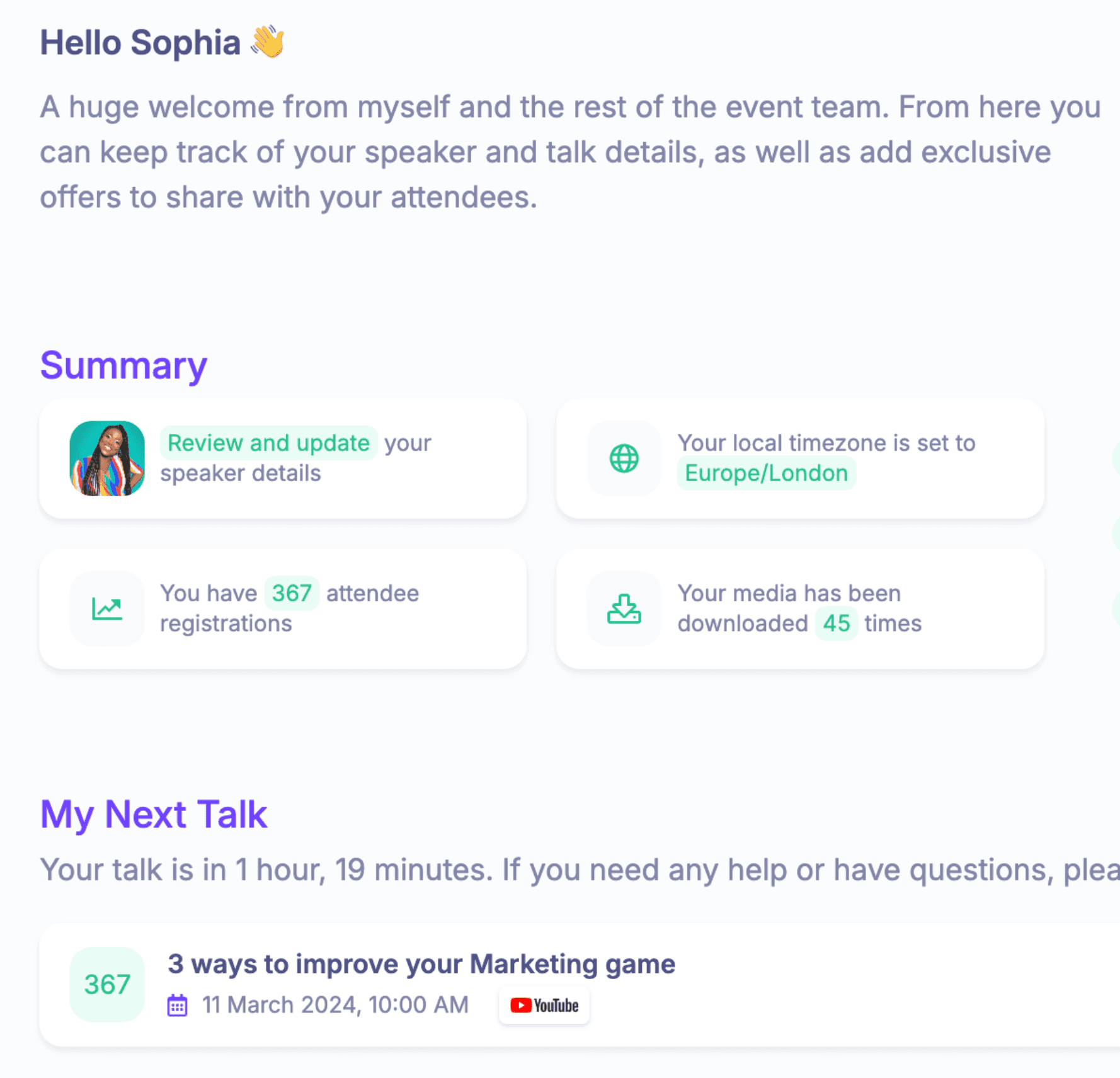
If you send dashboard access, make the first step obvious. HeySummit's help article on sending speaker login credentials explains that the speaker email template must be active, then organizers can send login details from the speaker menu so the speaker can log in and start introducing themselves to attendees.
Speaker promotion and referral handoff
Speakers promote better when the ask is specific and the assets are easy to use. Do not simply say, "Please share." Give them a small promotion kit.
Include:
- The event promise in one or two sentences.
- The audience fit, so speakers know who should attend.
- Suggested email copy, social copy, and short captions.
- Speaker-specific graphics or approved event images.
- Recommended send or posting dates.
- A speaker-specific registration, referral, or affiliate link.
- Claims to avoid, especially around guaranteed outcomes, revenue, attendee numbers, or limited availability.
If your event uses affiliates, connect the promotion kit to the right tracking workflow. HeySummit's affiliate platform page describes affiliate signup, central affiliate management, affiliate dashboards, commission settings, and performance tracking. Keep the promise practical: use affiliate tools to track and manage the program, but do not promise guaranteed ticket sales or automatic payout behavior unless you have verified the exact setup for your event.
Speaker communication checklist
A good speaker experience usually comes down to predictable communication. Build these messages before you need them.
- Invitation: why the speaker is a fit, what the event is, and what you are asking for.
- Acceptance: confirmation, working title, format, deadlines, and next steps.
- Profile reminder: missing bio, headshot, links, session description, or timezone details.
- Promo kit: approved copy, images, links, and suggested dates.
- Technical reminder: join links, recording instructions, webinar details, rehearsal windows, and backup contact.
- Day-before reminder: exact time, timezone, audience context, and what to have ready.
- Thank-you follow-up: replay links, relevant outcomes, referral follow-up, and feedback request.
HeySummit's custom emails feature page describes centralized event email management, email customization, segmentation, sender options, and email reporting. That kind of workflow is useful because speaker coordination often fails when every reminder lives in a separate personal inbox.
Common mistakes to avoid
- Making the call too vague. "Submit any topic" creates weak proposals. Give speakers a clear audience, theme, and session examples.
- Confusing speaker recruitment with speaker career advice. Your page is for organizers, so keep the promise focused on building the event lineup.
- Asking for too much too early. Collect enough to review the proposal, then collect deeper assets after acceptance.
- Leaving promotion until the end. Decide early whether speakers will receive referral links, affiliate details, or promotional copy.
- Promising outcomes you cannot control. Avoid guaranteed attendee, revenue, response-rate, or promotion claims.
- Managing accepted speakers only by email. A dashboard, portal, or structured checklist reduces missed details and repeated questions.
Use the template, then operationalize it
The best call for speakers is not just persuasive. It is operational. It helps the right speakers understand the event, submit useful proposals, accept with confidence, and move into the next step without guessing what you need from them.
Start with the page and email templates above. Then build the handoff: speaker profile, session details, technical setup, promotional assets, referral tracking, reminders, and post-event follow-up.
If you want to see how that speaker workflow fits inside a complete online event platform, explore the HeySummit speaker dashboard or take the HeySummit product tour. You can also start a free trial and build your next speaker-led event in one place.
Frequently asked questions
Table of Contents
Call for speakers definitionCall for speakers template: public page copySpeaker proposal form fieldsSpeaker invitation email templateAcceptance email templateCall for speakers timelineMove accepted speakers into a real workflowSpeaker promotion and referral handoffSpeaker communication checklistCommon mistakes to avoidUse the template, then operationalize itFrequently Asked QuestionsTry HeySummit free
HeySummit is the easiest way for creators and educators to grow their audience, authority and revenue with professional online events created in minutes, not weeks.
Share this article on:
Recent Posts
Loading feed...