Event Group Registration: Bulk Ticket Handoff Guide
-1690817315934-652794559.png&w=96&q=75)
Benjamin Dell
Founder, HeySummit
A school coordinator buys ten places for your online event. The order succeeds, the receipt arrives, and your sales report looks right. But four attendee names are still missing, one email belongs to the buyer rather than the person attending, and nobody has checked whether the assigned tickets unlock the right sessions.
Event group registration is the work of connecting that purchase to the people who will actually attend. This guide gives you a choice of registration models, a purchase-to-attendee checklist, a copyable worksheet, and an exception plan. Start by separating the order from each attendee's place.
What event group registration means
Group registration lets one purchaser reserve or buy several event places in one order while those places may belong to different attendees. A complete workflow connects the purchaser, individual tickets, attendee identities, messages, and access without treating them as the same record.
The purchaser pays or coordinates the booking. An attendee uses a place. The purchaser may also attend, but buying ten tickets does not automatically mean the purchaser is one of the ten people.
For operational planning, call the sale complete when the order and purchased quantity are confirmed. Call fulfillment complete when each intended attendee has the right ticket, receives the required instructions, and has a confirmed route to the promised event access. Keep cancellations and unresolved seats visible rather than counting them as ready attendees.
If you are choosing the broader tool setup, our guide to event registration software explains how registration fits alongside ticketing and event delivery.
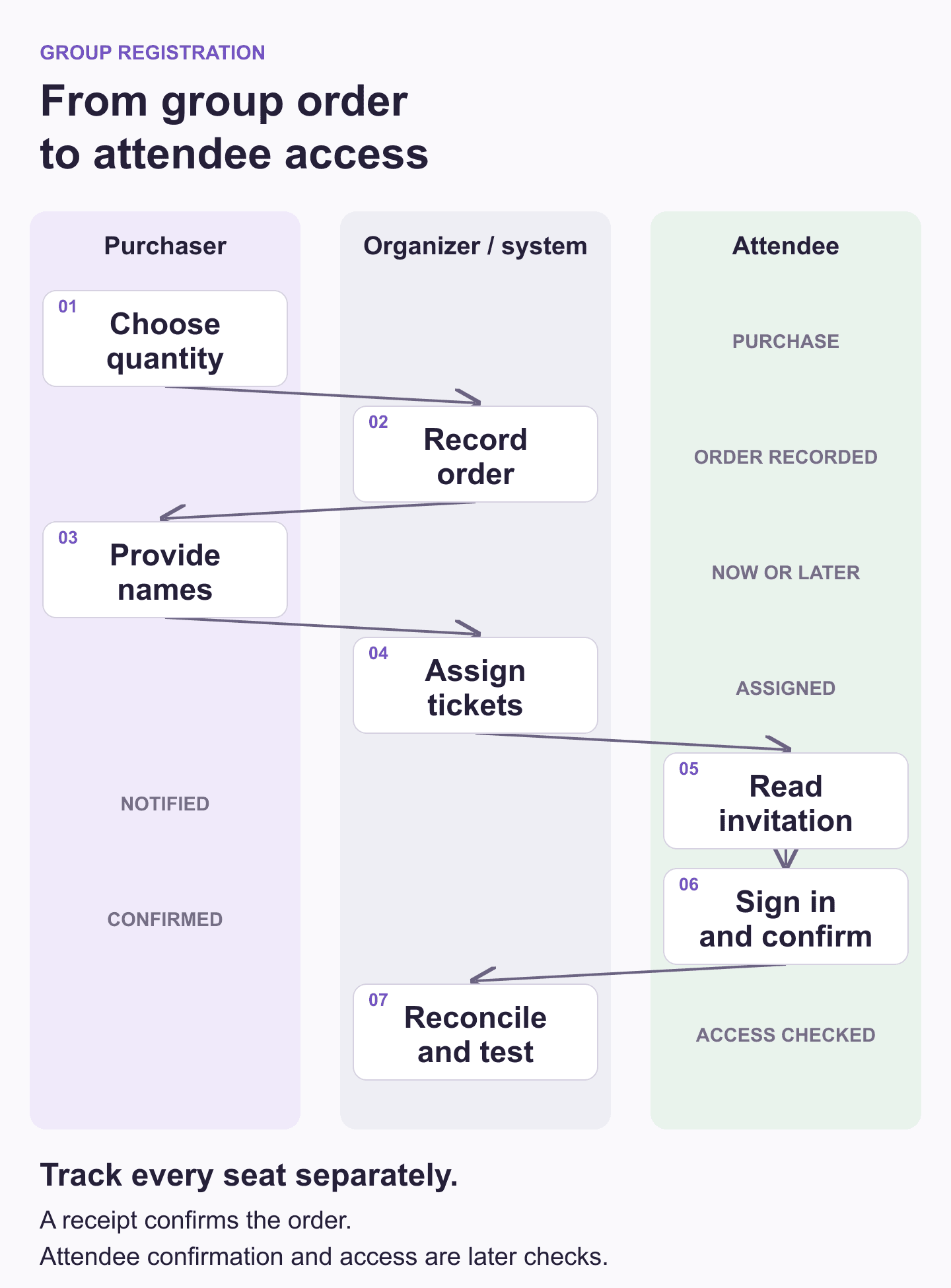
The purchaser supplies the order and names. The organizer or system connects those names to tickets. Each attendee then needs their own instructions and sign-in route. Assignment can happen immediately or later, but the unfinished work needs an owner either way.
Separate group registration from group pricing
Group pricing answers how much the order costs. Group registration answers who uses each place and how they get access. A bulk discount changes the price at a chosen quantity; it does not, by itself, collect the missing names or deliver individual access instructions.
You can sell several tickets at the normal price and still need a group registration process. You can also offer a group discount while leaving the buyer to complete attendee assignments afterward. Decide the price and the fulfillment process separately, then explain both before checkout.
Keep offer economics in your online summit ticket pricing plan. This article focuses on what happens to the places once someone buys them. There is no universal group-size threshold or proven performance lift to rely on. Choose quantities your team can fulfill and track whether each attendee gets the promised access.
Choose how attendees will claim their places
The best model depends on when the roster becomes available and who can finish the registration work. Ask a prospective group buyer whether they know every attendee's details before choosing the form.
On a small screen, swipe sideways to read every column.
| Model | Best fit | Buyer effort | Attendee effort | Failure signal | Control to add | Capability to verify |
|---|---|---|---|---|---|---|
| Collect at checkout | Buyer knows the roster | Enter every attendee | Review instructions and sign in | Incorrect or unfinished repeated fields | Review screen and clear corrections | Separate ticket and attendee records |
| Assign after purchase | Names follow the purchase | Pay now; provide names later | Respond after assignment | Sold seats remain unassigned | Owner, deadline, reminders, open-seat count | Deferred assignment and organizer correction |
| Separate self-registration | People enter their own details | Share the supported claiming route | Claim place before deadline | Claims exceed seats or lose order linkage | Seat limits, expiry, reconciliation | Reliable linked claims; do not assume shared codes suffice |
Use immediate assignment when the buyer already has a reliable roster. If a coordinator needs to secure the budget before names are final, deferred assignment is a reasonable choice only when you can track and follow up on unfinished seats.
A separate self-registration or code route gives each person responsibility for their own details. It also introduces another reconciliation job. Verify seat limits, order linkage, expiry, and duplicate prevention in the chosen platform. Do not assume that a shared discount code reserves a fixed number of places, or that HeySummit supplies this exact group-code model.
Write the rules before opening checkout
Give the buyer a short explanation of what they are buying and what happens next. State the allowed quantity, any discount conditions, whether the buyer will attend, the details needed now, and the assignment deadline. Name the person who will follow up if the roster remains incomplete.
Write substitutions, transfers, refunds, and late changes into the event's policy. Specify who can request a correction, which deadlines apply, how the original attendee's access changes, and who contacts the replacement. Payment, tax, and refund treatment depend on your event, payment setup, and applicable requirements.
Ask for the right attendee information
Keep order details and attendee details separate. The purchaser's contact may be the right destination for a receipt or roster reminder. Each attendee's contact is the destination for individual participation instructions. Ask whether you need a person's role, accessibility request, or session choice for a defined event task before adding another repeated field.
Our guide to event registration questions helps you choose fields that have a clear purpose. Make attendee email addresses easy to review, especially when one coordinator is entering several people's information.
Make the form usable and the data purpose clear
The W3C forms tutorial recommends clear labels, instructions, validation, and notifications. Ask only for information needed to complete the process. Label repeated attendee fields so the buyer can distinguish one person from another, and explain how to correct errors without losing the rest of the roster.
When a buyer supplies other people's details, the ICO's data-protection principles provide a useful UK reference for purpose, transparency, minimisation, accuracy, retention, and security. Explain why you need the details and restrict access to the working roster. The guidance is under review following legislative changes. Apply requirements for your jurisdiction; this is operational guidance, not legal advice.
The purchase-to-attendee handoff checklist
Use this sequence to make the next action clear. A platform may automate parts of it, but your team still needs to know who owns any step that fails.
- Confirm the order and quantity. The operations owner takes the confirmed order reference and ticket count, checks the intended ticket type, and records the purchased seats. A pending or unclear order stays an exception. Pass the confirmed quantity to the person collecting attendee details.
- Separate buyer and attendee details. The roster owner takes the buyer's list and confirms who will use each place, including whether the buyer attends. The output is a list of distinct intended attendees. Repeated buyer details across several seats are a signal to review, not evidence that several people are registered.
- Connect each person to a ticket. The buyer or authorized organizer uses the platform's assignment process. Check the ticket identifier and intended attendee against the order. Pass the assigned list to the notification owner; a name in a spreadsheet alone does not establish a ticket assignment.
- Track unfinished seats. The roster owner compares purchased places with active assignments. Record the remaining seats, who will supply the details, and when. If that count remains unchanged near the deadline, send the buyer a specific request for the missing people rather than a generic event reminder.
- Notify each recipient. The communication owner checks that each assigned attendee receives a message explaining the event, ticket or access level, sign-in route, and support contact. Keep the buyer's receipt separate. A send attempt does not confirm delivery or a recipient's response.
- Confirm the sign-in identity. Each attendee follows their individual instructions using the email linked to the assignment. The support owner handles wrong addresses or duplicate accounts. Pass unresolved identity problems to the person who can correct the ticket before attempting another registration.
- Check the intended access. The access owner verifies the ticket's promised sessions, replays, or venue entry as relevant to the event. Use a representative test for each access level and review changed assignments separately. A working homepage does not prove that a restricted session is available.
- Reconcile the checkpoints. The operations owner compares purchased seats, named assignments, notification attempts, attendee confirmations, and access checks. Keep those counts separate. If all tickets have names but one invitation failed, the remaining work belongs to communication or support.
- Resolve exceptions before the deadline. The named exception owner applies the event's policy, records the change, and tells the affected people what happens next. Recheck identity and access after a substitution. Escalate an unsupported second transfer rather than promising a workaround.
- Prepare the final working roster. The operations owner freezes or exports the relevant roster when the event needs it. Record a version and a late-change route. Pass confirmed attendees and open exceptions to the event team without silently discarding unfinished seats.
A buyer-facing next step can be as simple as: "Your order covers ten places. Six are assigned and four are awaiting names. Please send the remaining details to the event coordinator by Friday. Each attendee will receive their own access instructions after assignment." Use your actual deadline and supported assignment route.
Build the receipt, roster request, attendee invitation, and correction message into your event communication plan template. Give each message a recipient and an owner.
Copyable group registration worksheet
Use one order summary like the template below, plus a separate row for each seat in a restricted attendee sheet. For each seat, keep a ticket reference, attendee identity, access level, notification checkpoint, confirmation checkpoint, exception, and next action.
On a small screen, swipe sideways to read every column.
| Field | Fictional example | What to record |
|---|---|---|
| Order reference | SCHOOL-DEMO-10 | Link to the confirmed order |
| Purchaser contact | Jordan, fictional school coordinator | Keep separate from attendee contacts |
| Ticket/access level | Full event access | State promised sessions or replays |
| Seats purchased | 10 | Reconcile cancellations separately |
| Named/assigned seats | 6 | Link each active person to a ticket |
| Unassigned seats | 4 | List exactly what is missing |
| Notifications | 6 attempts | Track delivery issues separately |
| Attendee confirmations | 5 | Record responses, not assumptions |
| Access checks | Pending | Record checked ticket levels and changes |
| Exceptions | 1 wrong email; 4 awaiting names | Keep each exception and owner visible |
| Current owner | Roster owner plus support owner | Assign ownership per unresolved job |
| Next action | Request four names; correct one email | Name the supported correction route |
| Due date | Chosen assignment deadline | Use the actual date for the event |
Suggested planning labels are Purchased, Awaiting names, Assigned, Notified, Confirmed, Access tested, and Exception. Use these as worksheet labels, separate from the statuses shown by your registration platform. Keep notification and access evidence in separate fields so an assigned person can still have an unresolved delivery problem.
For a confirmed order whose quantity has not changed, seats purchased minus active assigned seats gives the unassigned-seat count. After a cancellation or quantity reduction, reconcile the effective order quantity first. Count a replacement against the same place, not as an extra place sold.
Worked example: ten seats for a school team
This fictional example uses a school coordinator called Jordan and an order reference of SCHOOL-DEMO-10. All names are invented, and the quantities illustrate the process rather than a recommended group size.
Jordan buys ten places and supplies six attendee identities. The initial worksheet records ten purchased, six assigned, and four unassigned. Jordan is the buyer but is not attending. The buyer receives the receipt and a request for the four missing names. Each of the six assigned people needs individual event instructions.
Suppose five of those six confirm receipt of their instructions, while Avery reports a wrong email address. Record six notification attempts, five confirmations, one address exception, and four seats awaiting names. Do not mark all ten places ready. The roster owner requests the final names from Jordan; the support owner corrects Avery's assignment through the supported process.
Jordan later supplies the remaining four names. After assignment, the summary becomes ten purchased, ten assigned, and zero unassigned. If Avery's correction and all outstanding confirmations are complete, the confirmed count reaches ten. Record which access levels were checked and which changed assignments still need review.
Before the event, Casey withdraws and Sam takes that place under the event's substitution policy. The quantity stays ten. Update the active assignment, record Casey as replaced, notify Sam, and check what happens to Casey's access. Until Sam confirms and the replacement's access is checked, keep that seat open as a substitution exception.
The final reconciliation should explain all ten active places, who occupies them, which messages were sent, who confirmed, and what access was checked. Keep the substitution history. The useful result is a roster your event team can act on, with every changed or unfinished place accounted for.
Plan for the exceptions
A short exception plan gives the organizer somewhere to start when the counts stop matching. The safe action depends on the platform's permissions and your event's policy. Never fix a roster problem by sharing the buyer's password or overwriting an unrelated attendee.
On a small screen, swipe sideways to read every column.
| Exception | Owner and signal | Safe next action | Communication and recheck |
|---|---|---|---|
| Missing name/email | Roster owner; unassigned seat | Request required details from buyer | Assign, notify, and check access afterward |
| Wrong email | Support owner; failed delivery or mismatch | Verify identity and correct through supported controls | Tell affected attendee; recheck sign-in and access |
| Duplicate attendee | Roster owner; same person linked twice | Confirm intended people before changing tickets | Explain correction; check the surviving assignment |
| Buyer also attending | Buyer; unclear roster count | Include buyer once among the intended attendees | Send their individual instructions; reconcile quantity |
| Attendee declines | Buyer; refusal or withdrawal | Apply event policy for replacement or cancellation | Update active roster and next recipient |
| Substitute attendee | Authorized organizer; replacement request | Record original and replacement; follow transfer policy | Notify replacement; check both access outcomes |
| Second transfer | Organizer; transfer limit reached | Check permitted organizer action; escalate if unsupported | Explain limit; verify any approved correction |
| Mixed ticket levels | Access owner; wrong session available | Compare assignment with purchased entitlement | Correct authorized ticket; recheck affected content |
| Refund/reduced quantity | Payment owner; changed effective order | Apply refund policy and reconcile remaining places | Notify relevant people; check affected access |
| Late assignment | Operations owner; deadline approaching | Check whether supported correction can finish in time | Communicate limitation; record remaining exception |
| Recipient cannot access | Support owner; failed sign-in or restricted content | Check identity, ticket assignment, and entitlement | Give supported next step; test the intended route |
For a late change, decide whether the organizer can complete the assignment and access check before the relevant session or entry deadline. If that cannot happen, tell the buyer and attendee the actual limitation and the policy-dependent options. Keep the exception visible to the team running the event.
Questions to ask about group registration software
Evaluate group registration software against the handoffs you need. Ask the vendor to demonstrate the awkward cases as well as the successful checkout.
- Can one order contain several separately identifiable tickets, with the buyer distinct from each attendee?
- Can attendee assignment happen immediately or later, and can the organizer identify seats still awaiting names?
- Who can assign, correct, or transfer a ticket? What limits and history apply?
- What does the buyer receive, what does each recipient receive, and how do you investigate a failed notification?
- How do ticket levels control the promised sessions, replays, or venue access?
- Can your team reconcile the order, ticket, attendee, notification, and access information without losing the relationships?
- Do exports or integrations preserve purchaser and attendee identities separately?
- Are repeated fields accessible, easy to review, and limited to information needed for the event?
- Which jobs need another process, such as procurement approvals, delegated group administration, or chasing an unfinished roster?
If a capability is missing, name the person and process that will cover it before you open sales. A worksheet can help coordinate the work, but it cannot create ticket access that the platform does not support.
Where HeySummit fits
HeySummit's bulk ticket pricing guide documents quantity ranges and optional attendee assignment after a bulk purchase. Buyers can enter names and emails then or defer that step. Multiple-ticket purchasing must be enabled.
The same guidance describes one transfer per ticket, blocks recipient re-transfer, and allows organizers to transfer on an attendee's behalf. It also states that a new attendee receives an email notification. Ticket transfers can be disabled for an event.
HeySummit ticketing connects pricing and ticket-based access with the wider event workflow. Use your order and assignment records alongside the worksheet to track work that still needs a person. Keep a roster owner responsible for missing names and the group summary instead of assuming this follow-up is automated.
If your requirements include corporate group-account administration, procurement approval chains, advanced roster automation, or specialist venue badging, verify those needs separately. You may need an additional system or operating process.
Explore ticketing through the link above, or see how HeySummit works across registration and event delivery.
Give every purchased place a next action
Before opening group sales, choose the assignment model and fill in the worksheet's owner, deadline, and exception route. After each order, ask which places are waiting for names, messages, confirmation, or an access check. A clear next action for every unfinished seat makes the buyer's purchase usable by the people it was intended for.
Frequently asked questions
Table of Contents
What event group registration meansSeparate group registration from group pricingChoose how attendees will claim their placesWrite the rules before opening checkoutThe purchase-to-attendee handoff checklistCopyable group registration worksheetWorked example: ten seats for a school teamPlan for the exceptionsQuestions to ask about group registration softwareWhere HeySummit fitsGive every purchased place a next actionFrequently Asked QuestionsTry HeySummit free
HeySummit is the easiest way for creators and educators to grow their audience, authority and revenue with professional online events created in minutes, not weeks.
Share this article on:
Recent Posts
Loading feed...