InEvent vs HeySummit: Pricing, Features, and Best Fit for 2026

Octavia
Content Contributor, HeySummit
Short answer: Evaluate InEvent when your event depends on a configured enterprise platform with mobile apps, badge printing, access control, CRM and onsite support. Evaluate HeySummit when you want event pages, registration, paid access, speakers, sponsors, video integrations, email and reporting in one workflow for online, hybrid, in-person or on-demand events. HeySummit's ticket-linked QR check-in can support basic entry verification; specialist venue infrastructure needs a separate evaluation. Ask both vendors to demonstrate your required workflow and confirm its package, staffing and support scope.
If you are comparing InEvent vs HeySummit in 2026, start with the work your event team must do. InEvent's event management documentation describes registration, landing pages, custom email, payments, sponsors, lead capture, analytics and CRM integrations, alongside onsite and virtual delivery options. HeySummit also brings registration, ticketing, speakers, sponsors, video, email, replays and reporting into the event workflow. Compare how each handles your actual event rather than assuming that one platform lacks these shared capabilities.
This guide compares pricing, event formats, setup complexity, registration, ticketing, streaming, onsite and hybrid needs, speaker and sponsor workflows, analytics, integrations, and buyer fit. If you are building a wider shortlist, you can also explore more event platform comparisons.
InEvent vs HeySummit at a glance
On smaller screens, swipe sideways to compare all three columns.
| Decision area | InEvent | HeySummit |
|---|---|---|
| Best fit | Enterprise event teams, agencies, conference organizers, and teams running complex in-person, hybrid, virtual, or webinar programs. | Creators, educators, communities, nonprofits, marketers, and lean event teams launching online, hybrid, in-person, paid, speaker-led, or on-demand events. |
| Not ideal for | Events that do not need the additional modules or services in the proposed package. Compare the demonstrated workflow and total quote before deciding. | Venue programs that require specialist kiosks, badge printing, offline scanning, access-control hardware or a native mobile app. Confirm security and compliance requirements separately. |
| Pricing and packaging | Public starting-price guidance plus scoped packages. Confirm attendee allowances, billing term, modules, hardware, services and support against current InEvent pricing. | HeySummit publishes self-serve pricing with a free trial, attendee-based plan options, transaction fees, add-ons, and enterprise options. |
| Setup complexity | A configured event stack with registration, onsite, mobile and integration options. Ask who owns setup, testing and event-day operations. | An integrated setup through HeySummit features for event pages, registration, tickets, speakers, email, video and reporting. Test your launch checklist with the people who will run it. |
| Event formats | Strong fit for in-person, hybrid, virtual, webinar, conference, trade show, award, fundraising, and enterprise event formats. | Supports online, hybrid, and in-person events, including live, pre-recorded, paid, free, multi-session, and on-demand programs. |
| Registration and ticketing | Includes registration and ticketing as part of a broader enterprise event management suite. | Built for event ticketing, paid access, checkout, ticket restrictions, add-ons, and event upsells. |
| Event pages and setup | Useful when registration sites are part of a larger event operations stack that may include mobile app and onsite workflows. | Includes an event landing page builder for branded event pages, registration flow, and launch setup. |
| Video and streaming | Includes live streaming and virtual stages as part of the enterprise event experience. | Connects events to video and streaming integrations, with a wider video integration hub for provider choice. |
| Onsite and hybrid operations | Documents check-in, badges, mobile app, access control and onsite options. Confirm the required hardware, services, connectivity and support in the proposal. | Supports hybrid event platform workflows and basic ticket-linked QR or eligible manual check-in. Authorized, signed-in staff and internet access are required; assess specialist venue systems separately. |
| Speakers and sponsors | Supports speakers, exhibitors, sponsors, and event operations in a broader enterprise event stack. | Includes a speaker dashboard, sponsor visibility through sponsor booths, partner promotion, and event emails. |
| Analytics and integrations | Emphasizes performance analytics, feedback, surveys, content management, CRM, integrations, lead capture, and event data workflows. | Event analytics covers native registrations, ticket orders/revenue and referrals, with available attendance/replay signals depending on provider, settings and access. CRM pipeline and closed revenue need separate evidence. |
What is InEvent?
InEvent is an event management platform for in-person, hybrid, virtual and webinar programs. InEvent's event management documentation covers planning, registration, attendee control, marketing, engagement, lead capture, analytics and CRM integrations. These are vendor capability descriptions, not independent proof of performance or a promise that every package includes every module.
Its product pages describe a configurable set of tools, including mobile apps, check-in and badges, access control, ticketing, exhibitors, sponsors, budgeting, suppliers, hospitality, virtual stages and live streaming. Ask InEvent to demonstrate the combination you need and identify which subscription, services and hardware it requires.
Choose InEvent when your buying criteria include:
- Complex in-person or hybrid event operations.
- Mobile app experience, check-in, QR scanning, access control, or badge-style onsite needs.
- Exhibitor, sponsor, lead capture, hospitality, supplier, or budgeting workflows.
- CRM, data, security, compliance, procurement or support requirements that the vendor must substantiate for your proposed deployment.
- A team that expects a configured event stack rather than a lightweight self-serve launch path.
For an online summit, compare the specific registration, speaker, replay and sponsor workflows you will use. A small team can evaluate InEvent too. Team size alone does not establish cost, implementation effort or fit; a scoped quote and a realistic setup test are more useful.
What is HeySummit?
HeySummit is an event platform for organizers who want to create, grow, and monetize events without building a patchwork of tools. You can see how HeySummit works across event setup, pages, registration, tickets, speakers, sponsors, video integrations, email, and reporting.
HeySummit is especially relevant when the event is audience, content, education, community, or revenue-led. That might be a virtual summit, paid workshop, creator-led conference, nonprofit event, hybrid program, replay package, training event, expert series, sponsor-supported event, or multi-session online event.
Choose HeySummit when your buying criteria include:
- An online event platform or hybrid workflow with event pages, registration and access in one place.
- Registration pages, paid tickets, add-ons, checkout, and replay access in one place.
- Speaker onboarding, speaker promotion, sponsor pages, and partner revenue workflows.
- Video provider flexibility rather than being locked into one streaming workflow.
- Native registration, ticket revenue and referral reporting, alongside the attendance and replay signals available for your delivery setup.
InEvent pricing vs HeySummit pricing
The InEvent pricing page publishes platform starting-price guidance and distinct packages for virtual, in-person, hybrid and webinar events. Compare the price with its attendee allowance, billing term, modules and onsite deliverables. Ask sales to separate platform access from hardware, production services, implementation and support.
On 9 November 2026, InEvent's USD pricing page listed platform prices starting from US$9,000 for a single event or US$20,000 annually. These are starting prices, not per-attendee fees or a binding quote for every feature. Confirm the currency, contract, attendee allowance and package scope directly with InEvent; do not assume hardware or project management is included.
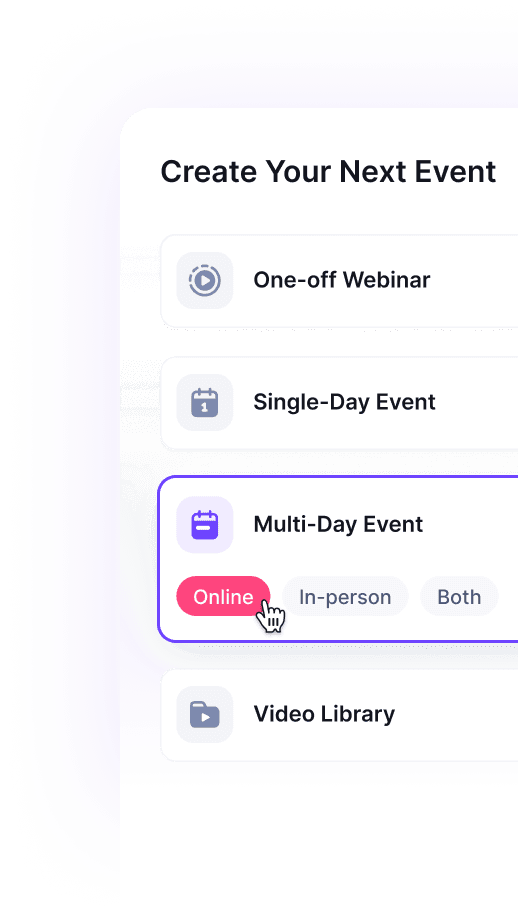
HeySummit publishes HeySummit pricing with plan-based options, a free trial, attendee allowances and transaction fees. Check the selected currency and billing term, required plan, add-ons and any enterprise scope. A public starting price or plan card is a starting point for the comparison, not the complete event budget.
Use this pricing lens:
- Evaluate InEvent's model when the event requires onsite logistics, mobile apps, access control, exhibitors or production services. Confirm each requirement and its delivery owner in the quote.
- Evaluate HeySummit's model when the required workflow combines event pages, online or hybrid delivery, registration, ticketing, sponsor and speaker coordination, and replay access. Check plan eligibility and delivery-provider costs.
- Compare total event cost, not only subscription price. Include platform fees, payment processing, implementation time, staffing, integrations, support, attendee overages, add-ons, and any tools you can stop paying for.
Feature comparison
Event setup and landing pages
InEvent offers event setup as part of a broader operations environment, including registration, onsite, mobile, sponsor, analytics and integration options. Check which modules your package includes and who will configure them.
HeySummit's branded event pages sit alongside tickets, speaker profiles, sessions, emails, video integrations and reporting. Test a complete attendee journey before judging setup effort or launch readiness.
Registration, ticketing, and monetization
InEvent includes registration and ticketing in a broader enterprise event suite. That can be useful when the registration flow must connect to onsite check-in, mobile app access, lead capture, CRM data, exhibitors, and complex attendee operations.
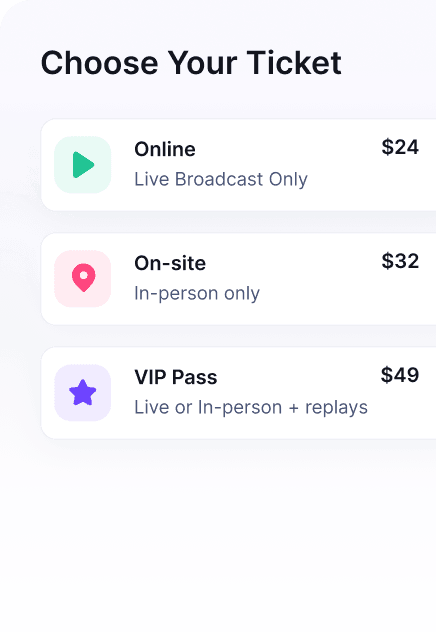
HeySummit supports event ticketing, paid access, add-ons and checkout within the event setup. Replay packages and on-demand content can extend access after the live event; confirm recording availability, delivery-provider support and the access period you intend to offer.
Video, streaming, and virtual delivery
InEvent includes virtual stages and live streaming as part of its event platform. That can be useful for enterprise teams that want a controlled event experience with a larger operational layer around the live program.
HeySummit works well when the organizer wants provider flexibility. Its video and streaming integrations let teams connect common video tools and keep the attendee registration, session access, replay, and email journey inside HeySummit.
Hybrid and in-person events
InEvent's documented onsite options include check-in, badge printing, mobile apps and access control. If your event requires kiosks, offline operation, access-control hardware or zones, exhibitor lead capture, hospitality or onsite support, require a demonstration and written scope for those needs. Do the same for any security or compliance requirement.
HeySummit supports hybrid events and in-person events, including basic ticket-linked QR check-in. The first valid scan marks the purchase as checked in; a repeat scan shows it has already been verified. The device guidance requires internet access and a browser signed in as authorized event staff. Eligible in-person tickets also support manual check-in when event settings and ticket status permit. Check current plan eligibility before committing to this entry-verification workflow, and evaluate specialist venue infrastructure separately. Use the QR check-in buyer checklist to test tickets, staff permissions, connectivity and fallback arrangements.
Speakers, sponsors, and partner workflows
InEvent supports speaker, exhibitor, and sponsor workflows inside a wider event operations system. That is helpful for larger teams coordinating multiple stakeholder groups, booths, lead capture, event app surfaces, and onsite experience.
HeySummit's speaker dashboard lets speakers manage profiles and sessions, while a sponsor booth provides a dedicated sponsor destination. If selected speakers or partners will use tracked promotion, evaluate the event affiliate platform separately. A speaker is not automatically an affiliate, and sponsor visibility is a different activity from affiliate referrals or commissions.
Analytics and reporting
InEvent emphasizes analytics, feedback, surveys, lead capture, CRM, and integration workflows for enterprise event teams. That is valuable when the reporting job includes attendee engagement, lead handoff, exhibitor value, onsite activity, and event operations data.
HeySummit's reporting and analytics tools provide native registration, order/ticket-revenue and referral records. Available attendance and replay signals depend on the delivery provider, settings and access method. Registration does not prove attendance, and ticket check-in does not measure watch time. Arbitrary embeds and external livestream audiences should not be assumed to supply per-viewer reporting.
Keep downstream CRM evidence separate. A referral or CRM sync does not by itself establish attributed pipeline or closed revenue. Review CRM and revenue integrations for available handoffs and payment options, then test the exact fields, sync direction, permissions and plan availability your reporting process needs.
Is HeySummit a good InEvent alternative?
HeySummit can be an InEvent alternative when your required workflow centers on event pages, registration, ticketing, speaker and sponsor coordination, video integrations, email, replay access and reporting. Test those steps with your own event rather than using team size or an assumed launch-speed advantage as the deciding factor.
Basic QR entry verification does not require the same infrastructure as a complex venue program. If you need kiosks, badge printing, offline scanning, specialist access-control hardware, a native mobile app, exhibitor lead capture or managed onsite services, evaluate a specialist suite and confirm those deliverables. Security and compliance requirements need evidence for the proposed deployment on either platform.
How to choose between InEvent and HeySummit
Use these questions to make the comparison practical:
- What is the main event job? If it is enterprise onsite or hybrid event operations, start with InEvent. If it is audience growth, paid online events, speaker-led content, community, education, or monetization, start with HeySummit.
- How much onsite infrastructure do you need? Separate basic ticket-linked QR entry from kiosks, badge printing, offline scanning, hardware and access zones. Ask for a venue-specific test and a named owner for each system.
- What must happen before launch? Test page setup, registration, payment, staff roles, video delivery, check-in and replay access. Ask each vendor what your team must configure and what implementation or support is included.
- How should pricing be compared? Start with InEvent's published platform starting prices and HeySummit's current plan details, then compare scoped quotes for the same attendee allowance, billing term, modules, delivery needs, hardware, staffing and support.
- What proof do you need before buying? Review product pages, demos, current pricing, and third-party review directories such as G2, Capterra, SoftwareAdvice, and GetApp. Do not rely on old review scores or outdated pricing screenshots.
Final verdict
Evaluate InEvent for complex in-person, hybrid, virtual or webinar operations when its documented mobile, onsite, lead-capture and integration options match your requirements. Confirm package inclusion, hardware, implementation, support and compliance evidence before committing.
Evaluate HeySummit when online, hybrid, in-person, paid, sponsor-supported, speaker-led or on-demand events need registration, ticketing, pages, speakers, sponsors, video integrations, email, replays and reporting in one workflow. Confirm basic QR entry and provider-aware reporting against the event you will actually run.
Compare public InEvent pricing starting-price guidance and package scope with current HeySummit pricing, then request demonstrations and quotes against the same event checklist. Choose the platform whose verified workflow and total scope fit that checklist.
Frequently asked questions
Table of Contents
InEvent vs HeySummit at a glanceWhat is InEvent?What is HeySummit?InEvent pricing vs HeySummit pricingFeature comparisonIs HeySummit a good InEvent alternative?How to choose between InEvent and HeySummitFinal verdictFrequently Asked QuestionsTry HeySummit free
HeySummit is the easiest way for creators and educators to grow their audience, authority and revenue with professional online events created in minutes, not weeks.
Share this article on:
Recent Posts
Loading feed...