Event Check-In Software for Small Hybrid Events: QR Code Setup and Buyer Checklist
-1690817315934-652794559.png&w=96&q=75)
Benjamin Dell
Founder, HeySummit
Event check-in software has one deceptively simple job: confirm that the right person or ticket has arrived and record that arrival. The hard part is choosing how much software you actually need. A small hybrid workshop may only need ticket-linked QR codes, authorised staff, duplicate-scan handling, a manual fallback, and a reliable internet connection. A large venue with walk-up sales, badge printers, kiosks, RFID, offline operation, or multiple access zones needs a different class of system.
This guide helps you make that decision before you buy for the longest feature list. You will see where registration ends and check-in begins, what to test in a QR workflow, and when an integrated event platform can keep the process simpler without pretending it replaces specialist onsite infrastructure.
- Register: the attendee chooses an eligible ticket.
- Issue access: the event platform creates the ticket and QR code.
- Scan: an authorised team member opens the code on an internet-connected device.
- Verify: the system records a valid first scan or flags a repeat scan.
- Handle exceptions: staff use the attendee record when a code is unavailable.
- Review: the team checks attendance information after the event.
Registration, check-in, and access control are different jobs
These terms are often bundled together, but they solve different problems. Keeping them separate makes software comparisons much easier.
| Job | Question it answers | Typical output |
|---|---|---|
| Registration | Who plans to attend, and what access have they chosen or bought? | An attendee record, order, and ticket. |
| Check-in | Has this attendee or ticket arrived? | A verified arrival and timestamped check-in state. |
| Access control | Where may this person go inside the venue? | Permission for a room, zone, session, or restricted area. |
A platform can handle event registration software and basic attendee check-in without being an enterprise access-control system. That can be exactly the right fit for a smaller event, as long as the boundary is explicit.
Start with the quick fit decision
An integrated event platform is usually enough when your arrival workflow follows the ticket you already issued and the failure modes are straightforward. Specialist onsite software earns its place when the venue itself introduces operational complexity.
| Operational need | Integrated workflow likely enough | Specialist system likely needed |
|---|---|---|
| Ticket verification | One QR code linked to an existing event ticket. | Several credential types or complex onsite issuance. |
| Connectivity | Reliable internet is available at every check-in point. | The venue needs verified offline operation and later syncing. |
| Exceptions | Staff can find an attendee and check in an eligible ticket manually. | Walk-in registration, onsite payment, ticket changes, and reprints are common. |
| Credentials | Attendees show a code on a phone or printed receipt. | Badges, wristbands, RFID, NFC, or physical passes are required. |
| Venue access | Check-in means entry to the event or a simple session record. | Different zones, doors, security levels, or regulated attendance rules apply. |
| Arrival pattern | A small team can staff a few known entry points. | Large arrival bursts need dedicated lanes, kiosks, hardware, or onsite support. |
If most of your answers sit in the middle column, keeping event ticketing, QR verification, attendee communication, and reporting in one workflow can reduce handoffs. If several answers sit in the right-hand column, shortlist specialist products and test the exact venue conditions instead of assuming a general event platform will cover them.
Use a buyer checklist based on failure modes
Feature grids make every capability look equally important. Your event-day failure modes are a better filter. Ask what happens when the happy path breaks.
Ticket and QR verification
- Does every eligible purchase receive a unique code?
- Can attendees retrieve it from their account, email, or printable receipt?
- What does staff see on a valid first scan?
- What happens when the same code is scanned twice?
- Can the workflow distinguish a valid ticket from a code that should not grant entry?
Staff access and devices
- Which organiser, staff, or team-member permission is required?
- Does the scanning device need an authenticated session?
- Can you use a phone, tablet, or standalone reader?
- Does every check-in point have tested internet access and a charged backup device?
Exceptions and fallback
- Can staff find the attendee when their phone is flat or the code is missing?
- Can an eligible ticket be checked in manually from the attendee record?
- Who handles refunds, unassigned tickets, name changes, or the wrong ticket type?
- Where will you send a walk-in who has not registered?
Attendance and reporting
- Do you only need event entry, or do you also need session attendance?
- Can the team tell which tickets have already been checked in?
- How will attendance information fit into your broader event reporting and analytics review?
- What information needs to move into a CRM, certificate process, sponsor report, or post-event follow-up?
This is also where format matters. A hybrid event platform has to keep online and in-person access paths understandable without treating them as the same experience.
A practical HeySummit QR workflow
HeySummit is an event-management platform rather than a dedicated onsite access-control product. Its check-in workflow is useful when you want a ticket-linked QR process inside the same system that manages registration, attendee access, communications, and the rest of the event lifecycle.
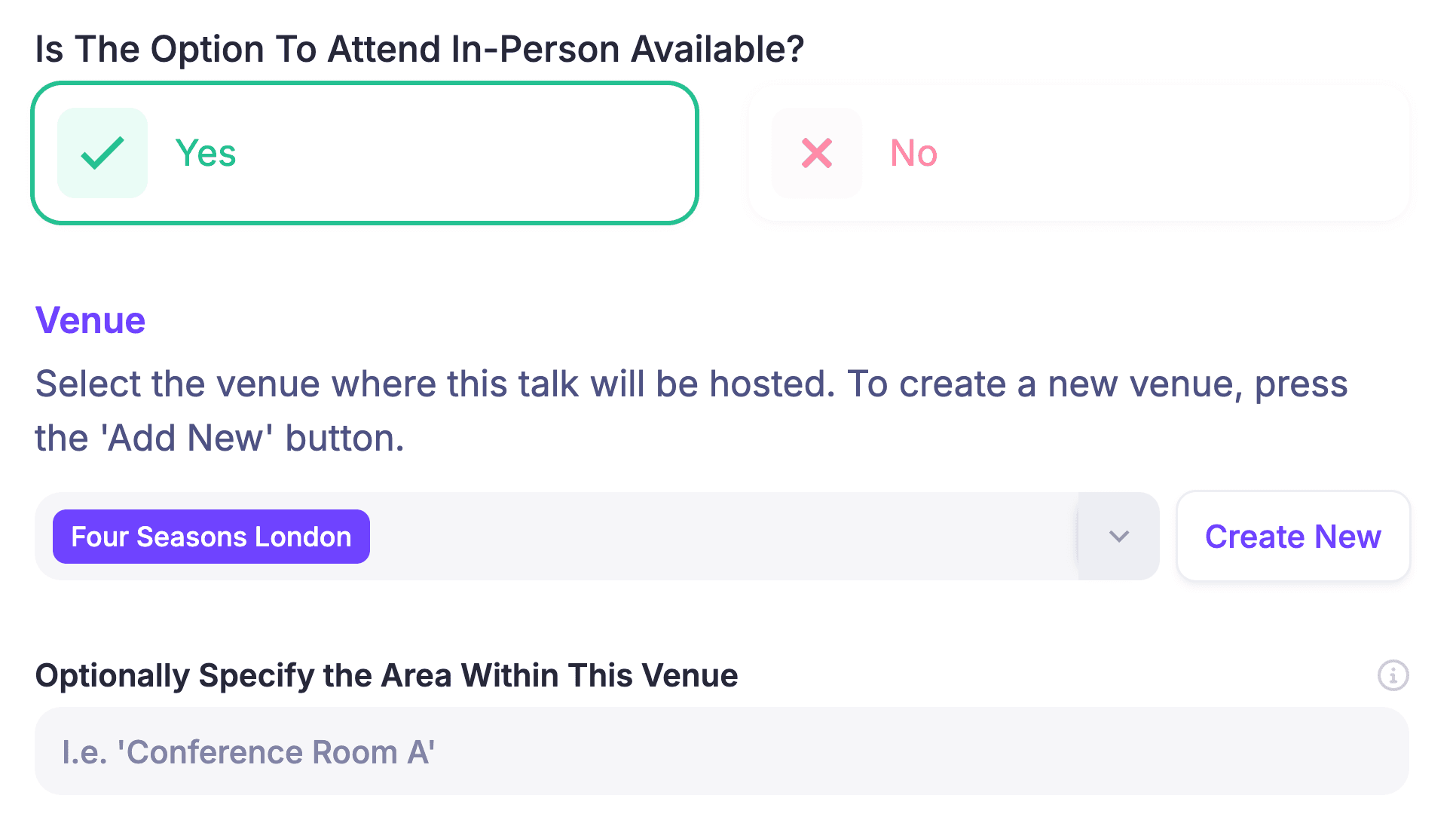
- Enable the in-person event path and configure the relevant talks or venue. Keep the online and in-person attendance options clear so the ticket and session setup match the experience you are selling.
- Create an eligible ticket. Decide whether it covers online broadcasts, replays, in-person attendance, or a combination. Make the access description visible before checkout.
- Let HeySummit issue the purchase QR code. HeySummit's QR-code check-in guide explains that each purchased ticket, add-on, and donation receives a unique code, and that attendees can retrieve it from My Purchases or a receipt. Relevant event emails can also include the code for in-person attendees.
- Give the right people check-in permission. Use the event owner, staff, or a team member authorised to check in attendees. Do not rely on shared credentials at the door when named team access can make ownership clearer.
- Test the scanning device while logged in. The device guidance for HeySummit QR check-in says the QR code opens a secure HeySummit page, so the reader needs internet access and an authenticated HeySummit session. A phone, tablet, or standalone scanner can work if it can open that page.
- Run a valid scan and a repeat scan. The first valid scan records the check-in. A later scan of the same code shows that the ticket has already been verified, giving staff a clear duplicate-scan state without promising that QR check-in is a security or fraud-prevention system.
- Test the manual exception path. If someone cannot show a code, HeySummit's manual check-in steps direct authorised staff to Reports > Attendees, then Manage Tickets, where an eligible active in-person ticket can be checked in from the attendee record.
- Decide whether session attendance matters. The QR receipt can optionally expose talk-level attendance controls. Use them only if your staff plan and reporting process can support that extra step consistently.
For a smaller event, that may cover the essential path from registration to arrival. See how the broader in-person event registration and check-in workflow fits alongside ticketing, promotion, attendee management, and follow-up.
Run this pre-event QA checklist
Do not make event day the first realistic test. Use a clean test attendee and ticket, then run the workflow on the actual devices and network you expect to use.
- Create or assign an eligible in-person ticket to a test attendee.
- Open the QR code from the attendee account, an event email, and a printable receipt.
- Scan it from every device model or reader type the door team will use.
- Confirm the scanner is logged into the correct event and has check-in permission.
- Scan the same code again and make sure staff recognise the repeat-scan message.
- Find the attendee in Reports and test the manual fallback on a separate eligible test ticket.
- Test venue Wi-Fi and mobile connectivity at each check-in point, not only in the office.
- Assign one exception desk or owner for missing codes, ticket questions, refunds, and walk-ins.
- Charge devices, pack power banks, and define what the team does if the internet fails.
- Decide whether talk-level attendance is required and rehearse it if so.
- Write down who reviews attendance information after doors close.
If you are coordinating online and venue work at the same time, use the broader guide to plan a hybrid event so check-in is part of the event-day runbook rather than an isolated software task.
Prepare the exception desk before doors open
A reliable check-in plan does not eliminate exceptions; it routes them away from the main line. Give one person the permissions and context to resolve the cases the scanning team should not improvise.
| What staff see | Likely cause | Next step |
|---|---|---|
| The ticket is already verified. | The code was scanned earlier. | Check the attendee and ticket details before deciding whether another person is presenting the same code. |
| The secure page will not open. | The device is offline or not authenticated. | Restore connectivity or sign in on the approved device; move the attendee to the exception desk meanwhile. |
| The attendee has no code. | The phone, email, or printed receipt is unavailable. | Find the attendee and use the manual ticket check-in path if the ticket is eligible. |
| The manual check-in option is missing. | The ticket may be refunded, already checked in, unassigned, or not eligible for in-person access. | Review the ticket record instead of overriding the state at the door. |
| The guest is not registered. | This is a walk-in, not a check-in exception. | Send them to the separate registration or sales process defined for your event. |
Choose specialist onsite software when the venue demands it
A simple integrated workflow is not automatically better. It is better only when it covers the failures your team is likely to face.
Evaluate specialist event check-in software when you need:
- Reliable offline operation at a venue with weak or unavailable connectivity.
- Self-service kiosks or unattended check-in points.
- Onsite registration, payment, ticket changes, or credential printing.
- Badges, wristbands, RFID, NFC, or other physical credentials.
- Multiple access zones, restricted rooms, age checks, or security workflows.
- High-volume arrivals that require dedicated hardware, lane planning, or onsite support.
- Complex session scanning or regulated attendance records.
- A venue or production partner that already operates a tested check-in stack.
Adding a specialist tool also creates a data-handoff decision. Define which system owns registration, which one owns onsite arrival, and how the final attendance state gets back to the rest of your event tech stack. Two capable systems can still create a bad event-day experience if staff do not know which record to trust.
Avoid these common buying and setup mistakes
- Buying for impressive features instead of likely failures. Kiosks and RFID do not make a small event safer if the real risk is an untested login or weak venue Wi-Fi.
- Treating registration as proof of arrival. A registration record tells you who intended to attend; check-in records who arrived.
- Skipping the repeat-scan test. Door staff need to know what a duplicate looks like before a queue forms.
- Assuming every device is ready. Test the browser, QR reader, login, camera permissions, battery, and network on the actual hardware.
- Leaving exceptions in the main line. Give edge cases one clear place to go and one person empowered to resolve them.
- Promising offline support without testing it. If the workflow depends on a secure web page, plan for internet access or choose software with verified offline behavior.
- Ignoring the post-event owner. Decide who reviews arrival and attendance information while the event plan is still being built.
Pick the smallest system that covers the real risk
The right event check-in software is not the product with the most onsite features. It is the system that covers your tickets, permissions, devices, connectivity, exceptions, attendance needs, and venue constraints without creating a more fragile workflow.
For a small hybrid or in-person event, an integrated ticket-to-QR process may be enough. HeySummit can keep the check-in path connected to the event you already built, while leaving kiosks, badge printing, RFID, offline operation, and complex access control to specialist tools when those needs are real. Explore HeySummit for in-person events, then test the exact arrival workflow your team will use before opening the doors.
Frequently asked questions
Table of Contents
Registration, check-in, and access control are different jobsStart with the quick fit decisionUse a buyer checklist based on failure modesA practical HeySummit QR workflowRun this pre-event QA checklistPrepare the exception desk before doors openChoose specialist onsite software when the venue demands itAvoid these common buying and setup mistakesPick the smallest system that covers the real riskFrequently Asked QuestionsTry HeySummit free
HeySummit is the easiest way for creators and educators to grow their audience, authority and revenue with professional online events created in minutes, not weeks.
Share this article on:
Recent Posts
Loading feed...