7 Best Eventbrite Alternatives for Paid and Multi-Session Events
-1690817315934-652794559.png&w=96&q=75)
Benjamin Dell
Founder, HeySummit
The best Eventbrite alternative depends on what you need to replace. Ticket Tailor is a direct ticketing option for organizers who already own their audience. HeySummit fits content-led paid online and multi-session events. Zoom Events is built around video-first virtual programs. Whova focuses on app-led conferences. Cvent covers complex enterprise portfolios. vFairs suits virtual expos and managed event programs. Zeffy is designed for eligible nonprofit fundraising events.
Eventbrite can still be the sensible choice. Its marketplace, paid and free ticketing, recurring-date support, Organizer app, mobile check-in, and onsite sales cover the main job for many public events. Switch only when another platform solves a defined workflow or cost problem that matters more than the disruption of moving.
HeySummit publishes this guide and is one of the products compared. The method is simple: start with the event operating model, compare the attendee-facing price and the organizer's total cost, then test the same representative event in every shortlisted platform.
Quick answer: choose by the job you need to replace
Stay with Eventbrite
Best when marketplace discovery, straightforward ticketing, recurring dates, and event-day check-in are the main jobs.
HeySummit
Best for content-led paid online and multi-session events with speakers, partners, access rules, external video, and replays.
Ticket Tailor
Best for direct ticket sales when you own the audience and need a focused ticketing system.
Zoom Events
Best for video-first multi-day or multi-track virtual events inside the Zoom ecosystem.
Whova
Best for app-led conferences with agendas, networking, sponsors, exhibitors, badges, and onsite operations.
Cvent
Best for enterprise event portfolios that need venue, registration, onsite, CRM, governance, and reporting depth.
vFairs
Best for virtual expos, fairs, booths, managed services, and modular virtual, hybrid, or in-person programs.
Zeffy
Best for eligible nonprofits that need fundraising ticketing and donor workflows.
Before you switch, decide whether Eventbrite is actually the problem
Eventbrite's current US organizer pricing lists a 3.7% plus $1.79 service fee per paid ticket and a 2.9% payment-processing fee per order. Buyers pay those fees by default, although an organizer can choose to cover them, and free tickets have no ticketing fees. Rates and plan details vary by country, so use the pricing shown for your event region on the day you compare.
Those fees are only one part of the decision. Eventbrite's Organizer app supports attendee check-in, onsite ticket sales, order management, and ticket scanning. Its multiple-date and recurring-event guidance covers events spanning several dates, repeating instances, and time slots.
That means the real question is not whether Eventbrite can sell a ticket across several dates. Ask whether the event needs deeper session, speaker, content-access, sponsor, affiliate, replay, video-delivery, app, exhibitor, onsite, or enterprise-governance workflows.
A vague complaint about fees is not enough. Calculate the full attendee-facing price and the organizer's total system cost first. A one-off support problem or an unchecked assumption about a missing feature is also a weak reason to move.
Comparison method: test one representative event
Use the same event in every vendor demonstration. A useful test case is a paid three-day online or hybrid program with 12 speakers, two ticket tiers, several sessions, replay access, two sponsors, reminder emails, and post-event reporting.
For each platform, verify:
- the event formats and main operating job;
- ticketing, attendee-facing total price, organizer cost, payment processing, payout, and refunds;
- multi-session agendas, content access, replays, and recurring-event behavior;
- online delivery and any external video integrations;
- speaker, sponsor, exhibitor, and affiliate workflows;
- event pages, registration, email, discovery, and marketing;
- mobile apps, badges, check-in, and other onsite boundaries;
- exports, CRM connections, analytics, implementation, support, and exit terms.
Eventbrite alternatives comparison
On a phone, swipe sideways to see every column in the table.
| Option | Best for | Event formats | Ticketing and payment model | Multi-session depth | Online delivery | Onsite and mobile | Pricing motion | Important non-fit |
|---|---|---|---|---|---|---|---|---|
| Eventbrite | Marketplace discovery and straightforward ticketing | Public, private, free, paid, recurring, timed-entry, and multi-date events | Ticket and payment-processing fees for paid events, free tickets without ticketing fees | Multiple dates and time slots, but validate deeper session and content-access needs | Online event links and integrations rather than a broad content-led event operating layer | Organizer app, ticket scanning, check-in, onsite sales, and supported printers | Published regional fees plus optional paid marketing or tailored plans | May not own the full speaker, sponsor, affiliate, replay, or multi-session content workflow |
| HeySummit | Content-led paid online and multi-session events | Online, hybrid, in-person, live, pre-recorded, and on-demand programs | Free and paid tickets, access rules, add-ons, donations, and connected payment providers | Sessions, speakers, ticket access, sponsors, affiliates, emails, and replays in one event journey | Coordinates supported external video and streaming providers | Event access and check-in support, but not a full badge-printing or custom attendee-app suite | Published subscription plans and transaction terms | Not a consumer marketplace, native video studio, reserved-seating system, or heavy enterprise onsite suite |
| Ticket Tailor | Direct ticket sales for an owned audience | In-person, online, recurring, timed, and seated ticketed events | Flat usage charges through pay-as-you-go or prepaid credits, with separate payment-processor fees | Recurring occurrences and event tickets, with streaming links available for online events | Connects tickets to online event links and external services | Free check-in app, door sales, seating, and scanner support | Usage-based pricing shown in the account billing area | A focused ticketing tool may need other systems for a broad speaker, sponsor, and content program |
| Zoom Events | Video-first multi-track virtual events | Virtual, hybrid, multi-day, multi-session, and recurring programs | Customizable registration and ticketing for free, paid, public, or private events | Parallel tracks, sessions, lobby, networking, expo, and event-wide analytics | Native Zoom ecosystem for live sessions and recordings | Virtual attendee experience rather than deep venue, badge, and onsite operations | Sales or plan-led Zoom pricing | Less suitable when event marketing, speakers, partners, or cross-provider delivery matter more than native video |
| Whova | App-led conferences and onsite or hybrid operations | In-person, hybrid, and virtual conferences | Registration and ticketing connected to the attendee app, access, and event data | Agenda, abstracts, speakers, sponsors, exhibitors, networking, and targeted access | Virtual event support and integrations alongside the conference app | Attendee app, badges, check-in, networking, exhibitors, and lead retrieval | Request a quote for the event scenario | May be more conference and app infrastructure than a lean content-led program needs |
| Cvent | Enterprise event portfolios and governance | In-person, trade show, webinar, virtual, hybrid, and portfolio programs | Flexible registration inside a modular enterprise suite | Broad event, attendee, venue, marketing, integration, and reporting workflows | Virtual and webinar products within the wider Cvent platform | Venue sourcing, attendee apps, check-in, lead capture, badges, and attendance tracking | Sales-led modular contract | Buying and implementation weight can exceed the needs of a small or self-service team |
| vFairs | Virtual expos, managed programs, and modular event operations | Virtual, hybrid, in-person, webinars, fairs, expos, and conferences | Registration and ticketing with tiers, groups, discounts, add-ons, and payment gateways | Sites, agendas, speakers, exhibitors, sponsors, booths, sessions, and reports | Virtual venues, stages, booths, chat, networking, and webinars | Mobile app, kiosks, check-in, badges, lead capture, and onsite assistance | Custom package based on the required event tools and services | Feature and service breadth can be unnecessary for a focused ticketing or creator-led event |
| Zeffy | Eligible nonprofit fundraising events | Fundraisers, ticketed nonprofit events, in-person payments, and related campaigns | No platform or card-processing fees for eligible nonprofits, funded through optional donor tips | Ticket types, dates, buyer questions, reminders, attendee lists, and check-in | Ticketing and fundraising workflows rather than a deep multi-track virtual venue | QR tickets, check-in, door sales, and Tap to Pay | Free for eligible organizations under Zeffy's model | For-profit businesses and organizations outside supported eligibility rules cannot use it |
Use this matrix to rule options in or out. If you are still comparing categories, the guide to event registration software versus an event platform explains where ticketing ends and the wider event workflow begins. Teams treating the public site as a separate buying decision can also compare the best event website builders.
The seven Eventbrite alternatives
1. HeySummit for content-led paid and multi-session events
Best for: creators, educators, communities, and brands running paid online or multi-session events with speakers, sponsors, affiliates, external video, and replay access.
Why it makes the shortlist: HeySummit connects the event site, registration, tickets, access rules, sessions, speaker workflows, sponsors, affiliates, email, integrations, analytics, and replay in one event journey. The HeySummit Product Tour shows the wider workflow, while event ticketing and access control covers free and paid tiers, access rules, add-ons, and related revenue tools.
Representative-event fit: The three-day program can give standard and VIP buyers different live and replay access, coordinate 12 speakers, place sponsors, track partner referrals, schedule emails, and connect each session to a supported delivery provider.
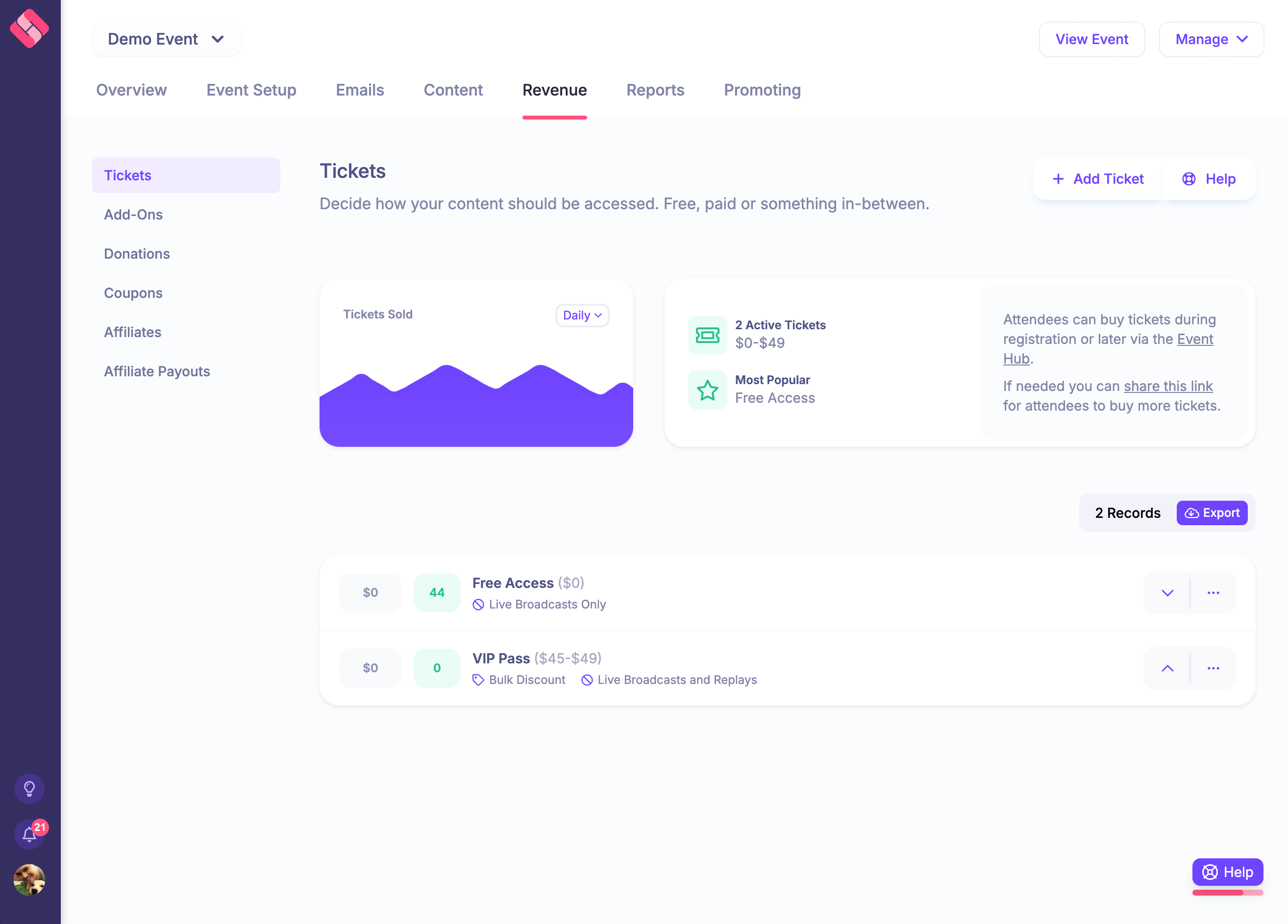
Pricing motion: HeySummit publishes subscription plans and transaction terms. Check the current plan allowances, payment-provider costs, transaction terms, and required integrations for the exact event.
Choose it when: the hard job is coordinating content, speakers, partners, paid access, and replays around an audience-growth or revenue goal.
Skip it when: you mainly need consumer marketplace demand, native video production, reserved seating, a custom attendee app, badge printing, venue sourcing, or a procurement-heavy enterprise onsite suite. HeySummit uses video and streaming integrations instead of claiming to replace every webinar or streaming provider.
For a direct two-product decision, compare HeySummit and Eventbrite directly. The generated HeySummit versus Eventbrite feature comparison provides another product view, but recheck any pricing or plan details against the current vendor pages before making a decision.
2. Ticket Tailor for direct ticket sales
Best for: organizers who own their audience and want focused ticketing without buying a broad event operating layer.
Why it makes the shortlist: Ticket Tailor supports ticket sales, recurring events, seating, online event links, a check-in app, door sales, widgets, and integrations. Its current pricing guidance describes usage-based pay-as-you-go and prepaid options. It also states that Ticket Tailor charges a flat usage fee rather than a commission based on ticket price, while Stripe, PayPal, or Square charge their own processing fees.
Representative-event fit: It can sell the two ticket tiers, manage orders, connect buyers to online event links, and check attendees in. The team should demonstrate how it will handle the agenda, speakers, sponsors, session access, reminders, replays, and reporting across any connected tools.
Pricing motion: Usage-based pricing. Compare pay-as-you-go with prepaid credits, then add payment processing, optional features, and the cost of adjacent delivery or marketing tools.
Choose it when: ticket sales, branding, checkout, and event-day access are the main jobs and you already have the rest of the event system.
Skip it when: the event depends on a broad speaker, sponsor, affiliate, content-access, replay, and multi-session workflow that you do not want to assemble across several products.
3. Zoom Events for video-first virtual programs
Best for: multi-day or multi-track virtual and hybrid events that want delivery, lobby, networking, expo, and analytics inside the Zoom ecosystem.
Why it makes the shortlist: Zoom's current virtual-event platform page describes parallel sessions and tracks, a central lobby, an expo floor, ticketing and registration, networking, and event-wide analytics.
Representative-event fit: The three-day program can run simultaneous sessions, give attendees a central event hub, provide sponsor booths, and report on engagement across the event. Demonstrate the exact speaker workflow, registration data, ticket rules, recordings, accessibility, and integrations required by the team.
Pricing motion: Zoom plan or sales-led pricing. Confirm the required Zoom products, host licenses, attendee limits, support, storage, and professional services in the quote.
Choose it when: native video delivery and a Zoom-centered virtual attendee experience are the core requirements.
Skip it when: event marketing, partner promotion, speaker self-service, cross-provider delivery, paid content access, or a broader replay business matters more than keeping the event inside Zoom.
4. Whova for app-led conferences
Best for: conferences where the attendee app, agenda, networking, sponsors, exhibitors, badges, and onsite operations need to work together.
Why it makes the shortlist: Whova's current platform overview covers registration and ticketing, abstract and speaker management, agendas, exhibitors and sponsors, check-in, name badges, networking, announcements, an attendee app, reports, lead retrieval, and surveys. Its registration product can connect ticket access to event days, session tracks, and networking opportunities.
Representative-event fit: The program can combine registration, a personalized agenda, sponsor and exhibitor visibility, targeted access, attendee networking, check-in, and post-event reports. Ask the vendor to demonstrate app setup and the online or hybrid delivery model with the exact program.
Pricing motion: Quote-based. Include the app, registration, badges, check-in, exhibitors, lead retrieval, integrations, support, and any hardware or service costs.
Choose it when: a conference app and onsite or hybrid operations carry more risk than the ticket checkout alone.
Skip it when: a lean team primarily needs a content-led online event workflow and would not use the conference-app or onsite depth.
5. Cvent for enterprise event portfolios
Best for: enterprise teams running many events with complex registration, venue, onsite, CRM, governance, and reporting requirements.
Why it makes the shortlist: The current Cvent platform spans in-person, virtual, hybrid, webinar, and trade-show programs. It connects venue sourcing, branded registration, attendee experiences, attendance data, lead capture, CRM sync, and performance reporting.
Representative-event fit: Cvent can support the event within a wider governed portfolio, including registration and onsite workflows, data connections, and reporting. The buying team should test the required modules and the work needed to configure them.
Pricing motion: Sales-led modular contract. Include implementation, hardware, onsite services, integrations, security work, support, renewal terms, and exit costs.
Choose it when: enterprise governance, portfolio consistency, venue and onsite breadth, integrations, and service coverage justify a heavier system.
Skip it when: a small or creator-led team needs fast self-service setup and would carry more platform and procurement weight than the event warrants.
6. vFairs for expos and managed event programs
Best for: virtual expos, fairs, booths, conferences, and hybrid programs that need a broad product set and hands-on service.
Why it makes the shortlist: The current vFairs event management platform covers event sites, registration and ticketing, mobile apps, check-in, badges, exhibitors, sponsors, speakers, abstracts, virtual stages, booths, networking, lead capture, and analytics. Its pricing page uses a custom package model based on the tools and services an event needs.
Representative-event fit: The three-day program can combine a branded site, ticketing, sessions, speakers, sponsor or exhibitor spaces, virtual delivery, an app, onsite tools, and reports. Ask which elements are software, add-ons, hardware, or managed services.
Pricing motion: Custom package. Scope the whole program, including virtual venue, app, badges, exhibitors, integrations, project support, and onsite assistance.
Choose it when: the event needs a virtual expo or feature-rich managed program and the team wants help operating it.
Skip it when: the event only needs focused ticketing or a lean content-led workflow and would not use the expo, app, onsite, or service layers.
7. Zeffy for eligible nonprofit fundraising events
Best for: eligible nonprofits and registered charities running fundraising events with tickets, donations, reminders, and check-in.
Why it makes the shortlist: Zeffy's nonprofit event ticketing page describes ticket types, buyer questions, payment collection, reports, QR check-in, door sales, reminders, and attendee lists. Zeffy says its nonprofit customers pay no platform or card-processing fees because the service is funded through optional donor tips.
Representative-event fit: An eligible nonprofit can sell tickets, collect related donations, ask registration questions, email attendees, and manage check-in. It should separately plan any complex agenda, speaker, sponsor, video, networking, or replay workflows.
Pricing motion: Free for eligible organizations under Zeffy's optional-tip model. Confirm current terms and whether the donor checkout experience fits the fundraising policy.
Choose it when: nonprofit fundraising ticketing is the main job and the organization meets the eligibility rules.
Skip it when: the organizer is a for-profit business. Zeffy's eligibility guidance says organizations must be a nonprofit or registered charity in a supported country and have a bank account in the organization's name.
Compare total cost, not the headline fee
A ticketing fee is easy to spot. The expensive gap is often a missing tool, manual process, hardware requirement, or migration project.
Buyer total
Ticket price, mandatory fees, processing, tax, optional add-ons, and the final amount at checkout.
Organizer platform cost
Subscription, usage, per-event fees, absorbed ticket fees, refunds, chargebacks, and payout timing.
Adjacent tools
Video, email, CRM, mobile app, hardware, badges, streaming, storage, captions, and integrations.
People and change
Implementation, migration, design, training, services, support, internal staff time, and exit work.
For covered US live-event tickets, the Federal Trade Commission's fee rule guidance says businesses displaying prices must show the total price upfront and include mandatory charges they can calculate. This is general information, not legal advice. Check the rules that apply to your event, location, sales channels, and buyers.
Build the comparison using the same country, currency, ticket price, order size, sales volume, refund assumptions, and source date. The online summit ticket pricing guide can help separate access-tier strategy from platform selection. Use the paid webinar guide when the event is a smaller paid online format.
Switch without disrupting attendees
- Freeze the event scope and assign an owner. Write down the sessions, ticket types, access rules, buyers, speakers, sponsors, integrations, and reporting requirements that must survive the move.
- Export the data you are allowed to use. Include attendees, orders, tickets, refunds, consent records, campaigns, and stable IDs. An export does not create new marketing permission.
- Rebuild the full attendee journey. Cover pages, registration questions, tickets, tax and fee settings, emails, calendar links, access rules, sessions, speakers, sponsors, delivery providers, and tracking.
- Run free and paid test orders. Verify checkout, processing, refunds, confirmations, invoices or receipts, calendar links, login, live access, replay, and support messages.
- Test event-day operations. Rehearse mobile access, check-in, badges, scanning, support escalation, schedule changes, speaker handoff, sponsor visibility, and any livestream failover.
- Test the data handoff. Confirm CRM sync, exports, analytics, consent fields, attribution, payouts, and finance reconciliation.
- Communicate the change. Update attendees, speakers, sponsors, partners, public pages, ads, QR codes, calendar links, and support documentation from one approved source of truth.
- Keep a rollback path. Define the last safe cutover point and the conditions that would send the team back to the old workflow.
- Close only after reconciliation. Match orders, payouts, attendee counts, refunds, exports, recordings, and open support issues before canceling the old platform.
A practical decision path
- Need a marketplace and straightforward public ticketing? Stay with Eventbrite.
- Need direct ticketing for an audience you already own? Shortlist Ticket Tailor.
- Need content-led paid online or multi-session operations? Shortlist HeySummit.
- Need Zoom-native multi-track virtual delivery? Shortlist Zoom Events.
- Need an app-led conference and onsite workflow? Shortlist Whova.
- Need enterprise portfolio controls, venue, and onsite breadth? Shortlist Cvent.
- Need a managed virtual expo or fair? Shortlist vFairs.
- Run an eligible nonprofit fundraising event? Shortlist Zeffy.
Keep the shortlist to two or three platforms. Ask each vendor to demonstrate the same event and attach every paid module, service, and dependency to the written quote. The best choice is the one that removes the named constraint without making the rest of the event harder to operate.
See how HeySummit handles the wider event workflow
HeySummit is worth a closer look when tickets are only one part of the job. The platform brings event pages, registration, sessions, speakers, sponsors, affiliates, email, access rules, connected video providers, analytics, and replays into one organizer workflow.
Start with the HeySummit Product Tour. Then review ticketing and access control and current HeySummit pricing against the representative event you used for every other vendor.
Frequently asked questions
Table of Contents
Quick answer: choose by the job you need to replaceBefore you switch, decide whether Eventbrite is actually the problemComparison method: test one representative eventEventbrite alternatives comparisonThe seven Eventbrite alternativesCompare total cost, not the headline feeSwitch without disrupting attendeesA practical decision pathSee how HeySummit handles the wider event workflowFrequently Asked QuestionsTry HeySummit free
HeySummit is the easiest way for creators and educators to grow their audience, authority and revenue with professional online events created in minutes, not weeks.
Share this article on:
Recent Posts
Loading feed...