Event Follow-Up Email Templates: Attendees, No-Shows, Replays, and Next Steps
-1690817315934-652794559.png&w=96&q=75)
Benjamin Dell
Founder, HeySummit
An event follow-up email is a message sent after an event outcome to deliver access, resources, feedback requests, relationship next steps, or an eligible offer. The useful version starts with the recipient's situation. A live attendee, a no-show, a speaker, and a sponsor rarely need the same message.
Use one rule before you reach for a template: route first, write second. Decide what happened, what the recipient can access, why you are contacting them, and the single action they should take next. Then write the shortest message that does that job.
Quick answer
A strong event follow-up email includes a recognisable event reference, the outcome or resource relevant to that audience, one clear next action, a support route, and any required identity or preference information. Send it when the promised resource, access rule, and owner are ready, not because a generic timing rule says the clock has run out.
Choose the follow-up path before you write
The same registration list can contain people in very different states. Start with four inputs: audience outcome, message purpose, access state, and next action. This keeps an access update from turning into a generic promotional blast.
On a phone, swipe sideways to read the full routing matrix.
| Audience outcome | What changed | Immediate need | Message purpose | One useful next action | Owning data source |
|---|---|---|---|---|---|
| Live attendee | They attended at least part of the event | Promised resources, recap, or feedback route | Service, learning, or relationship | Open the resource or answer the survey | Event platform, webinar provider, or attendance system |
| Registered no-show | They registered but did not attend | An accurate alternative | Service or access | Watch an eligible replay or view another resource | Registration and attendance records |
| Replay-eligible registrant | The live session has ended and access is available | The right replay link and access window | Access | Open the replay | Ticket and talk replay settings |
| Known replay viewer | A reliable external system recorded a view | A next step connected to what they watched | Learning, relationship, or eligible marketing | Use one relevant resource or offer | Video, CRM, or analytics system |
| Speaker | Their session or event commitment is complete | Assets, thanks, and agreed follow-up | Relationship and operations | Review or share the agreed asset | Speaker workflow owner |
| Sponsor or partner | The event has produced agreed deliverables | Status, assets, and a review point | Relationship and commercial operations | Review the deliverable summary | Sponsor owner and agreed reporting system |
| Internal owner | The public event has ended but operational work remains | Clear ownership and readiness checks | Internal operations | Complete the assigned task | Project plan or internal workspace |
If you need to see how these states fit into the whole lifecycle, an event attendee journey map helps connect post-event messages to the promises made during registration and attendance.
Build the event follow-up plan
Resolve operational promises before asking for anything new. If the event promised slides, a recording, or a sponsor introduction, make those items ready first. A feedback request or offer can wait until the service and access work is settled.
On a phone, swipe sideways to use the complete planning worksheet.
| Segment | Readiness condition | Sender | Promised asset | Access rule | One CTA | Owner | Measurement source | Preference check |
|---|---|---|---|---|---|---|---|---|
| Example: no-show with replay access | Recording processed and ticket access confirmed | Recognisable event sender | Session replay | Eligible ticket, available until the stated date | Watch the replay | Event operations | Event platform and video provider | Service purpose confirmed; any promotion assessed separately |
Give each message one dominant purpose. A wider sequence can move from access to feedback and then to an eligible commercial step, but each email should make one promise and ask for one action.
Use one event follow-up email blueprint
A reusable blueprint is safer than polished copy that pretends every event is the same. Build each message from these parts:
- Contextual subject: name the event, resource, or next step. Avoid vague subjects such as “A quick follow-up”.
- Recognisable sender: use the organiser, host, or team name the recipient already knows.
- Audience-specific opening: state why this person is receiving this version.
- Promised outcome or resource: make the useful item easy to find.
- One next action: choose the main link or reply you want.
- Support route: tell the reader where to go if access or details are wrong.
- Identity and preference controls: include the information required for the message and jurisdiction.
Use personalisation only when the source data is reliable. An incorrect session title or empty first-name field makes a supposedly personal email feel less trustworthy than plain copy.
Template blueprint for live attendees
Live attendees have already experienced the event. Their first follow-up should help them use what they were promised, capture feedback, or continue a relevant relationship.
Subject: Your [event name] resources
Opening: Thanks for joining [event or session].
Resource: Here is [the promised resource or recap], available [accurate access detail].
One action: [Open the resource / answer the survey / review the next event].
Support: If your access does not look right, contact [support route].
Do not assume attendance proves marketing consent or interest in every product. If feedback is the next job, link to focused post-event survey questions and keep the email centred on that request.
Template blueprint for registered no-shows
A no-show message should not shame the recipient or manufacture urgency. Acknowledge that they registered, then give them a truthful alternative.
Subject: Catch up on [event or session]
Opening: You registered for [event or session], but we did not see you there.
Access: Your [ticket or registration] includes [accurate replay or resource access].
One action: [Watch the replay / open the recap / view the next available session].
Support: If you expected different access, contact [support route].
If there is a genuine expiry date, state it plainly. If there is no replay, say so and offer an alternative you can actually deliver. This is follow-up, not a second event reminder email.
Template blueprint for replay access and engagement
Replay eligibility is not the same as replay viewing. Before promising a recording, confirm the ticket applies to replays, the talk has a replay source, and any content or expiry restrictions allow this recipient to watch it.
HeySummit's current replay guidance says eligible attendees need both ticket access and an available talk replay. The practical virtual event replay access guide goes deeper into packaging, windows, and entitlement decisions.
Subject: Your replay access for [event or session]
Access: Your [ticket or registration] includes this replay until [verified date or condition].
One action: Watch [session title].
Support: Sign in with [accurate access instruction], or contact [support route] if the replay is unavailable.
Create a separate viewer branch only when a reliable video or CRM system supplies that behaviour. Do not label every replay-eligible person as a viewer.
Template blueprint for speakers
Speaker follow-up is a relationship and delivery workflow. Keep it separate from the attendee broadcast.
- Thank them for the specific session or contribution.
- Share the recording, clips, slides, or performance information you agreed to provide.
- Confirm any remaining promotional or administrative task.
- Ask for one next action, such as approving a clip or booking a debrief.
Do not invent performance data or turn private feedback into a testimonial request without context. If you want a quote, ask clearly and make approval explicit.
Template blueprint for sponsors and partners
Sponsors and partners need a clear account of agreed work, not a generic thank-you. Name which assets or placements are ready, what reporting is still pending, and who owns the review.
Subject: [Event name] sponsor follow-up and next review
Status: [Agreed assets or placements] are complete. [Named report or deliverable] will be ready when [condition].
One action: Review [the deliverable summary / the next meeting time].
Owner: Contact [named owner] with questions.
Do not imply that attendee data can be shared simply because someone sponsored the event. Follow the relevant agreement, privacy notice, permissions, and jurisdiction before any data handoff.
Complete the internal follow-up first
Customer-facing messages should not get ahead of unresolved event work. Before a public send, assign owners for:
- replay processing and access checks;
- slides, downloads, and other promised resources;
- support exceptions and failed access;
- the survey and its response owner;
- speaker and sponsor deliverables;
- CRM or ESP handoff;
- measurement and the internal report.
If the team needs a structured review after those systems are ready, a post-event report template can keep the operational and performance work separate from the public follow-up copy.
Send each follow-up when its promise is ready
There is no universal hour count for every event and audience. Use readiness conditions instead:
- Service and access: send when the resource works, the entitlement is confirmed, and support exceptions are known.
- Learning and feedback: send when the response window is open and someone owns the findings.
- Relationship follow-up: send when the speaker, sponsor, or partner deliverable is accurate.
- Eligible marketing: send only after you have confirmed the purpose, recipient, permission or other lawful basis, and opt-out route for the relevant jurisdiction.
This order protects the promise the event already made. It also prevents a useful access email from being buried under a survey, sales pitch, and unrelated invitation.
Keep service messages and marketing messages distinct
Message classification depends on purpose and context, not the label in your project plan. The US Federal Trade Commission's CAN-SPAM guide explains requirements for commercial email, including accurate sender and subject information, a valid postal address, a clear opt-out route, and prompt handling of opt-out requests.
For UK recipients, the Information Commissioner's Office guidance on electronic mail marketing distinguishes genuine service messages from direct marketing and warns that adding promotional material can change how a message is treated.
These sources are a starting point, not legal advice. Review the recipient, channel, purpose, content, consent or other permitted basis, identity information, and opt-out requirements for every jurisdiction that applies to your event.
Set up event follow-up in HeySummit
Start with HeySummit's built-in transactional messages when they already match the event outcome. For a custom one-off segment, use a Broadcast. For an ongoing event rule, use an Auto message when the Email Broadcasts & Sequences feature is available on the account. HeySummit is built for event-related email, not as a full replacement for an email service provider.
- Open Emails and choose the message type that matches the job.
- Set the recipient type and apply Audience Filters to the parent message.
- Write the content, choose one next action, and check the sender and subject.
- Add follow-up steps when the wider sequence needs them. Follow-up children use the parent audience; they do not have independent filters.
- Preview the rendered message and send a test before relying on a scheduled send.
- Confirm ticket and talk replay settings before you promise access.
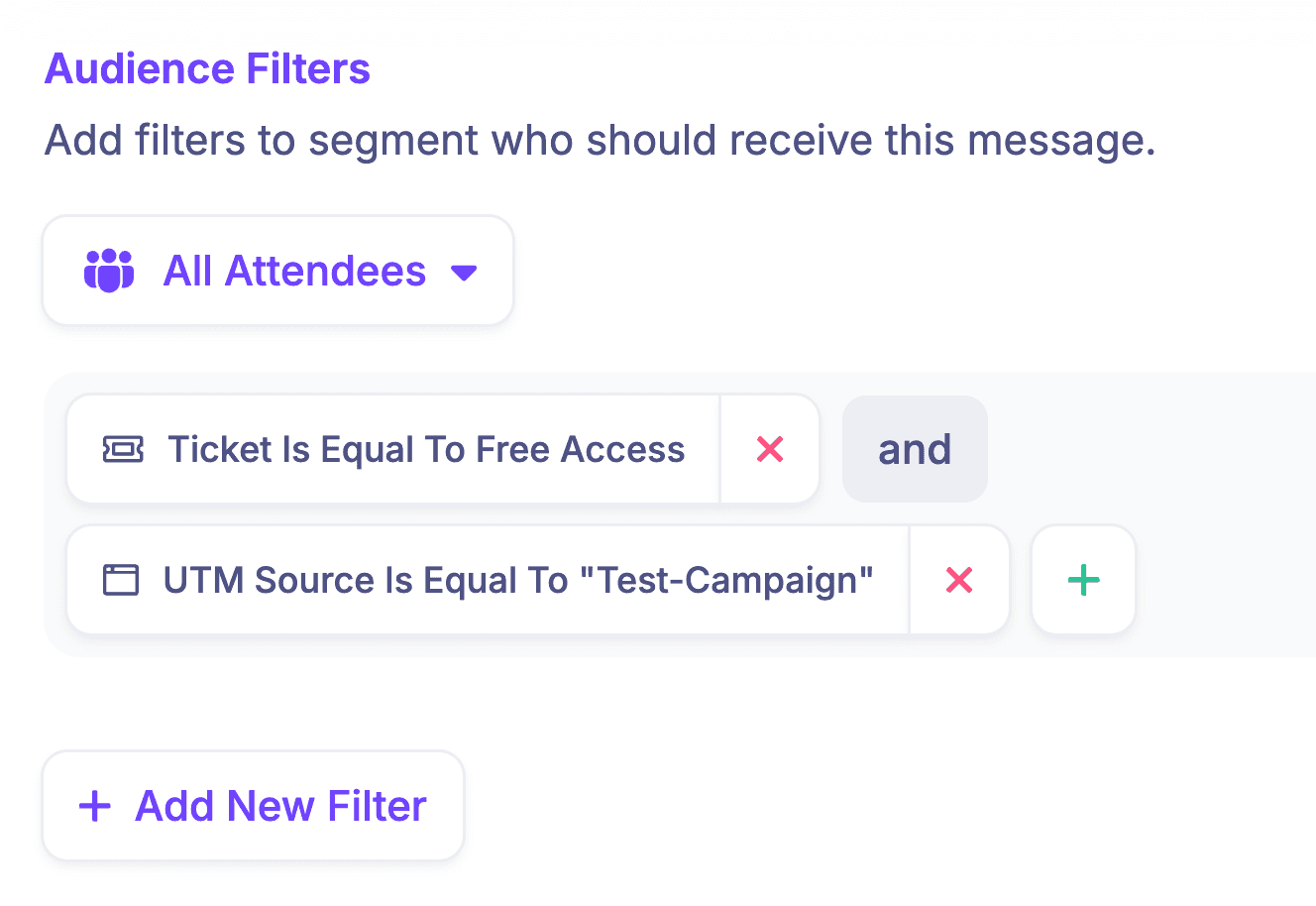
See how custom event emails fit into the event workflow. When segmentation or lifecycle logic belongs outside the event platform, use your CRM and revenue integrations or a Zapier event automation instead of pretending HeySummit owns external data it does not have.
Measure the outcome without overclaiming
Give each signal an owner. Delivery and bounce data may live in the sending system. Replay access may live in the event platform or video provider. Survey responses belong to the survey tool. Commercial outcomes belong in the CRM or payment system.
A small measurement plan is enough:
- delivery or bounce status where available;
- the main link or access action;
- survey response when feedback is the purpose;
- support exceptions caused by incorrect access;
- the downstream CRM outcome when a later eligible campaign owns it.
Do not treat an open as proof that the message created value. Measure the action the email was supposed to make possible.
Avoid these event follow-up mistakes
- Sending one generic message to every audience.
- Promising a replay before checking the ticket and talk settings.
- Mixing a service update with an unrelated promotion.
- Giving the reader several competing calls to action.
- Using personalisation fields with incomplete or unreliable data.
- Treating sequence children as separately segmented.
- Sending speaker or sponsor follow-up through the attendee workflow.
- Using urgency or performance claims you cannot support.
- Omitting a support route, sender identity, or required preference control.
Use this event follow-up checklist
- Confirm the audience outcome.
- Classify the message purpose.
- Verify what the recipient can access.
- Choose one next action.
- Confirm the sender and operational owner.
- Check consent, preferences, and jurisdiction requirements.
- Preview the message and test the real access path.
- Record which system will measure the result.
- Confirm the internal owners are ready.
The best follow-up is not the longest sequence. It is the one that recognises what happened, keeps its promise, and gives the recipient one useful next step. If you want to see how that email fits with tickets, replays, speakers, sponsors, and reporting, explore the HeySummit product tour.
Frequently asked questions
Table of Contents
Choose the follow-up path before you writeBuild the event follow-up planUse one event follow-up email blueprintTemplate blueprint for live attendeesTemplate blueprint for registered no-showsTemplate blueprint for replay access and engagementTemplate blueprint for speakersTemplate blueprint for sponsors and partnersComplete the internal follow-up firstSend each follow-up when its promise is readyKeep service messages and marketing messages distinctSet up event follow-up in HeySummitMeasure the outcome without overclaimingAvoid these event follow-up mistakesUse this event follow-up checklistFrequently Asked QuestionsTry HeySummit free
HeySummit is the easiest way for creators and educators to grow their audience, authority and revenue with professional online events created in minutes, not weeks.
Share this article on:
Recent Posts
Loading feed...