Event Cancellation Announcement Templates: Cancel, Postpone, or Move Online
-1690817315934-652794559.png&w=96&q=75)
Benjamin Dell
Founder, HeySummit
A useful event cancellation announcement says exactly what changed, names the affected event and date, tells the recipient what to do next, and gives ticket or refund information only when it has been confirmed. If details are still open, give people one official update page, a support contact, and a real time for the next update.
The wording matters, but the message is only one part of the job. You may also need to update the event page, schedule, tickets, emails, calendar entries, partners, speakers, venue, video provider, and support team. This guide helps you choose the right change state first, then adapt clear message blueprints for each audience.
Choose the right change state before you announce it
Cancel, postpone, and reschedule are not interchangeable. Choose the state that matches what you have actually decided. If safety or timing requires an early warning before the decision is final, send a holding notice and state what you are still checking.
On a phone, swipe sideways to see every column in this decision matrix.
| Change state | What it means | What you can say now | Recipient action | Next update | Systems to check |
|---|---|---|---|---|---|
| Cancelled | The event will not go ahead in its planned form. | State the cancellation directly. Include the approved reason only if it is useful and safe to share. | Explain whether they need to request anything, wait for a ticket update, or take no action. | Give a date for any open refund, credit, access, or replacement decision. | Event page, ticket sales, payment owner, emails, calendar, speakers, sponsors, venue, support. |
| Postponed | The event is still intended to happen, but no replacement date is confirmed. | Say that the date is not yet known. Do not call the event rescheduled. | Tell people whether their registration or ticket remains valid, only if that has been verified. | Commit to the next decision update, even if the new date is still unknown then. | Event dates, scheduled emails, ticket timing, calendar entries, contributors, venue, video provider. |
| Rescheduled | A replacement date and the main operating details are confirmed. | Show the old and new date, time, time zone, venue, or access details together. | Explain whether registration, tickets, calendar entries, sessions, and access carry over. | Send a reminder after every affected system has the new details. | Talk schedule, event dates, tickets, reminders, calendar, venue, video links, speakers, sponsors. |
| Moved online | The physical event or part of it will use an online delivery path. | Name the online format, access route, start time, and any equipment or sign-in step that is confirmed. | Tell attendees how to join and whether their ticket terms or access have changed. | Promise the access details later if the online room is not ready yet. | Event page, video provider, tickets, access emails, venue, travel information, speakers, support. |
| Venue or access link changed | The event still runs, but the place or joining route is different. | Label the old detail as obsolete and make the replacement unmistakable. | Ask the recipient to update travel plans, calendar details, or saved links as needed. | Confirm once public pages and reminders all point to the replacement. | Event page, calendar, venue or room, maps, accessibility details, emails, partners, support. |
| Partial programme change | One session, speaker, time, location, or part of the programme changes. | State what changed and what remains the same. | Target only the affected audience when possible, with a link to the current schedule. | Follow up if a replacement speaker, recording, or session time is still open. | Talk page, schedule, speaker, sponsor, reminders, venue or video room, support. |
This matrix handles the decision at the point of change. If you are planning before anything goes wrong, use an event contingency plan template to assign backup owners and actions in advance.
Build one source of truth
Choose one public page or controlled record that holds the latest confirmed version of the change. Every email, social update, calendar notice, partner message, and support reply should point back to that same truth.
Do not silently delete old information that people may still have in their inbox or calendar. Mark it as superseded, add the replacement, and record who owns the remaining questions.
On a phone, swipe sideways to complete every field in this worksheet.
| Field | Confirmed answer | Owner | Message use | Open question or deadline |
|---|---|---|---|---|
| Event and original details | ___ | ___ | Name the affected event, date, time zone, venue, or access route. | ___ |
| Change state | Cancel / postpone / reschedule / move online / venue or link / partial change | Decision owner: ___ | Put the decision near the top of every message. | Approved at: ___ |
| Affected audiences | Attendees / paid ticket holders / speakers / sponsors / partners / vendors / staff / public | Audience owner: ___ | Split messages where the required action differs. | Segment check due: ___ |
| Approved reason | ___ or intentionally omitted | Approver: ___ | Keep it brief. Do not speculate or assign blame. | Can this be shared publicly? ___ |
| Ticket, refund, credit, or access status | ___ | Payment or access owner: ___ | Use only verified policy, timing, and eligibility wording. | Next decision: ___ |
| Recipient action | ___ or no action required | Action owner: ___ | Give one clear next step and a deadline only when needed. | ___ |
| Support route | Email / help page / phone / form: ___ | Support owner: ___ | Use the same staffed route in every affected channel. | Coverage confirmed until: ___ |
| Official update location | Page or record: ___ | Page owner: ___ | Link to the current status instead of repeating unstable detail. | Updated at: ___ |
| Channel order | Internal / contributors / public page / direct email / calendar / social / partners | Communications owner: ___ | Choose the order for this event, not a universal script. | First publish time: ___ |
| Next update or closure | Date, time, time zone: ___ | Resolution owner: ___ | Use this when any material detail remains open. | Closure proof: ___ |
If your event has many audiences and channels, the broader event communication plan template helps you map each audience to its owner, approver, source, fallback, and measurement.
What every event change announcement should include
Write for a reader who may be scanning on a phone, travelling, or trying to find a working link. The W3C's cognitive accessibility guidance recommends familiar words, short sentences, short blocks of text, unambiguous content, and separated instructions. That is exactly what a change notice needs.
- A direct subject or headline. Name the event and the change.
- The original details. Include the affected date, time zone, venue, session, or link.
- The confirmed state. Say cancelled, postponed, rescheduled, moved online, relocated, or changed.
- A brief approved reason. Include it only when appropriate and useful.
- The next action. Tell the recipient what to do now, or say that no action is required.
- Verified ticket or access information. Do not promise a refund, credit, transfer, or replay before the owner confirms it.
- A support route. Give people one place for questions.
- The next update. Name a date and time when important facts are still open.
- The sender. Make it clear who is responsible for the message.
Avoid vague subjects, hidden decisions, blame, forced optimism, legal conclusions, and fixed processing times that nobody has verified. Do not hide a promotion inside an operational message.
Initial holding notice blueprint
Use a holding notice when people need an early warning but you have not confirmed the final state. It should reduce confusion without filling gaps with guesses.
Subject: Important update about [Event name] on [original date]
We are reviewing a change that may affect [Event name] on [date, time and time zone].
What we know now: [confirmed fact]. What is still being confirmed: [open decision]. [State what remains unchanged, if useful.]
You do not need to [take action / travel / use the original link] until we publish the next update.
We will update [official page] by [date, time and time zone]. If you need help before then, contact [support route].
[Sender name and role]
Do not use this blueprint to float an unapproved cause, promise a refund, or invent an exact resolution deadline. Promise the next communication, not the outcome you do not yet control.
Full cancellation announcement for attendees and ticket holders
Free registrants and paid ticket holders may need different instructions. Keep one approved source of truth, then change the action, ticket wording, and support route for the segment receiving the message.
Subject: [Event name] on [original date] has been cancelled
We are writing to confirm that [Event name], scheduled for [date, time, time zone and location or format], has been cancelled.
[Optional approved explanation in one or two sentences.]
What this means for you: [verified registration, ticket, refund, credit, access or replay status]. [State any action the recipient must take, or say that no action is required.]
The latest information is at [official page]. If [material question] is still open, we will update you by [date, time and time zone].
For help, contact [support route].
[Sender name and role]
If the payment owner has not confirmed the method or timing, say that the refund or credit decision is pending. A vague but accurate status is safer than a precise promise that the team cannot keep.
Postponement and reschedule announcement blueprints
Postponed with no new date
Subject: [Event name] has been postponed
[Event name] will not take place on [original date, time and time zone]. We intend to run the event later, but the replacement date is not yet confirmed.
[State whether registration or ticket access remains valid only if this has been verified.] You do not need to [action], or please [one required action].
We will publish the next update at [official page] by [date, time and time zone]. For questions, contact [support route].
[Sender name and role]
Rescheduled with a confirmed date
Subject: New date for [Event name]: [new date]
[Event name] has moved from [old date, time, time zone and venue or format] to [new date, time, time zone and venue or format].
[State what carries over for registration, tickets, speakers, sessions and access.] Please [update your calendar / use the new link / confirm attendance / take no action].
See the current schedule at [official page]. If you need help, contact [support route].
[Sender name and role]
After changing a date, audit every normal reminder. The event reminder email sequence gives you the expected touchpoints to check for old dates, time zones, locations, and links.
Move-online, venue-change, and access-link blueprints
Moving an event online
Subject: [Event name] is moving online
[Event name] will now take place online on [date, time and time zone]. The original [venue or physical arrangement] no longer applies.
Join through [official access route]. You will need [confirmed sign-in, device or software requirement]. [State any verified effect on tickets, sessions or access.]
We will publish any remaining details at [official page] by [date and time]. For help, contact [support route].
[Sender name and role]
Changing the venue
Subject: New venue for [Event name]
[Event name] will take place at [new venue and address] on [date, time and time zone], not at [old venue].
[State arrival, accessibility, travel, parking or check-in implications.] [State what remains unchanged.]
Use [official page or map] for the current details. For help, contact [support route].
[Sender name and role]
Replacing an access link
Subject: Corrected access link for [Event name or session]
The previous access link for [event or session] should no longer be used.
Join at [official page or corrected link] on [date, time and time zone]. [State whether the start time or sign-in step also changed.]
If the new route does not work, contact [support route].
[Sender name and role]
A move online does not mean every physical-event promise transfers cleanly. Confirm tickets, delivery tools, accessibility, speaker setup, venue obligations, and support separately. If a recording or replay is the alternative, use a defined virtual event replay access plan instead of promising that every registrant will receive the same content automatically.
Partial programme and session-change blueprint
Use this when one speaker, session, start time, room, or part of the programme changes but the wider event continues.
Subject: Update to [session or programme item] at [Event name]
[Describe the changed session, speaker, time or location.] The rest of [Event name] will continue as planned.
[State the replacement, recording or revised time if confirmed.] Please [one required action, or no action required].
See the current schedule at [official page]. We will update you by [date and time] if [remaining question] is still open.
For help, contact [support route].
Link to the current schedule instead of copying a long agenda into every message. That gives you one place to correct if another detail changes.
Adapt the message for each audience
The facts should come from one source, but the next action will differ. Use an event attendee journey map to find the registration, checkout, access, reminder, session, and replay touchpoints affected for attendees. Then prepare the other routes:
- Attendees and registrants: explain access, travel, calendar, replay, and support implications.
- Paid ticket holders: use only confirmed refund, credit, transfer, ticket, and access wording.
- Speakers and hosts: give the session status, recording or alternative plan, deliverables, public-message timing, and a direct owner.
- Sponsors and partners: name the status of agreed placements, assets, reporting, and commercial follow-up without guessing at contract remedies.
- Vendors and venues: state the operating decision, asset or access handoff, contract owner, and confirmation route.
- Internal team and support: supply the approved wording, known unknowns, source of truth, escalation path, and who can answer each question.
- Public or media: publish a concise confirmed status and one official update location.
Do not send one generic message when one audience must request a refund, another must stop travelling, and another must deliver a replacement recording.
Publish in the right order and keep channels consistent
There is no universal minute-by-minute order. Safety, legal, contractual, and operational needs can change the sequence. A practical default is:
- Confirm the decision, owners, approved reason, ticket or refund wording, support route, and next update.
- Brief the internal team and support responders.
- Tell directly affected speakers, sponsors, partners, venues, or vendors when they need context before the public notice.
- Update the public event page or other official source of truth.
- Send the correct attendee and ticket-holder messages to the right segments.
- Update calendars, social posts, venue listings, video tools, CRMs, ESPs, and partner channels according to ownership.
- Cancel or supersede obsolete reminders, scheduled emails, links, automations, and landing-page copy.
- Send the promised resolution, reminder, or closure update after open questions settle.
Map the workflow to HeySummit and adjacent tools
HeySummit can keep event dates, schedules, audience filters, event emails, tickets, access, replays, speakers, sponsors, and reporting close to the same event record. That reduces the number of places where the team must reconstruct context. It does not remove the need to verify every downstream owner.
When you change talk dates, HeySummit can update the event start and end dates if automatic date handling is enabled. You can also shift a whole talk schedule by the same amount. Review scheduled emails, ticket timing, and every other date-based setting afterward.
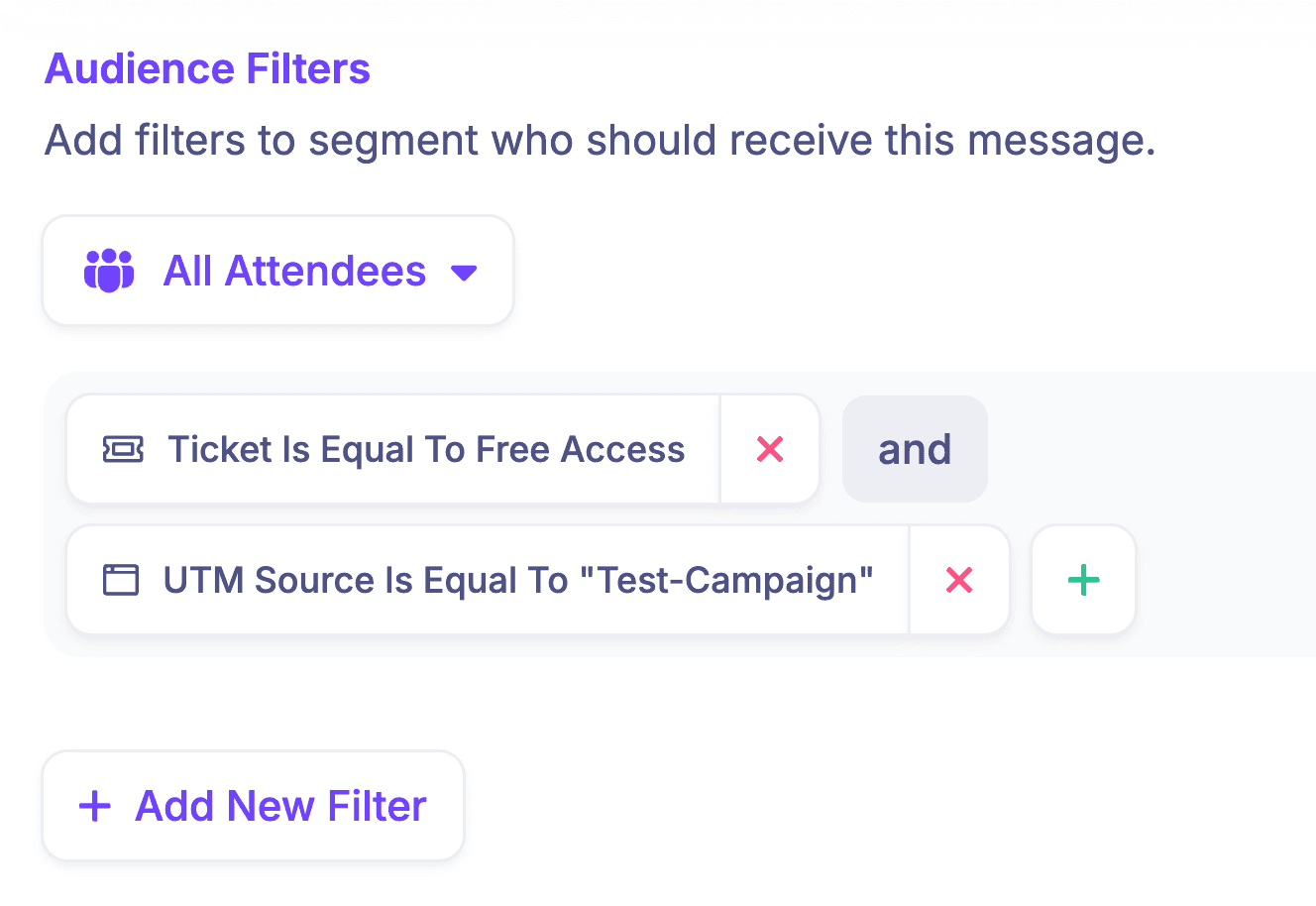
For an eligible account, a one-off Broadcast or an Auto campaign can target a selected audience through filters. Preview the message and send a test before relying on the send. Transactional messages, follow-up emails, and already-sent messages have locked audience or scheduling boundaries, so duplicate an eligible message when you need a fresh editable copy.
Already-claimed tickets can keep their previous access until you deliberately synchronise a permission change. Payment processors may still own the refund. A CRM or external email platform may still own separate campaigns. Calendar tools, video providers, venues, insurers, and support systems may all need their own checked update.
Set and staff the event support email so recipients have a clear route for questions. Sender reply-to settings can follow a separate fallback chain, so verify where replies will actually go.
See how custom event emails use audience filters, Broadcast and Auto messages, previews, tests, sender settings, and delivery reporting inside the wider event workflow.
Separate service updates from marketing
A cancellation, schedule, access, or refund-status message has an operational purpose. Keep it focused on that job.
The UK Information Commissioner's Office explains that a message sent purely for administrative or customer-service purposes is not direct marketing, but adding advertising or promotional material changes how the message is treated. This is UK guidance, not universal legal advice. The applicable rules depend on the recipient, channel, message, and jurisdiction.
If you want to promote a different event, upsell an alternative, or make a new commercial offer, use a separate message with the permission and controls that purpose requires.
Run the pre-send and resolution checks
- The decision, approved reason, and wording match.
- The audience and ticket segment are correct.
- The event name, old details, new state, date, time zone, venue, and links are verified.
- The payment or access owner has approved refund, credit, ticket, and replay wording.
- The support route is staffed and visible.
- The official update page is current.
- Old reminders, scheduled messages, calendar entries, landing-page copy, and links have been reviewed.
- The email has been previewed and tested with a realistic test recipient.
- Instructions use clear words, short sentences, meaningful links, and visible separation.
- The next update or closure message has an owner and time.
- Final event, ticket, access, partner, and support records will be reconciled after the change.
A calm message cannot repair an unowned operating change. Decide what is true, assign the open questions, and keep every channel tied to the same source until the event reaches a clear resolution.
If your event workflow spans pages, registration, schedules, speakers, tickets, emails, access, replays, sponsors, and reporting, you can see how HeySummit works across the full event lifecycle.
Frequently asked questions
Table of Contents
Choose the right change state before you announce itBuild one source of truthWhat every event change announcement should includeInitial holding notice blueprintFull cancellation announcement for attendees and ticket holdersPostponement and reschedule announcement blueprintsMove-online, venue-change, and access-link blueprintsPartial programme and session-change blueprintAdapt the message for each audiencePublish in the right order and keep channels consistentMap the workflow to HeySummit and adjacent toolsSeparate service updates from marketingRun the pre-send and resolution checksFrequently Asked QuestionsTry HeySummit free
HeySummit is the easiest way for creators and educators to grow their audience, authority and revenue with professional online events created in minutes, not weeks.
Share this article on:
Recent Posts
Loading feed...